RAG System Implementation Using GitHub Models
Table of Contents
1. Auto-tangle Configuration
;; Enable auto-tangling on save
(defun rag-system-auto-tangle()
  (when (equal (buffer-file-name)
               (expand-file-name "rag-system.org"))
    (org-babel-tangle)))

(add-hook 'after-save-hook #'rag-system-auto-tangle)

;; Function to ensure tangling before loading
(defun ensure-rag-system-tangled ()
  (let ((org-file (expand-file-name "rag-system.org"))
        (el-file (expand-file-name "rag-system.el")))
    (when (or (not (file-exists-p el-file))
              (file-newer-than-file-p org-file el-file))
      (with-current-buffer (find-file-noselect org-file)
        (org-babel-tangle)))))

;; Call this function before loading the RAG system
(ensure-rag-system-tangled)
2. RAG System Setup
The pipeline reads left to right: PDFs are extracted, chunked, and embedded into a FAISS index on the ingest side; queries are embedded with the same model and used to fetch top-k chunks on the retrieval side; the LLM is the join point where retrieved context meets the user prompt.
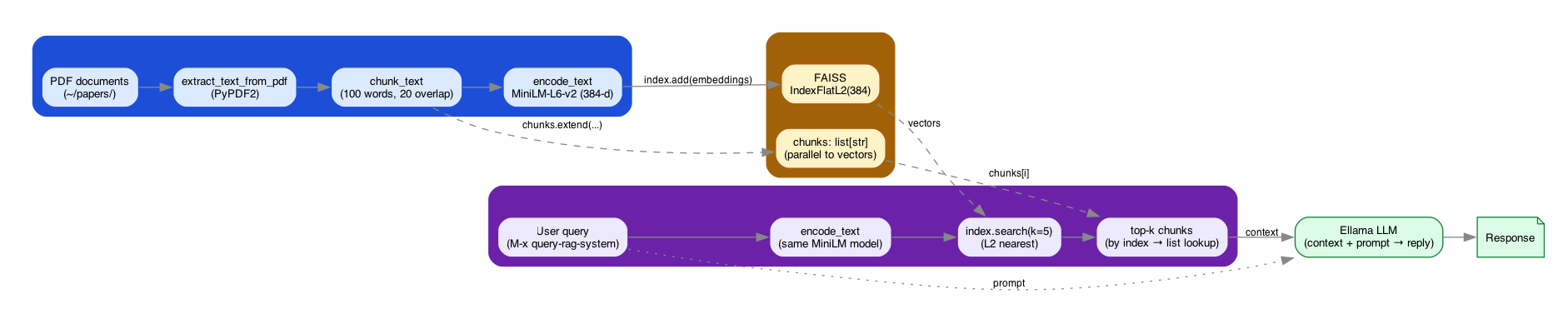
Figure 1: RAG pipeline – ingestion (PDF → chunk → MiniLM embed → FAISS) and retrieval (query → embed → search → top-k → Ellama LLM) joined at the vector store and the LLM.
2.1. Python Dependencies
import sys
import os
from transformers import AutoTokenizer, AutoModel
import torch
import faiss
import numpy as np
import pickle
import PyPDF2

print("Python dependencies loaded successfully.")
2.2. Initialize RAG System
# Load model and tokenizer from Hugging Face
model_name = "sentence-transformers/all-MiniLM-L6-v2"
tokenizer = AutoTokenizer.from_pretrained(model_name)
model = AutoModel.from_pretrained(model_name)

# Initialize FAISS index
index = faiss.IndexFlatL2(384)  # 384 is the dimensionality of the chosen model
chunks = []

def chunk_text(text, chunk_size=100, overlap=20):
    words = text.split()
    chunks = []
    for i in range(0, len(words), chunk_size - overlap):
        chunk = ' '.join(words[i:i + chunk_size])
        chunks.append(chunk)
    return chunks

def encode_text(text):
    inputs = tokenizer(text, padding=True, truncation=True, return_tensors="pt")
    with torch.no_grad():
        outputs = model(**inputs)
    return outputs.last_hidden_state.mean(dim=1).numpy()

def add_to_index(text):
    global chunks
    new_chunks = chunk_text(text)
    chunks.extend(new_chunks)
    embeddings = encode_text(new_chunks)
    index.add(embeddings)

def query_index(query, k=5):
    query_vector = encode_text([query])
    D, I = index.search(query_vector, k)
    return [chunks[i] for i in I[0]]

def extract_text_from_pdf(file_path):
    with open(file_path, 'rb') as file:
        reader = PyPDF2.PdfReader(file)
        text = ''
        for page in reader.pages:
            text += page.extract_text()
    return text

print("RAG system initialized successfully.")
3. Emacs Lisp Implementation
(require 'org)
(require 'ob-python)
(require 'ellama)

(defun setup-rag-system ()
  "Set up the RAG system using Babel."
  (interactive)
  (org-babel-execute-buffer))

(defun chunk-and-index-document (file)
  "Chunk and index a document for the RAG system."
  (interactive "fChoose a file to index: ")
  (with-temp-buffer
    (insert-file-contents file)
    (let ((content (buffer-string)))
      (org-babel-execute-src-block
       nil
       (format "
text = extract_text_from_pdf('%s')
add_to_index(text)
print('Document indexed: %s')
" file file)
       '((:results . "silent"))))))

(defun query-rag-system (query)
  "Query the RAG system and return relevant chunks."
  (interactive "sEnter your query: ")
  (org-babel-execute-src-block
   nil
   (format "
results = query_index('%s')
print('RAG Results:', '\\n'.join(results))
" query)
   '((:results . "output"))))

(defun ellama-with-rag (prompt)
  "Use Ellama with RAG-enhanced context."
  (interactive "sEnter your prompt: ")
  (let* ((relevant-chunks (query-rag-system prompt))
         (enhanced-prompt (concat "Context:\n" relevant-chunks "\n\nPrompt: " prompt)))
    (ellama-chat enhanced-prompt)))

(defun bulk-index-directory (directory)
  "Recursively index all PDF files in the given directory."
  (interactive "DChoose a directory to index: ")
  (let ((pdf-files (directory-files-recursively directory "\\.pdf$")))
    (dolist (file pdf-files)
      (message "Indexing %s" file)
      (chunk-and-index-document file))
    (message "Finished indexing %d files" (length pdf-files))))

(provide 'rag-system)
4. Usage Instructions
To use this RAG system with GitHub models:
- Ensure you have the necessary Python libraries installed (
transformers,torch,faiss-cpu, andPyPDF2). - Save this org file as
rag-system.orgin your Emacs configuration directory. In your Emacs init file, add:
(load "rag-system.el")- The system will automatically tangle on save and ensure the
.elfile is up-to-date before loading. - Use
M-x setup-rag-systemto initialize the RAG system. - Use
M-x chunk-and-index-documentto add individual documents to your knowledge base. - Use
M-x bulk-index-directoryto recursively index all PDF files in a directory. - Use
M-x ellama-with-ragto query your knowledge base and get enhanced responses from Ellama.
Example usage:
(setup-rag-system)
(bulk-index-directory "~/papers/")
(ellama-with-rag "What are the main findings across these papers?")
Note: The first time you run this, it will download the model from Hugging Face, which may take some time depending on your internet connection.
5. Customization Options
You can customize this RAG system by modifying the following:
- Change the
model_namein the Python setup to use a different Hugging Face model. - Adjust the
chunk_sizeandoverlapparameters in thechunk_textfunction to optimize for your specific use case. - Modify the
kparameter inquery_indexto retrieve more or fewer relevant chunks.
6. Troubleshooting
If you encounter any issues:
- Ensure all required Python libraries are installed and up-to-date.
- Check that the file paths in the auto-tangle configuration are correct for your system.
- If you're having memory issues, consider using a smaller model or reducing the chunk size.
7. Future Improvements
Potential enhancements for the RAG system:
- Implement caching to speed up repeated queries.
- Add support for more document types beyond PDFs.
- Implement a more sophisticated chunking strategy, possibly based on semantic boundaries.
- Add a function to save and load the FAISS index for persistence across Emacs sessions.
- Integrate with other Emacs packages for enhanced note-taking and research workflows.