LLM Engineer's Handbook - Notes & Diagrams
Table of Contents
- 1. Resources & Community
- 2. Chapter Notes & Diagrams
- 2.1. Chapter 1: Understanding the LLM Twin Concept and Architecture
- 2.2. Chapter 2: Tooling and Installation
- 2.3. Chapter 3: Data Engineering
- 2.4. Chapter 4: RAG Feature Pipeline
- 2.5. Chapter 5: Supervised Fine-Tuning
- 2.6. Chapter 6: Fine-Tuning with Preference Alignment
- 2.7. Chapter 7: Evaluating LLMs
- 2.8. Chapter 8: Inference Optimization
- 2.9. Chapter 9: RAG Inference Pipeline
- 2.10. Chapter 10: Inference Pipeline Deployment
- 2.11. Chapter 11: MLOps and LLMOps
- 3. Usage Notes
- 4. Related
1. Resources & Community
- Discord Server: https://packt.link/llmeng - Join the Packt Data & ML Community
- Book Website: https://www.packtpub.com/en-us/product/llm-engineers-handbook-9781836200079
- Color Images: https://static.packt-cdn.com/downloads/9781836200079_ColorImages.pdf
2. Chapter Notes & Diagrams
2.1. Chapter 1: Understanding the LLM Twin Concept and Architecture
2.1.1. Core Concepts
- Introduction to LLM Twin concept
- System architecture principles
- ML pipeline fundamentals
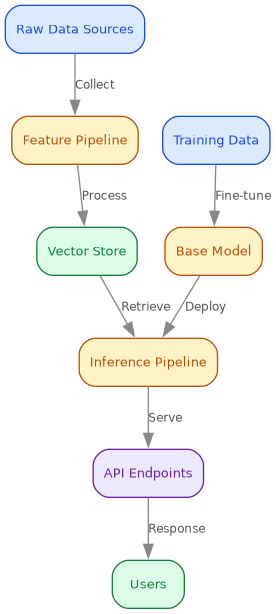
2.1.2. System Architecture
2.2. Chapter 2: Tooling and Installation
2.2.1. Key Components
- Python ecosystem setup (Python 3.11.8)
- MLOps/LLMOps tooling
- MongoDB and vector databases
- AWS configuration
2.3. Chapter 3: Data Engineering
2.3.1. Pipeline Overview
- Data collection strategies
- ETL process design
- Warehouse integration
2.3.2. ETL Workflow

2.4. Chapter 4: RAG Feature Pipeline
2.4.1. RAG Concepts
- Retrieval-Augmented Generation basics
- Advanced techniques
- Feature pipeline design
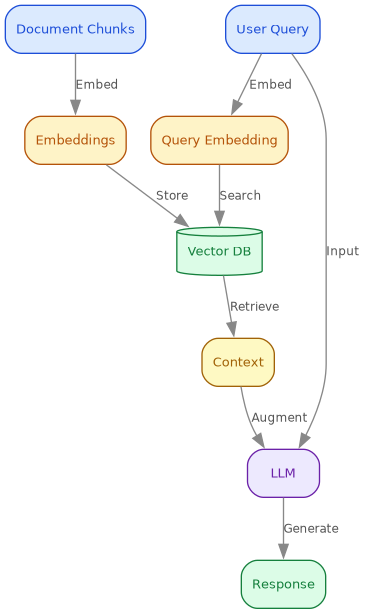
2.4.2. Architecture Components
2.5. Chapter 5: Supervised Fine-Tuning
2.5.1. Training Process
- Instruction dataset creation
- Fine-tuning techniques
- Model evaluation
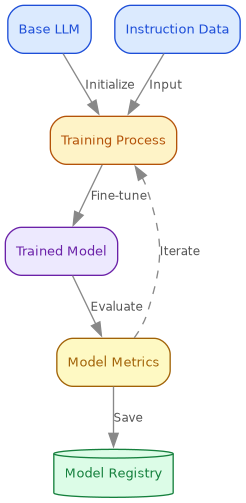
2.5.2. Training Flow
2.6. Chapter 6: Fine-Tuning with Preference Alignment
2.6.1. Key Concepts
- Preference datasets
- Direct Preference Optimization (DPO)
- Alignment techniques
2.7. Chapter 7: Evaluating LLMs
2.7.1. Evaluation Methods
- Model metrics
- RAG evaluation strategies
- TwinLlama-3.1-8B analysis
2.8. Chapter 8: Inference Optimization
2.8.1. Optimization Strategies
- Model parallelism
- Quantization techniques
- Performance tuning
2.9. Chapter 9: RAG Inference Pipeline
2.9.1. Pipeline Implementation
- Advanced RAG techniques
- Query optimization
- Response generation
2.9.2. Advanced RAG Flow

2.10. Chapter 10: Inference Pipeline Deployment
2.10.1. Deployment Strategy
- Service architecture
- Scaling patterns
- Performance monitoring
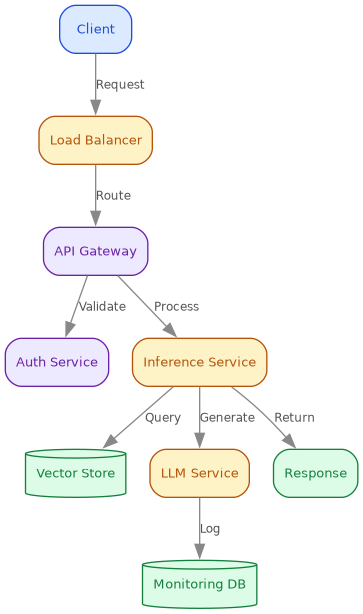
2.10.2. Service Architecture
2.11. Chapter 11: MLOps and LLMOps
2.11.1. DevOps Evolution
- MLOps fundamentals
- LLMOps specific practices
- Cloud deployment
2.11.2. CI/CD Pipeline

3. Usage Notes
- Each diagram is an inline
#+begin_src dotblock;C-c C-cin Emacs re-renders the:filePNG (or rungmake diagrams) - The diagrams/ directory is created automatically on render
- Graphviz (
dot) required for diagram generation - Add notes and update diagrams as you study each chapter
4. Related
- Strategies for Fine-Tuning Machine Learning Models – fine-tuning, outside the book
- RAG System Implementation Using GitHub Models – a RAG pipeline built
- Machine Learning Design Patterns – patterns the book assumes
- Agentic Systems: What the 2026 Books Do Not Cite – what the 2026 books cite