Org-mode Metadata Generation and Publishing
Table of Contents

1. Overview
This note describes the shape of an Org-mode publishing pipeline that keeps metadata consistent and the site deployable: what the moving parts are, how they compose, and where each one fits in the build graph. It deliberately talks in concepts rather than specific scripts — the scripts churn; the pipeline shape does not. For the live wal.sh implementation see Org-Publish at Scale, which measures the same shape against a 660-file site.
2. Goals
- Automate metadata generation for Org-mode files
- Maintain consistent metadata across a large number of files
- Improve organization and searchability of Org-mode content
- Streamline the publishing process for a website built with Org-mode
- Provide flexibility in tooling choice and execution options
3. Workflow Components
The pipeline decomposes into three orthogonal concerns: a metadata linter that reads org files and proposes header changes; a publisher that exports those org files to HTML; and a driver (the Makefile) that wires the two together and orchestrates deployment. None of these need to know about each other's internals — they communicate through the org files on disk.
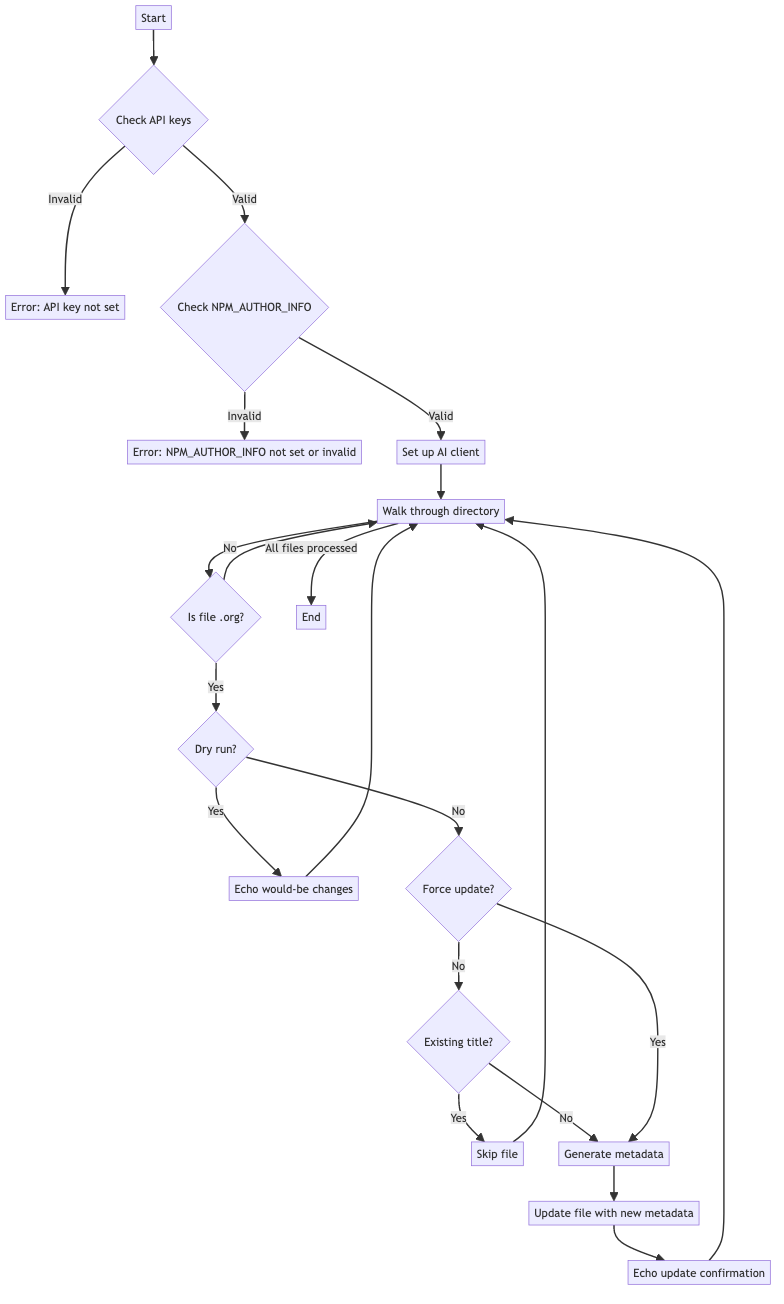
3.1. Metadata linter
A standalone tool that walks the source tree, opens each .org file, and
reconciles its header block against a target schema. The concept is
language-agnostic — any tool that can read text, ask a model, and rewrite
the prologue works. What matters is the contract:
- Recursive scan over the source tree, scoped to
.orgfiles. - Schema-aware generation of header fields (
#+TITLE,#+DESCRIPTION,#+KEYWORDS,#+AUTHOR,#+EMAIL,#+URL,#+REVIEWER) using the document body as context. - Provider flexibility — the same workflow can target OpenAI, Anthropic, or a local model; the source of truth is the on-disk org file, not any particular SDK.
- Two-mode execution: dry-run prints proposed diffs without touching the file; force-mode overwrites existing headers, otherwise the tool only fills gaps.
- Robust I/O: encoding detection, atomic writes, idempotent reruns.
The linter is invoked from the Makefile, not from Emacs — it operates on text, before org-publish ever opens the files. This keeps the metadata step cheap (no JVM, no Emacs daemon) and independent of the publish toolchain.
3.2. Publish project alist
The publisher is an Emacs ox-publish project: a Lisp data structure
declaring base directory, target directory (a TRAMP path, for remote
deploys), and per-file behaviour. The configuration is data, not code, and
the same shape supports local-only output, remote SSH targets, or hybrid
setups.
Concerns expressed in the project alist:
- Source roots and recursion — which directories contain publishable org.
- Output target — a local path for preview, a TRAMP spec for deploy.
- Per-file functions —
org-html-publish-to-htmlfor.org,org-publish-attachmentfor static assets. - Export settings — preamble/postamble HTML, TOC, section numbering, author/creator stripping, timestamp suppression.
- Babel languages — which
#+begin_srcblocks may execute during export (e.g.dotfor diagrams,elispfor breadcrumbs). - Component split — separate
main,static,well-known, andimagescomponents, each with its own filter, so a CSS change does not re-export every page.
The exact alist for wal.sh lives in publish.el and is exercised by
Org-Publish at Scale.
3.3. Makefile
The Makefile is the user interface to the pipeline. It composes the linter and publisher into named workflows, encodes the credential-tier boundary (local vs remote), and is the entry point for both humans and agents. Targets the pipeline needs:
- Environment — tool versions, virtualenv, dependency install.
- Lint — run the metadata linter (dry-run by default).
- Publish — invoke
emacs --batchagainst the publish project alist. - Deploy — publish plus any extras the publisher does not handle
(
.htaccess,sitemap.xml, static JS bundles). - Preview — a local HTTP server pointing at the publish output.
- Verify — a SHA or content check confirming the deployed site matches HEAD.
- Clean — clear the org-publish timestamp cache when configuration changes require a full rebuild.
The Makefile classifies targets by which credential they touch: local-only operations (lint, publish-local, validate) need no keys; deploy operations (TRAMP, scp, rsync) need VPS credentials and only run from a host that has them. See Org-Publish at Scale for the FreeBSD-specific timing breakdown and the rsync-batching optimization.
4. Update Process
End-to-end flow when an author edits a note:
- Environment setup (one-time): install the linter's runtime, ensure Emacs has the publish project loaded, confirm SSH credentials for the deploy target.
- Metadata reconciliation:
- Dry-run:
gmake title-dry-run(or equivalent) — shows proposed header changes without writing. - Apply:
gmake title— fills only missing fields. - Overwrite:
gmake title-force— regenerates all fields against the current body.
- Dry-run:
- Publish:
gmake publishexports org to HTML and pushes via TRAMP. - Preview:
gmake serverruns a local HTTP server for visual review before the changes are publicly reachable. - Deploy:
gmake deploychains publish with the extras (htaccess, index.md, sitemap) the publisher does not produce. - Maintenance:
gmake cleanclears the timestamp cache when a config change requires a full re-export.gmake check-linkscatches broken internal references before deploy.gmake sitemapregeneratessitemap.xmlfrom the source tree.
The deploy step is the only one that touches the remote host. Everything upstream can run on a credential-free workstation.
5. Conclusion
The pipeline factors cleanly into three concerns: a metadata linter that
reads and rewrites org headers, a publisher (Emacs ox-publish) that
exports org to HTML, and a Makefile that wires both into named workflows
and enforces the local-vs-deploy credential boundary. Each component is
replaceable as long as it honours the contracts above; the on-disk org
files are the source of truth and the only thing they share.