Google Tag Manager dataLayer Schema
Table of Contents
1. Overview
The dataLayer is a JavaScript object that serves as a structured communication layer between a website and Google Tag Manager (GTM). It provides a standardized schema for passing analytics data, event information, and contextual variables to GTM, which then routes this data to various marketing and analytics platforms. This research explores schema design patterns, implementation strategies, and best practices for building maintainable, type-safe dataLayer architectures.
2. Background
Google Tag Manager introduced the dataLayer concept to decouple tracking implementation from marketing tag configuration. Prior to this, analytics tracking required direct integration of vendor-specific JavaScript snippets throughout application code. The dataLayer abstraction allows developers to push structured data without knowledge of downstream consumers, while marketing teams configure tag firing rules independently.
The dataLayer is fundamentally an array that accepts object pushes, with GTM merging these objects into a persistent data model. This architecture supports both page-load data population and dynamic event tracking throughout the user session.
3. Key Concepts
3.1. dataLayer Schema Design
A well-designed dataLayer schema provides consistency across an organization:
// Enhanced E-commerce schema example
window.dataLayer = window.dataLayer || [];
dataLayer.push({
  event: 'purchase',
  ecommerce: {
    transaction_id: 'T12345',
    value: 59.99,
    currency: 'USD',
    items: [{
      item_id: 'SKU001',
      item_name: 'Product Name',
      category: 'Category/Subcategory',
      price: 29.99,
      quantity: 2
    }]
  }
});
3.2. Event Taxonomy
Standardized event naming conventions improve maintainability:
- Page events:
page_view,virtual_page_view - User actions:
click,scroll,form_submit,video_play - E-commerce:
view_item,add_to_cart,begin_checkout,purchase - Custom events: Use namespaced prefixes like
app.feature.action
3.3. Type Safety with TypeScript
interface DataLayerEvent {
  event: string;
  [key: string]: unknown;
}

interface PurchaseEvent extends DataLayerEvent {
  event: 'purchase';
  ecommerce: {
    transaction_id: string;
    value: number;
    currency: string;
    items: EcommerceItem[];
  };
}

declare global {
  interface Window {
    dataLayer: DataLayerEvent[];
  }
}
4. Implementation
4.1. Initialization Pattern
// Initialize before GTM container loads
window.dataLayer = window.dataLayer || [];

// Page-level data (available immediately)
dataLayer.push({
  pageType: 'product',
  pageCategory: 'electronics',
  userId: 'user_hash_123',
  userLoggedIn: true
});
4.2. Event Helper Functions
const trackEvent = (eventName, eventParams = {}) => {
  window.dataLayer.push({
    event: eventName,
    ...eventParams,
    timestamp: new Date().toISOString()
  });
};

// Usage
trackEvent('button_click', {
  buttonId: 'cta-signup',
  buttonText: 'Sign Up Now',
  pageSection: 'hero'
});
4.3. Data Layer Validation
Implement runtime validation to catch schema violations:
const validatePurchaseEvent = (event) => {
  const required = ['transaction_id', 'value', 'currency', 'items'];
  const missing = required.filter(key => !event.ecommerce?.[key]);
  if (missing.length) {
    console.warn(`Purchase event missing: ${missing.join(', ')}`);
    return false;
  }
  return true;
};
5. References
- Google Tag Manager Developer Guide
- GA4 E-commerce Implementation
- Simo Ahava's Blog - GTM and analytics deep dives
- W3C Customer Experience Digital Data Layer
6. Notes
- Consider using a tag management abstraction layer for vendor-agnostic tracking
- Implement dataLayer debugging tools for development environments
- Document schema changes and maintain version compatibility
- Use GTM preview mode extensively during development
- Consider privacy implications and consent management integration
7. Schema format comparison
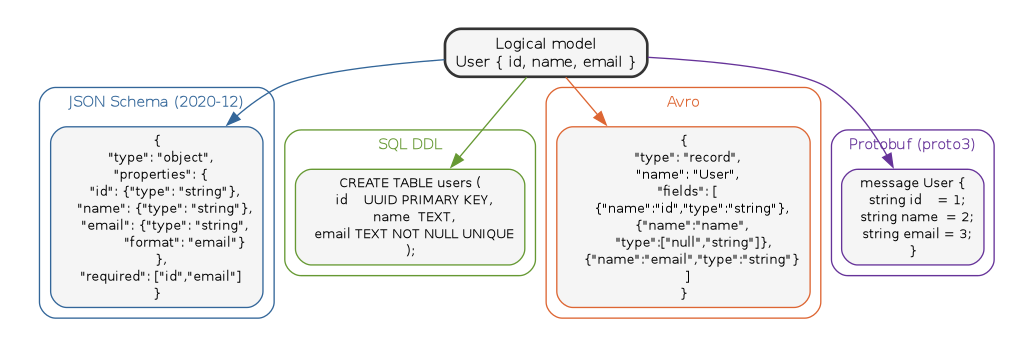
The dataLayer schema problem generalizes: a single logical entity is expressed in many formats (JSON Schema, SQL DDL, Avro, Protobuf), each with different evolution rules, type systems, and tooling.
// Schema format comparison -- one logical entity, four serializations
digraph schema_compare {
    rankdir=TB;
    graph [bgcolor="white", fontname="Helvetica", fontsize=11,
           pad="0.3", nodesep="0.3", ranksep="0.5"];
    node  [shape=box, style="rounded,filled", fontname="Helvetica",
           fontsize=10, fillcolor="#dbeafe", color="#888"];
    edge  [color="#aaa"];

    logical [label="Logical model\nUser { id, name, email }",
             shape=box, style="rounded,filled,bold",
             fillcolor="#dbeafe", color="#333", fontsize=11];

    subgraph cluster_json {
        label="JSON Schema (2020-12)";
        color="#369"; fontcolor="#369"; style="rounded";
        json [label="{\n  \"type\": \"object\",\n  \"properties\": {\n    \"id\": {\"type\": \"string\"},\n    \"name\": {\"type\": \"string\"},\n    \"email\": {\"type\": \"string\",\n              \"format\": \"email\"}\n  },\n  \"required\": [\"id\",\"email\"]\n}",
               color="#369"];
    }

    subgraph cluster_sql {
        label="SQL DDL";
        color="#693"; fontcolor="#693"; style="rounded";
        sql [label="CREATE TABLE users (\n  id    UUID PRIMARY KEY,\n  name  TEXT,\n  email TEXT NOT NULL UNIQUE\n);",
             color="#693"];
    }

    subgraph cluster_avro {
        label="Avro";
        color="#d63"; fontcolor="#d63"; style="rounded";
        avro [label="{\n  \"type\": \"record\",\n  \"name\": \"User\",\n  \"fields\": [\n    {\"name\":\"id\",\"type\":\"string\"},\n    {\"name\":\"name\",\n     \"type\":[\"null\",\"string\"]},\n    {\"name\":\"email\",\"type\":\"string\"}\n  ]\n}",
              color="#d63"];
    }

    subgraph cluster_proto {
        label="Protobuf (proto3)";
        color="#639"; fontcolor="#639"; style="rounded";
        proto [label="message User {\n  string id    = 1;\n  string name  = 2;\n  string email = 3;\n}",
               color="#639"];
    }

    logical -> json   [color="#369"];
    logical -> sql    [color="#693"];
    logical -> avro   [color="#d63"];
    logical -> proto  [color="#639"];
}
8. Related notes
- DynamoDB – schemaless storage shifts validation to the application layer
- GraphQL – typed schema as the API contract, with introspection
- Design-driven APIs – schema-first contracts and code generation
- GPT-4o structured output – JSON Schema as an LLM constraint
- Food ontology – modeling entities across representation choices
9. Postscript (2026)
Ten years on, the multi-format schema problem has only intensified.
JSON Schema 2020-12
is the de-facto draft, and OpenAPI 3.1
finally aligns its schema dialect with it – eliminating a decade of
near-but-not-quite incompatibility. For event streams, schema
registries (Confluent, AWS Glue Schema Registry)
now enforce compatibility rules at produce-time, treating Avro and
Protobuf schemas as first-class artifacts with versioned evolution.
Buf has displaced protoc for most teams,
adding lint rules and breaking-change detection that the original
toolchain never had. The dataLayer pattern itself remains
JSON-typed and loosely validated, but Server-Side GTM and consent-mode
v2 have pushed teams toward declaring dataLayer contracts in TypeScript
or JSON Schema and validating at the edge before forwarding to vendors.