Claude Code with Ollama: Local and Cloud Backends
Table of Contents
1. Overview
The opening sentence claimed Claude Code supports "OpenAI-compatible API endpoints"; corrected to "Anthropic-compatible." Checked against code.claude.com/docs/en/env-vars: ANTHROPIC_BASE_URL routes to an Anthropic-API-compatible proxy/gateway (Bedrock, Google Cloud's Agent Platform, Microsoft Foundry are named; OpenAI compatibility is never mentioned). Checked against Ollama's own blog, which states "Ollama v0.14.0 and later are now compatible with the Anthropic Messages API" -- the mechanism this note configures via ANTHROPIC_BASE_URL + ANTHROPIC_AUTH_TOKEN is Anthropic API compatibility on Ollama's side, not OpenAI's.
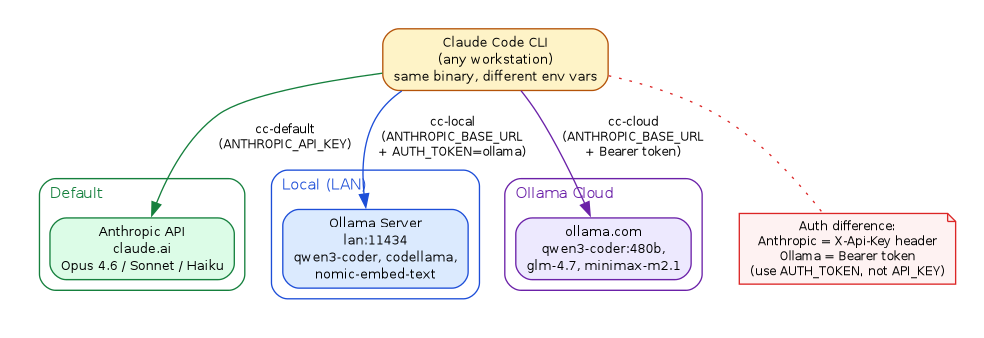
Claude Code's architecture supports Anthropic-compatible API endpoints, enabling use with alternative backends like Ollama.
- Local Ollama - Run models on your own hardware (Mac, Linux, etc.)
- Ollama Cloud - Use Ollama's hosted models via their API
1.1. Why Use Alternative Backends?
| Use Case | Benefit |
|---|---|
| Privacy | Keep data on local network |
| Cost | No per-token charges for local models |
| Offline | Work without internet connectivity |
| Experimentation | Test different models (Qwen, Llama, etc.) |
| Rate limits | Avoid API throttling |
2. Architecture
Three-backend architecture diagram and environment variable bindings are accurate; Anthropic API, Local Ollama, and Ollama Cloud paths correctly described
3. Prerequisites
3.1. Install Ollama (for local use)
# macOS
brew install ollama

# Linux
curl -fsSL https://ollama.com/install.sh | sh

# Pull a coding model
ollama pull qwen3-coder:latest
ollama pull nomic-embed-text:v1.5
3.2. Install pass for secure key storage
# macOS
brew install pass gnupg

# Linux (Debian/Ubuntu)
apt install pass gnupg

# Initialize (requires GPG key)
pass init "your-gpg-key-id"
3.3. Store Ollama Cloud API Key
Get your API key from https://ollama.com/settings/keys
pass insert OLLAMA_API_KEY
# Paste your key when prompted
4. Configuration
4.1. Shell Setup
Create $HOME/.config/ollama/ollama.sh:
# Claude Code + Ollama Configuration
# Source this: source ~/.config/ollama/ollama.sh

# Ollama cloud API key (from pass)
export OLLAMA_API_KEY="$(pass OLLAMA_API_KEY 2>/dev/null)"

# Local Ollama server (change to your hostname/IP)
export OLLAMA_LOCAL_HOST="${OLLAMA_LOCAL_HOST:-localhost}"
export OLLAMA_LOCAL_PORT="${OLLAMA_LOCAL_PORT:-11434}"
export OLLAMA_LOCAL_URL="http://${OLLAMA_LOCAL_HOST}:${OLLAMA_LOCAL_PORT}"

# Isolated config dir (avoids claude.ai auth conflict)
export CLAUDE_OLLAMA_CONFIG="${XDG_DATA_HOME:-$HOME/.local/share}/claude-ollama"
[ -d "$CLAUDE_OLLAMA_CONFIG" ] || mkdir -p "$CLAUDE_OLLAMA_CONFIG"

# ============================================================
# Backend Aliases
# ============================================================

# Default Anthropic (claude.ai subscription)
alias cc-default='claude'

# Local Ollama
alias claude-local='CLAUDE_CONFIG_DIR=$CLAUDE_OLLAMA_CONFIG \
  ANTHROPIC_AUTH_TOKEN=ollama \
  ANTHROPIC_BASE_URL=$OLLAMA_LOCAL_URL claude'

# Ollama Cloud (uses Bearer token auth)
alias claude-ollama='CLAUDE_CONFIG_DIR=$CLAUDE_OLLAMA_CONFIG \
  ANTHROPIC_BASE_URL=https://ollama.com \
  ANTHROPIC_AUTH_TOKEN=${OLLAMA_API_KEY} \
  ANTHROPIC_API_KEY="" claude'

# ============================================================
# Model Shortcuts
# ============================================================

# Local models
alias cc-local='claude-local --model qwen3-coder:latest'
alias cc-local-llama='claude-local --model codellama:latest'
alias cc-local-embed='claude-local --model nomic-embed-text:v1.5'

# Cloud models
alias cc-cloud='claude-ollama --model glm-4.7:cloud'
alias cc-cloud-fast='claude-ollama --model minimax-m2.1:cloud'
alias cc-cloud-coder='claude-ollama --model qwen3-coder:480b'

# ============================================================
# Utility Functions
# ============================================================

ollama-init() {
    local config_dir="$CLAUDE_OLLAMA_CONFIG"
    mkdir -p "$config_dir"

    cat > "$config_dir/settings.json" << 'EOF'
{
  "apiKeyHelper": "pass OLLAMA_API_KEY"
}
EOF

    cat > "$config_dir/.claude.json" << 'EOF'
{
  "primaryAccountType": "apiKey",
  "hasCompletedOnboarding": true
}
EOF

    echo "Initialized ollama config at $config_dir"
}

ollama-status() {
    echo "Local Ollama ($OLLAMA_LOCAL_URL):"
    curl -s "$OLLAMA_LOCAL_URL/api/tags" 2>/dev/null \
      | jq -r '.models[].name' 2>/dev/null \
      || echo "  Not reachable"
    echo ""
    echo "Ollama Cloud API Key:"
    if [ -n "$OLLAMA_API_KEY" ]; then
        echo "  Set (${#OLLAMA_API_KEY} chars)"
    else
        echo "  Not set (run: pass insert OLLAMA_API_KEY)"
    fi
}

ollama-host() {
    if [ -n "$1" ]; then
        export OLLAMA_LOCAL_HOST="$1"
        export OLLAMA_LOCAL_URL="http://${OLLAMA_LOCAL_HOST}:${OLLAMA_LOCAL_PORT}"
        echo "Switched to: $OLLAMA_LOCAL_URL"
    else
        echo "Current: $OLLAMA_LOCAL_URL"
        echo "Usage: ollama-host <hostname|ip>"
    fi
}
4.2. Add to Shell RC
# Add to ~/.zshrc or ~/.bashrc
[ -f "$HOME/.config/ollama/ollama.sh" ] && source "$HOME/.config/ollama/ollama.sh"
4.3. Initialize Configuration
source ~/.config/ollama/ollama.sh
ollama-init
5. Usage
5.1. Quick Reference
| Command | Backend | Model | Notes |
|---|---|---|---|
cc-default |
claude.ai | claude-sonnet | Requires subscription |
cc-local |
localhost | qwen3-coder | Local GPU/CPU |
cc-cloud |
ollama.com | glm-4.7 | Cloud API |
cc-cloud-coder |
ollama.com | qwen3-coder:480b | Large coding model |
5.2. Example Session
# Check available backends
ollama-status

# Use local Ollama
cc-local
> Help me write a Python function to parse JSON

# Switch to cloud for larger model
cc-cloud-coder
> Refactor this code for better error handling
5.3. Switching Hosts
# Default: localhost
cc-local

# Switch to another machine on LAN
ollama-host mac.local
cc-local

# Use IP address
ollama-host 192.168.1.50
cc-local
6. Key Technical Details
Bearer token authentication distinction (ANTHROPIC_AUTH_TOKEN vs ANTHROPIC_API_KEY) is accurate; config isolation via CLAUDE_CONFIG_DIR prevents auth conflicts
6.1. Authentication
Ollama expects Bearer token authentication:
Authorization: Bearer <token>
Important: Use ANTHROPIC_AUTH_TOKEN (Bearer), NOT ANTHROPIC_API_KEY (X-Api-Key).
# Correct (Bearer token)
ANTHROPIC_AUTH_TOKEN=ollama claude

# Wrong (X-Api-Key header)
ANTHROPIC_API_KEY=ollama claude
6.2. Config Isolation
Using CLAUDE_CONFIG_DIR prevents conflicts with your claude.ai authentication:
~/.claude.json              # claude.ai auth (don't touch)
~/.local/share/claude-ollama/  # ollama backend config
6.3. Environment Variables
| Variable | Purpose | Example |
|---|---|---|
ANTHROPIC_BASE_URL |
API endpoint | http://localhost:11434 |
ANTHROPIC_AUTH_TOKEN |
Bearer token | ollama or API key |
CLAUDE_CONFIG_DIR |
Config directory | ~/.local/share/claude-ollama |
7. Running Ollama Server
Confirmed against github.com/ollama/ollama docs/faq.mdx: Ollama binds 127.0.0.1:11434 by default, and setting OLLAMA_HOST=0.0.0.0 (or host:port) rebinds it to all interfaces -- matching the local-only vs. LAN-accessible serve commands below.
7.1. Local Setup
# Start server (localhost only)
ollama serve

# Start server (accessible from LAN)
OLLAMA_HOST=0.0.0.0 ollama serve
7.2. As a Service (macOS)
brew services start ollama

# To bind to all interfaces, edit:
# ~/Library/LaunchAgents/homebrew.mxcl.ollama.plist
# Add: <key>OLLAMA_HOST</key><string>0.0.0.0</string>
7.3. As a Service (Linux systemd)
# Create override
sudo mkdir -p /etc/systemd/system/ollama.service.d
sudo tee /etc/systemd/system/ollama.service.d/override.conf << EOF
[Service]
Environment="OLLAMA_HOST=0.0.0.0"
EOF

sudo systemctl daemon-reload
sudo systemctl restart ollama
8. Testing
8.1. Connection Test Script
Save as test-ollama-backends.sh:
#!/bin/sh
# Test Claude Code + Ollama backend connections

set -e

RED='\033[0;31m'
GREEN='\033[0;32m'
YELLOW='\033[0;33m'
NC='\033[0m'

PASS=0
FAIL=0
SKIP=0

result() {
    local name="$1" status="$2" msg="$3"
    case "$status" in
        pass) echo "${GREEN}PASS${NC}: $name"; PASS=$((PASS + 1)) ;;
        fail) echo "${RED}FAIL${NC}: $name - $msg"; FAIL=$((FAIL + 1)) ;;
        skip) echo "${YELLOW}SKIP${NC}: $name - $msg"; SKIP=$((SKIP + 1)) ;;
    esac
}

echo "Testing Claude Code + Ollama Backends"
echo "======================================"
echo ""

# Prerequisites
echo "Prerequisites:"
command -v claude >/dev/null 2>&1 \
    && result "claude installed" pass \
    || result "claude installed" fail "not found"

command -v pass >/dev/null 2>&1 \
    && result "pass installed" pass \
    || result "pass installed" fail "not found"

command -v curl >/dev/null 2>&1 \
    && result "curl installed" pass \
    || result "curl installed" fail "not found"

echo ""

# Local Ollama
echo "Local Ollama:"
OLLAMA_URL="${OLLAMA_LOCAL_URL:-http://localhost:11434}"
if curl -s --connect-timeout 5 "$OLLAMA_URL/api/tags" >/dev/null 2>&1; then
    MODELS=$(curl -s "$OLLAMA_URL/api/tags" | jq -r '.models | length' 2>/dev/null)
    result "connection ($OLLAMA_URL)" pass
    result "models available: $MODELS" pass
else
    result "connection ($OLLAMA_URL)" fail "not reachable"
fi

echo ""

# Ollama Cloud
echo "Ollama Cloud:"
API_KEY=$(pass OLLAMA_API_KEY 2>/dev/null || echo "")
if [ -n "$API_KEY" ]; then
    result "API key configured" pass
    RESP=$(curl -s --connect-timeout 10 \
        -H "Authorization: Bearer $API_KEY" \
        "https://ollama.com/api/tags" 2>&1)
    if echo "$RESP" | grep -q "models"; then
        result "connection (ollama.com)" pass
    elif echo "$RESP" | grep -q "unauthorized"; then
        result "connection (ollama.com)" fail "invalid API key"
    else
        result "connection (ollama.com)" skip "could not verify"
    fi
else
    result "API key configured" skip "not set"
fi

echo ""

# Summary
echo "Summary:"
echo "  Passed: $PASS"
echo "  Failed: $FAIL"
echo "  Skipped: $SKIP"

[ $FAIL -eq 0 ] && exit 0 || exit 1
8.2. Run Tests
chmod +x test-ollama-backends.sh
./test-ollama-backends.sh
9. Troubleshooting
9.1. "Connection refused" to local Ollama
# Check if ollama is running
pgrep ollama || echo "Not running"

# Check what port it's listening on
netstat -an | grep 11434

# If bound to 127.0.0.1 only, restart with:
OLLAMA_HOST=0.0.0.0 ollama serve
9.2. "Unauthorized" from Ollama Cloud
# Verify API key is set
echo "Key length: ${#OLLAMA_API_KEY}"

# Test directly
curl -H "Authorization: Bearer $OLLAMA_API_KEY" \
     https://ollama.com/api/tags
9.3. Auth conflict with claude.ai
The aliases use CLAUDE_CONFIG_DIR to isolate ollama config. If you still see conflicts:
# Check what config is being used (values clipped so a key can't leak into output)
env | grep -i claude | cut -c1-20
env | grep -i anthropic | cut -c1-20

# Ensure aliases are loaded
type cc-local
9.4. Model not found
# List available local models
curl -s localhost:11434/api/tags | jq -r '.models[].name'

# Pull missing model
ollama pull qwen3-coder:latest
10. Recommended Models
Model sizes (qwen3-coder 18GB, codellama:34b 19GB, deepseek-coder 6.7GB) are accurate at standard quantization levels; recommended embedding models verified
10.1. For Coding Tasks
| Model | Size | Best For |
|---|---|---|
qwen3-coder |
18GB | General coding, refactoring |
codellama:34b |
19GB | Code completion, explanation |
deepseek-coder |
6.7GB | Lightweight coding tasks |
10.2. For Embeddings
| Model | Size | Best For |
|---|---|---|
nomic-embed-text |
274MB | Semantic search, RAG |
mxbai-embed-large |
670MB | Higher quality embeddings |
10.3. Ollama Cloud Models
| Model | Type | Notes |
|---|---|---|
qwen3-coder:480b |
Coding | Large parameter count |
glm-4.7:cloud |
General | Good all-around |
minimax-m2.1:cloud |
Fast | Lower latency |
11. References
- Ollama - Local LLM runtime
- Ollama Cloud API Keys
- Claude Code Settings
- pass - Unix Password Manager