CI/CD Pipelines
Table of Contents
1. Overview
The CI/CD landscape in 2020 marked a significant shift toward container-native workflows, declarative pipeline definitions, and GitOps practices. This period saw the maturation of GitHub Actions, widespread adoption of GitLab CI, and the emergence of Kubernetes-native deployment tools like ArgoCD. Organizations moved from traditional Jenkins-based pipelines to more modern, cloud-native solutions that embraced infrastructure as code principles.
2. Background
2.1. The Evolution of CI/CD
Prior to 2020, Jenkins dominated the CI/CD space, but its plugin-based architecture and maintenance overhead led teams to seek alternatives. The containerization revolution with Docker and Kubernetes created demand for pipelines that could build, test, and deploy containerized applications seamlessly.
2.2. Key Market Trends
- Shift from VM-based to container-based build environments
- Adoption of YAML-based declarative pipeline definitions
- Integration of security scanning (DevSecOps) into pipelines
- Rise of GitOps as a deployment paradigm
- Increased focus on developer experience and self-service platforms
3. Key Concepts
3.1. Continuous Integration (CI)
Continuous Integration focuses on automatically building and testing code changes as they are committed. Key practices include:
- Automated builds triggered on every commit
- Comprehensive test suites (unit, integration, end-to-end)
- Static code analysis and linting
- Security vulnerability scanning
- Artifact generation and storage
3.2. Continuous Delivery/Deployment (CD)
Continuous Delivery ensures code is always in a deployable state, while Continuous Deployment automates the release to production:
- Immutable artifacts (container images)
- Environment promotion workflows (dev -> staging -> production)
- Feature flags for gradual rollouts
- Automated rollback capabilities
- Blue-green and canary deployment strategies
3.3. GitOps
GitOps treats Git as the single source of truth for infrastructure and application deployments:
- Declarative configuration stored in Git
- Automated synchronization between Git state and cluster state
- Pull-based deployments (cluster pulls changes from Git)
- Audit trail through Git history
- Self-healing infrastructure
4. Implementation
4.1. GitHub Actions
Released in 2019 and mature by 2020, GitHub Actions provides CI/CD directly integrated with GitHub repositories.
name: CI Pipeline
on:
  push:
    branches: [main]
  pull_request:
    branches: [main]

jobs:
  build:
    runs-on: ubuntu-latest
    steps:
      - uses: actions/checkout@v2
      - name: Build Docker image
        run: docker build -t myapp:${{ github.sha }} .
      - name: Run tests
        run: docker run myapp:${{ github.sha }} npm test
      - name: Push to registry
        run: |
          echo ${{ secrets.DOCKER_PASSWORD }} | docker login -u ${{ secrets.DOCKER_USERNAME }} --password-stdin
          docker push myapp:${{ github.sha }}
Strengths:
- Native GitHub integration
- Extensive marketplace of reusable actions
- Matrix builds for multi-platform testing
- Self-hosted runners for custom environments
4.2. GitLab CI
GitLab CI offers a comprehensive DevOps platform with built-in CI/CD.
stages:
  - build
  - test
  - deploy

variables:
  DOCKER_IMAGE: $CI_REGISTRY_IMAGE:$CI_COMMIT_SHA

build:
  stage: build
  image: docker:19.03
  services:
    - docker:19.03-dind
  script:
    - docker build -t $DOCKER_IMAGE .
    - docker push $DOCKER_IMAGE

test:
  stage: test
  image: $DOCKER_IMAGE
  script:
    - npm test
    - npm run lint

deploy-staging:
  stage: deploy
  script:
    - kubectl set image deployment/myapp myapp=$DOCKER_IMAGE
  environment:
    name: staging
  only:
    - main
Strengths:
- Single platform for code, CI/CD, and container registry
- Built-in security scanning (SAST, DAST, container scanning)
- Review apps for merge request previews
- Multi-project pipelines
4.3. CircleCI
CircleCI provides cloud-native CI/CD with strong parallelism support.
version: 2.1

orbs:
  docker: circleci/docker@1.0.0

workflows:
  build-and-deploy:
    jobs:
      - build
      - test:
          requires:
            - build
      - deploy:
          requires:
            - test
          filters:
            branches:
              only: main

jobs:
  build:
    docker:
      - image: cimg/node:14.0
    steps:
      - checkout
      - setup_remote_docker
      - run: docker build -t myapp .
      - docker/push:
          image: myapp

  test:
    docker:
      - image: cimg/node:14.0
    parallelism: 4
    steps:
      - checkout
      - run: npm ci
      - run: npm test -- --shard=$(echo $CIRCLE_NODE_INDEX)/$(echo $CIRCLE_NODE_TOTAL)
Strengths:
- Excellent parallelism and test splitting
- Orbs for reusable configuration
- Insights and analytics
- Resource classes for compute optimization
4.4. Jenkins
Jenkins remains relevant for organizations with complex, custom requirements.
pipeline {
    agent {
        kubernetes {
            yaml '''
                apiVersion: v1
                kind: Pod
                spec:
                  containers:
                  - name: docker
                    image: docker:19.03
                    command: ['cat']
                    tty: true
                    volumeMounts:
                    - name: docker-sock
                      mountPath: /var/run/docker.sock
                  volumes:
                  - name: docker-sock
                    hostPath:
                      path: /var/run/docker.sock
            '''
        }
    }
    stages {
        stage('Build') {
            steps {
                container('docker') {
                    sh 'docker build -t myapp:${BUILD_NUMBER} .'
                }
            }
        }
        stage('Test') {
            steps {
                sh 'npm test'
            }
        }
        stage('Deploy') {
            when { branch 'main' }
            steps {
                sh 'kubectl apply -f k8s/'
            }
        }
    }
}
Strengths:
- Extensive plugin ecosystem
- Highly customizable
- On-premise deployment for security requirements
- Jenkinsfile for pipeline-as-code
4.5. ArgoCD and GitOps
ArgoCD implements GitOps for Kubernetes deployments.
apiVersion: argoproj.io/v1alpha1
kind: Application
metadata:
  name: myapp
  namespace: argocd
spec:
  project: default
  source:
    repoURL: https://github.com/org/myapp-manifests
    targetRevision: HEAD
    path: overlays/production
  destination:
    server: https://kubernetes.default.svc
    namespace: production
  syncPolicy:
    automated:
      prune: true
      selfHeal: true
    syncOptions:
      - CreateNamespace=true
ArgoCD workflow:
- CI pipeline builds container image and pushes to registry
- CI updates Kubernetes manifests in Git with new image tag
- ArgoCD detects Git changes and syncs to cluster
- ArgoCD monitors for drift and self-heals
4.6. Container-Based Workflows
Modern CI/CD embraces containers at every stage:
# Multi-stage Dockerfile for CI/CD
FROM node:14 AS builder
WORKDIR /app
COPY package*.json ./
RUN npm ci
COPY . .
RUN npm run build
RUN npm test

FROM node:14-alpine AS production
WORKDIR /app
COPY --from=builder /app/dist ./dist
COPY --from=builder /app/node_modules ./node_modules
USER node
CMD ["node", "dist/server.js"]
Benefits:
- Reproducible builds across environments
- Isolated dependencies
- Smaller production images
- Security through minimal base images
5. Best Practices
5.1. Pipeline Design
- Keep pipelines fast: Target under 10 minutes for feedback
- Fail fast: Run quick checks (lint, unit tests) before slow ones
- Parallelize: Run independent jobs concurrently
- Cache dependencies: Avoid re-downloading on every build
- Use immutable artifacts: Build once, deploy everywhere
5.2. Security
- Scan dependencies: Use tools like Snyk, Dependabot, or Trivy
- Scan containers: Check for vulnerabilities in base images
- Manage secrets: Use vault solutions, never commit secrets
- Sign artifacts: Implement image signing for supply chain security
- Least privilege: CI/CD service accounts should have minimal permissions
5.3. Reliability
- Idempotent deployments: Running twice should produce same result
- Health checks: Verify deployments are healthy before proceeding
- Rollback automation: Automate rollback on failure detection
- Environment parity: Keep staging as close to production as possible
- Observability: Integrate logging, metrics, and tracing
6. References
- GitHub Actions Documentation
- GitLab CI/CD Documentation
- CircleCI Documentation
- Jenkins Pipeline Documentation
- ArgoCD Documentation
- GitOps Principles
- The Twelve-Factor App
- Humble, J., & Farley, D. (2010). Continuous Delivery. Addison-Wesley.
7. Notes
7.1. Tool Selection Considerations
| Criterion | GitHub Actions | GitLab CI | CircleCI | Jenkins |
|---|---|---|---|---|
| Setup Complexity | Low | Low | Low | High |
| Customization | Medium | Medium | Medium | High |
| Self-Hosting | Yes | Yes | No | Yes |
| Enterprise Features | Yes | Yes | Yes | Limited |
| Learning Curve | Low | Low | Low | Medium |
7.2. Migration Path from Jenkins
Organizations moving from Jenkins typically:
- Start with new projects on modern platforms
- Gradually migrate existing pipelines
- Maintain Jenkins for legacy systems with custom plugins
- Use Jenkins as an orchestrator calling modern CI tools
7.3. Emerging Trends (Late 2020)
- Tekton for Kubernetes-native pipelines
- GitHub Actions gaining market share rapidly
- Increased focus on supply chain security
- Platform engineering and internal developer platforms
- Ephemeral, on-demand build environments
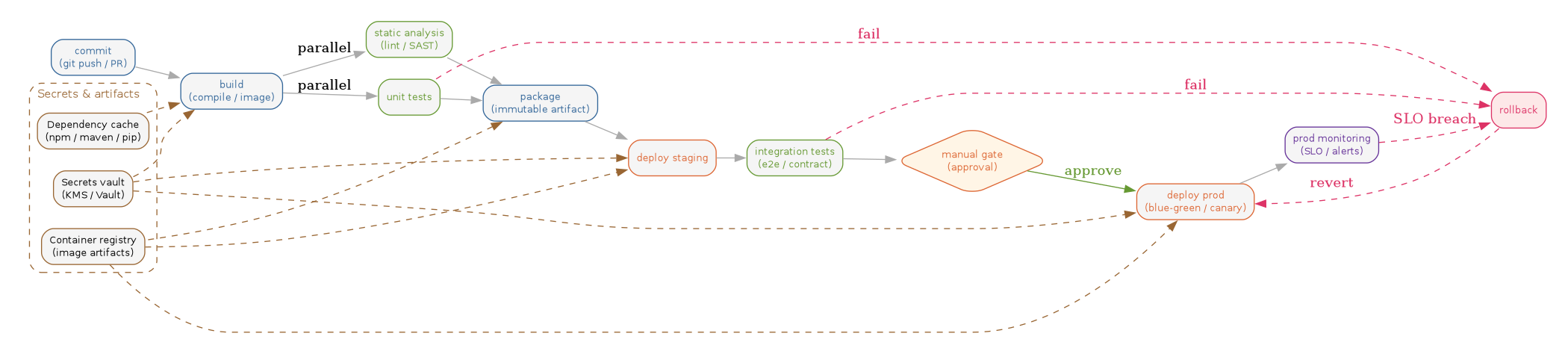
8. Canonical pipeline shape
The 2020 CI/CD reference architecture: a left-to-right pipeline with parallel quality gates after build, a manual approval before production, and feedback edges from monitoring back into rollback.
// CI/CD 2020 — canonical pipeline shape with parallel checks and rollback feedback
digraph ci_cd_pipeline {
    rankdir=LR;
    graph [bgcolor="white", fontname="Helvetica", fontsize=11,
           pad="0.3", nodesep="0.3", ranksep="0.4"];
    node  [shape=box, style="rounded,filled", fontname="Helvetica",
           fontsize=10, fillcolor="#dbeafe", color="#888"];
    edge  [color="#aaa"];

    // Inputs cluster — secrets and artifact stores feed the pipeline
    subgraph cluster_inputs {
        label="Secrets & artifacts"; labeljust="l"; color="#a16207";
        fontcolor="#a16207"; style="rounded,dashed";
        secrets   [label="Secrets vault\n(KMS / Vault)",
                   fillcolor="#fef9c3", color="#a16207", fontcolor="#a16207"];
        registry  [label="Container registry\n(image artifacts)",
                   fillcolor="#fef9c3", color="#a16207", fontcolor="#a16207"];
        depcache  [label="Dependency cache\n(npm / maven / pip)",
                   fillcolor="#fef9c3", color="#a16207", fontcolor="#a16207"];
    }

    // Pipeline stages
    commit   [label="commit\n(git push / PR)",
              fillcolor="#dbeafe", color="#1d4ed8", fontcolor="#1d4ed8"];
    build    [label="build\n(compile / image)",
              fillcolor="#dbeafe", color="#1d4ed8", fontcolor="#1d4ed8"];
    lint     [label="static analysis\n(lint / SAST)",
              fillcolor="#dcfce7", color="#15803d", fontcolor="#15803d"];
    unit     [label="unit tests",
              fillcolor="#dcfce7", color="#15803d", fontcolor="#15803d"];
    pkg      [label="package\n(immutable artifact)",
              fillcolor="#dbeafe", color="#1d4ed8", fontcolor="#1d4ed8"];
    stg      [label="deploy staging",
              fillcolor="#fef3c7", color="#b45309", fontcolor="#b45309"];
    integ    [label="integration tests\n(e2e / contract)",
              fillcolor="#dcfce7", color="#15803d", fontcolor="#15803d"];
    gate     [label="manual gate\n(approval)",     shape=diamond,
              fillcolor="#fef3c7", color="#b45309", fontcolor="#b45309"];
    prod     [label="deploy prod\n(blue-green / canary)",
              fillcolor="#fef3c7", color="#b45309", fontcolor="#b45309"];
    monitor  [label="prod monitoring\n(SLO / alerts)",
              fillcolor="#ede9fe", color="#6b21a8", fontcolor="#6b21a8"];
    rollback [label="rollback",
              fillcolor="#fee2e2", color="#b91c1c", fontcolor="#b91c1c"];

    // Main flow
    commit -> build;
    build  -> lint   [label="parallel"];
    build  -> unit   [label="parallel"];
    lint   -> pkg;
    unit   -> pkg;
    pkg    -> stg;
    stg    -> integ;
    integ  -> gate;
    gate   -> prod   [label="approve", color="#15803d", fontcolor="#15803d"];
    prod   -> monitor;

    // Feedback edges
    unit    -> rollback [label="fail",   style=dashed, color="#b91c1c", fontcolor="#b91c1c"];
    integ   -> rollback [label="fail",   style=dashed, color="#b91c1c", fontcolor="#b91c1c"];
    monitor -> rollback [label="SLO breach", style=dashed, color="#b91c1c", fontcolor="#b91c1c"];
    rollback -> prod    [label="revert", style=dashed, color="#b91c1c", fontcolor="#b91c1c"];

    // Inputs feed pipeline (loose, dashed)
    secrets  -> build [style=dashed, color="#a16207"];
    secrets  -> stg   [style=dashed, color="#a16207"];
    secrets  -> prod  [style=dashed, color="#a16207"];
    depcache -> build [style=dashed, color="#a16207"];
    registry -> stg   [style=dashed, color="#a16207"];
    registry -> prod  [style=dashed, color="#a16207"];
    pkg      -> registry [style=dashed, color="#a16207", dir=back];
}
9. Related notes
- Terraform AWS resource patterns — the IaC artifacts that CD pipelines apply against staging and production
- Grunt + git-flow + Puppet — the 2014-era predecessor: branch-driven asset builds and Puppet-mediated promotion
- 2019 software development radar — Git Flow, CD4ML, and the cultural backdrop these pipelines emerged from
- Kubeflow ML pipelines — applies the same DAG-of-stages model to model training, registry, and serving
10. Postscript (2026)
Six years in, GitHub Actions has consolidated the market: matrix builds, reusable workflows, and the Actions Importer have absorbed migrations from CircleCI, Jenkins, and even much of GitLab CI outside the GitLab-hosted base. The CD half of the picture is now overwhelmingly GitOps — Argo CD and Flux are CNCF graduated, and "image updater + manifest repo" is the default Kubernetes deploy shape. Supply-chain hardening went from aspirational to table-stakes: SLSA v1.0 provenance, CISA-driven SBOM mandates, and Sigstore/cosign keyless signing are now wired into the package and deploy stages of the diagram above. Test selection has caught up to compute cost — impact-aware runners (Bazel-style affected-target detection, Launchable, Datadog Test Optimization) routinely cut the unit/integration phases by 60-80%. The newest addition to the pipeline is an AI layer: PR-time review bots (Claude Code, Cursor reviewers, GitHub Copilot Code Review) and post-deploy heuristics that auto-trigger the rollback edge when error budgets burn faster than baseline — collapsing what used to be a human pager response into a sub-minute control loop.