HTML5 AppCache Expiration Rules
Table of Contents
1. Overview
HTML5 Application Cache (AppCache) was a browser mechanism introduced to enable offline web applications by allowing developers to specify which resources should be cached locally. The cache manifest file controlled caching behavior, but AppCache had significant design flaws including confusing update rules, no programmatic cache invalidation, and the "cache poisoning" problem where a cached manifest could prevent updates indefinitely. AppCache was deprecated in 2015 and removed from browsers by 2021, replaced entirely by Service Workers which provide fine-grained, programmatic control over caching strategies.
2. Background
- Introduced in HTML5 specification circa 2008-2010
- Designed for offline-first web applications (especially mobile)
- Used a cache manifest file (
CACHE MANIFEST) with MIME typetext/cache-manifest - Manifest sections:
CACHE,NETWORK,FALLBACK - Browser checked manifest for updates, not individual resources
- If manifest unchanged (byte-for-byte), entire cache considered valid
- Expiration controlled by HTTP headers on the manifest file itself
3. Key Concepts
3.1. Cache Manifest Sections
CACHE MANIFEST
# v1.0.0 - version comment forces update

CACHE:
/css/style.css
/js/app.js
/images/logo.png

NETWORK:
*

FALLBACK:
/ /offline.html
3.2. Expiration Rules
- Browser fetches manifest on each page load
- HTTP
Cache-ControlandExpiresheaders on manifest control check frequency - If manifest byte-content differs, entire cache invalidates and re-downloads
- Version comments (
# v1.0.0) commonly used to force updates window.applicationCache.update()could trigger manual checksswapCache()required to activate new cache afterupdatereadyevent
3.3. Critical Flaws
- All-or-nothing caching: entire cache invalidated on any change
- Master entries problem: page that references manifest always cached
- No partial updates or delta downloads
- Race condition between cache and network
- Debugging extremely difficult
FALLBACKrules unintuitive
4. Implementation
4.1. Legacy AppCache Pattern
<!DOCTYPE html>
<html manifest="app.manifest">
<head>
  <script>
    var appCache = window.applicationCache;
    appCache.addEventListener('updateready', function() {
      if (appCache.status === appCache.UPDATEREADY) {
        appCache.swapCache();
        if (confirm('New version available. Reload?')) {
          window.location.reload();
        }
      }
    });
  </script>
</head>
</html>
4.2. Modern Service Worker Replacement
// sw.js - Service Worker with Cache-First strategy
const CACHE_NAME = 'app-v1';
const urlsToCache = ['/css/style.css', '/js/app.js'];

self.addEventListener('install', event => {
  event.waitUntil(
    caches.open(CACHE_NAME)
      .then(cache => cache.addAll(urlsToCache))
  );
});

self.addEventListener('fetch', event => {
  event.respondWith(
    caches.match(event.request)
      .then(response => response || fetch(event.request))
  );
});
4.3. Service Worker Caching Strategies
- Cache First: Check cache, fall back to network
- Network First: Try network, fall back to cache
- Stale While Revalidate: Serve cache immediately, update in background
- Cache Only: Only serve from cache (offline)
- Network Only: Always fetch from network
5. References
6. Notes
- AppCache officially deprecated in HTML 5.1 (2016)
- Chrome removed AppCache support in Chrome 85 (2020)
- Firefox removed support in Firefox 84 (2020)
- Safari removed support in Safari 15.4 (2022)
- Workbox library simplifies Service Worker caching patterns
- Service Workers require HTTPS (except localhost)
- Consider Cache API storage limits (~50MB typical, varies by browser)
7. Cache invalidation state machine
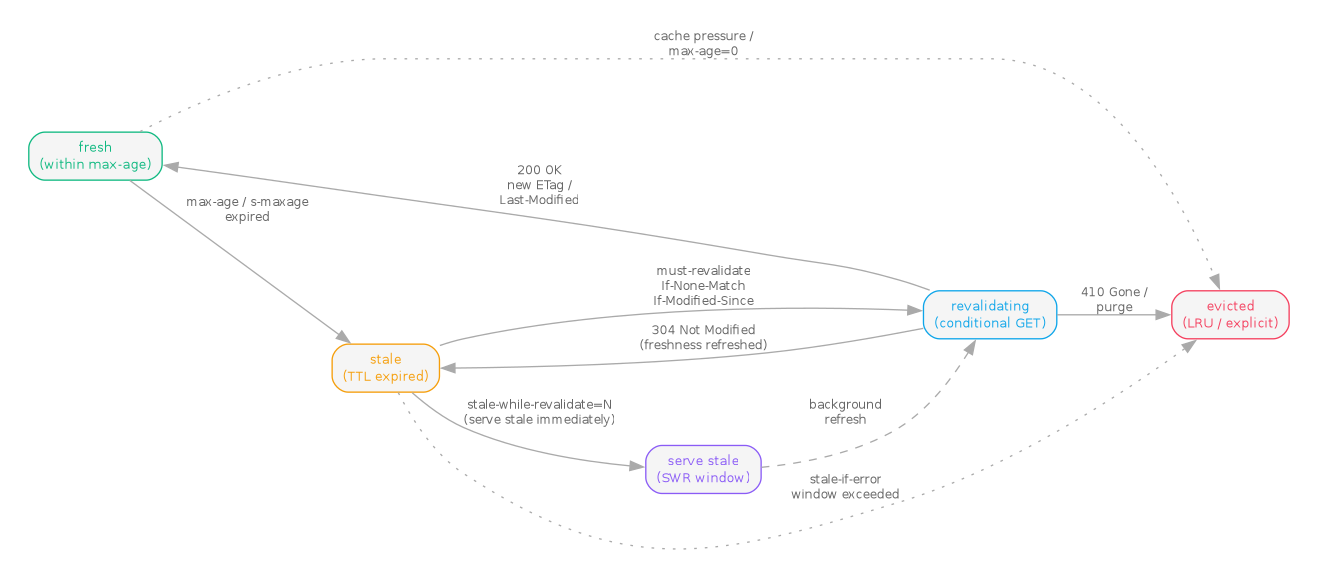
The HTTP cache model (RFC 9111, June 2022, obsoleting RFC 7234) describes a
stored response as moving through fresh, stale, revalidating, and
evicted states. Cache-Control directives (max-age, s-maxage,
must-revalidate, stale-while-revalidate) drive the transitions. The
stale-while-revalidate directive (RFC 5861, May 2010) added a side branch
where a stale response is served immediately while a background revalidation
runs against the origin.
// HTTP cache invalidation state machine -- RFC 9111 + RFC 5861
digraph cache_states {
    rankdir=LR;
    graph [bgcolor="white", fontname="Helvetica", fontsize=11,
           pad="0.3", nodesep="0.4", ranksep="0.5"];
    node  [shape=box, style="rounded,filled", fontname="Helvetica",
           fontsize=10, fillcolor="#dbeafe", color="#888"];
    edge  [color="#aaa", fontname="Helvetica", fontsize=9, fontcolor="#666"];

    // Tailwind palette: sky-500 #0ea5e9, amber-500 #f59e0b,
    //                   violet-500 #8b5cf6, emerald-500 #10b981,
    //                   rose-500 #f43f5e, slate-500 #64748b
    fresh        [label="fresh\n(within max-age)",
                  color="#10b981", fontcolor="#10b981"];
    stale        [label="stale\n(TTL expired)",
                  color="#f59e0b", fontcolor="#f59e0b"];
    revalidating [label="revalidating\n(conditional GET)",
                  color="#0ea5e9", fontcolor="#0ea5e9"];
    serve_stale  [label="serve stale\n(SWR window)",
                  color="#8b5cf6", fontcolor="#8b5cf6"];
    evicted      [label="evicted\n(LRU / explicit)",
                  color="#f43f5e", fontcolor="#f43f5e"];

    fresh        -> stale        [label="max-age / s-maxage\nexpired"];
    stale        -> revalidating [label="must-revalidate\nIf-None-Match\nIf-Modified-Since"];
    revalidating -> fresh        [label="200 OK\nnew ETag /\nLast-Modified"];
    revalidating -> stale        [label="304 Not Modified\n(freshness refreshed)"];
    revalidating -> evicted      [label="410 Gone /\npurge"];

    // stale-while-revalidate side branch (RFC 5861)
    stale        -> serve_stale  [label="stale-while-revalidate=N\n(serve stale immediately)"];
    serve_stale  -> revalidating [label="background\nrefresh", style=dashed];

    // Eviction can happen from any cached state
    fresh        -> evicted      [label="cache pressure /\nmax-age=0", style=dotted];
    stale        -> evicted      [label="stale-if-error\nwindow exceeded", style=dotted];
}
8. Related notes
- JavaScript security – Service Workers operate under the same-origin policy and require HTTPS; the cache they manage is a sandboxed origin-scoped store, which matters for any threat model that touches client-side caching.
- JavaScript global execution context – a Service Worker runs in its own
ServiceWorkerGlobalScope, distinct fromWindowandDedicatedWorkerGlobalScope; understanding the contexts clarifies whydocumentandwindoware unreachable fromsw.js. - Intelligent browser interceptor – the
fetchevent handler is the natural interception point for cache-state policy; this note frames the broader pattern of intercepting browser network traffic. - Polymer – early PWA shells (Polymer App Toolbox,
polymer buildwithsw-precache) were the proving ground for Service Worker caching strategies before Workbox subsumed them.
9. Postscript (2026)
The 2011 framing of this note assumed AppCache was the offline primitive worth understanding. That assumption did not survive the decade. AppCache was officially deprecated by the W3C in HTML 5.1 (November 2016) and removed from major browsers between Chrome 85 (August 2020), Firefox 84 (December 2020), and Safari 15.4 (March 2022). Service Workers, specified in the W3C Service Workers recommendation (first Working Draft 2014, Recommendation status reached 2022), plus the Cache API are the modern offline primitive. Google's Workbox (released 2017, currently 7.x) packages the common Service Worker patterns – CacheFirst, NetworkFirst, StaleWhileRevalidate – as drop-in routes, and is the default in vite-plugin-pwa and next-pwa.
The stale-while-revalidate directive itself was standardised in RFC 5861 (May 2010), and the broader HTTP caching model was refreshed in RFC 9111 (June 2022), which obsoletes RFC 7234. The same stale-while-revalidate semantics jumped from the network layer into the front-end data layer: Vercel's SWR (2019) and TanStack Query (formerly React Query, 2019, currently v5) both implement client-side caches with fresh / stale / revalidating states modelled directly on the HTTP cache machine. Both libraries are now standard in the React ecosystem and have ports for Vue, Solid, and Svelte.
On the transport side, HTTP/2 server push was removed from Chrome in version 106 (September 2022) and is effectively dead; the QUIC specification (RFC 9000) was published in May 2021 and the HTTP/3 specification (RFC 9114) followed in June 2022; both are now broadly deployed. The replacement preload mechanism is 103 Early Hints (RFC 8297), which CDNs including Cloudflare and Fastly support natively.