Building AI Agent Tool Systems: A Multi-Provider Architecture
Table of Contents
1. Introduction
AI coding assistants like Claude Code, Cursor, and Aider have demonstrated the power of giving LLMs access to tools - the ability to read files, search code, execute commands, and modify the environment. This article explores the architecture and design decisions behind building such a tool system, based on experience implementing gemini-repl, a multi-provider terminal AI agent.
2. Core Architecture
2.1. The Tool Trait
Direct fetch of src/tools/mod.rs from github.com/aygp-dr/gemini-repl-009 (main branch, 2026-10-08) confirms the Tool trait and ToolRegistry struct shown here match the live source exactly -- name(), description(), parameters_schema(), async execute() on the trait (the source also carries a default validate_params() method, omitted here for brevity), and tools: HashMap<String, Box<dyn Tool>>, workspace: PathBuf on the struct.
At the heart of the system is a simple trait that all tools implement:
#[async_trait]
pub trait Tool: Send + Sync {
    fn name(&self) -> &str;
    fn description(&self) -> &str;
    fn parameters_schema(&self) -> Value;
    async fn execute(&self, params: Value) -> Result<Value>;
}
This provides:
- Discoverability: Name and description for the LLM to understand capabilities
- Schema: JSON Schema for parameter validation
- Execution: Async execution with structured input/output
2.2. Tool Registry
Tools are managed through a registry that handles registration, lookup, and execution:
pub struct ToolRegistry {
    tools: HashMap<String, Box<dyn Tool>>,
    workspace: PathBuf,
}

impl ToolRegistry {
    pub fn initialize_default_tools(&mut self) -> Result<()>;
    pub fn initialize_self_modification_tools(&mut self) -> Result<()>;
    pub async fn execute_tool(&self, name: &str, params: Value) -> Result<Value>;
}
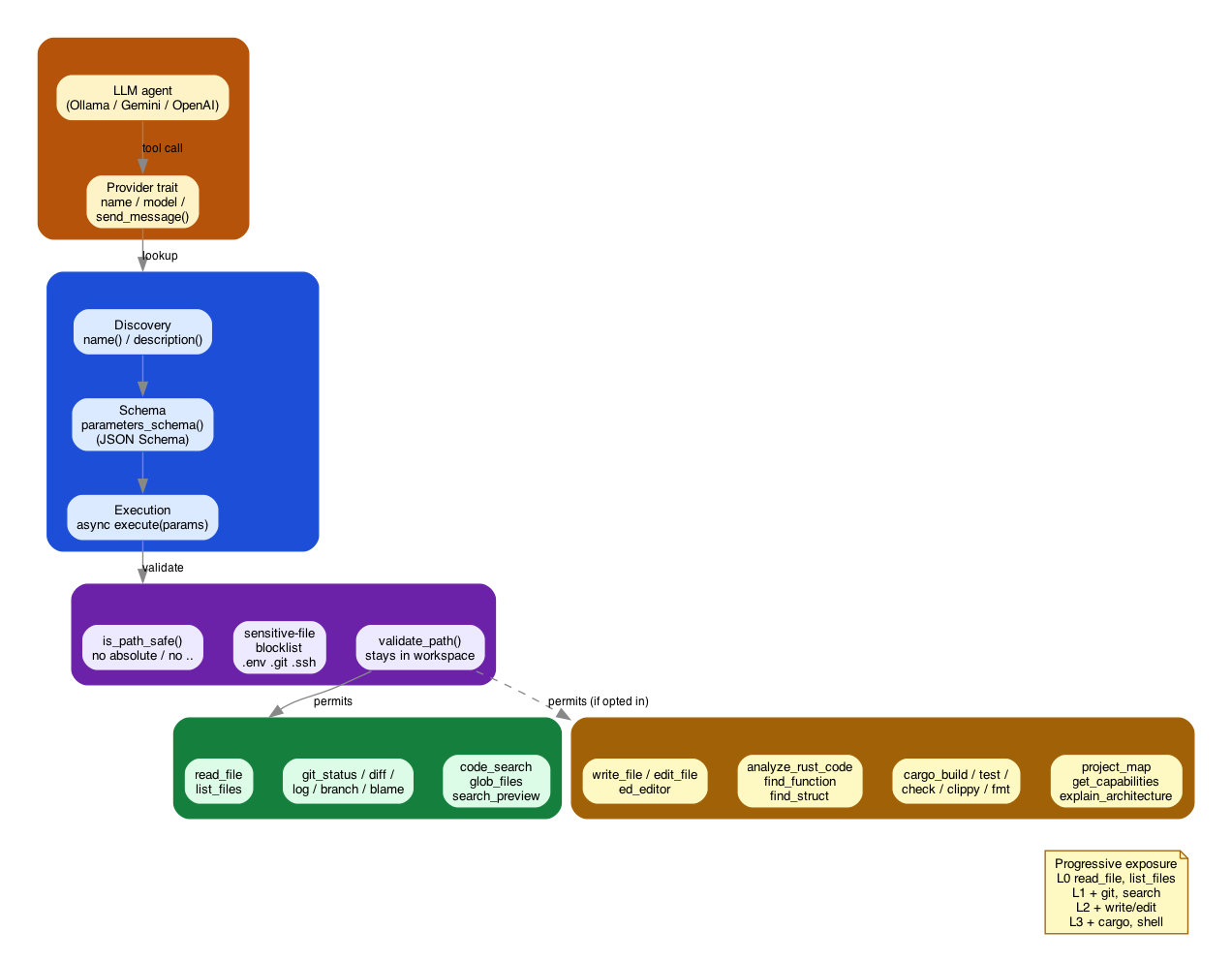
The registry layers discovery, schema, and execution per the Tool trait; every execution
crosses a security boundary before reaching either the always-on default plane or the
opt-in self-modification plane.
3. Tool Categories
3.1. Default Tools (Always Available)
These are read-only or low-risk tools safe for all users:
| Category | Tools | Purpose |
|---|---|---|
| File Ops | read_file, write_file, list_files |
Basic file operations |
| Git | git_status, git_diff, git_log, git_branch, git_blame |
Version control visibility |
| Search | code_search, glob_files, search_preview |
Codebase exploration |
3.2. Self-Modification Tools (Opt-in)
Higher-risk tools that can modify the codebase:
| Category | Tools | Purpose |
|---|---|---|
| File Ops | edit_file |
Modify existing files |
| Code Analysis | analyze_rust_code, find_function, find_struct |
AST-level analysis |
| Build Tools | cargo_build, cargo_test, cargo_check, clippy, rustfmt |
Rust toolchain |
| Self-Awareness | project_map, get_current_capabilities, explain_architecture |
Meta-cognition |
| Ed Editor | ed_editor |
Line-based editing (ed-style) |
4. Security Model
4.1. Path Safety
All file operations go through security validation:
pub fn is_path_safe(path: &Path) -> bool {
    // Reject absolute paths
    if path.is_absolute() { return false; }

    // Reject parent traversal
    for component in path.components() {
        if matches!(component, Component::ParentDir) {
            return false;
        }
    }

    // Reject sensitive files
    if is_sensitive_file(path) { return false; }

    true
}
4.2. Sensitive File Protection
Automatically blocks access to:
.env,.env.local- Environment secrets.git/- Repository internals.ssh/,.gnupg/,.aws/- Credential stores- Files containing "secret", "password", "credential"
4.3. Workspace Sandboxing
Tools operate within a workspace boundary:
pub fn validate_path(path: &Path, workspace: &Path) -> Result<PathBuf> {
    let canonical = path.canonicalize()?;
    let workspace_canonical = workspace.canonicalize()?;

    if !canonical.starts_with(&workspace_canonical) {
        bail!("Path escapes workspace");
    }
    Ok(canonical)
}
5. Multi-Provider Architecture
5.1. Provider Abstraction
The system supports multiple LLM backends through a provider trait:
#[async_trait]
pub trait Provider: Send + Sync {
    fn name(&self) -> &str;
    fn model(&self) -> &str;
    fn max_context_tokens(&self) -> usize;
    async fn send_message(&self, messages: &[Message], tools: &[ToolDefinition])
        -> Result<ProviderResponse>;
}
5.2. Supported Providers
Direct fetch of src/providers/mod.rs from github.com/aygp-dr/gemini-repl-009 (main branch, 2026-10-08) shows only gemini.rs and ollama.rs provider implementations exist. ProviderType::OpenAI is defined in the enum and named in the module doc comment as a design target, but the provider-construction match arm reads `ProviderType::OpenAI => { anyhow::bail!("OpenAI provider not yet implemented") }`. The table's original "OpenAI | Native function calling" row overstated working support -- corrected below; the matching claim under Lessons Learned -> Provider Differences Matter was fixed the same way.
| Provider | Use Case | Tool Calling |
|---|---|---|
| Ollama | Local, private inference | Simulated via prompting |
| Gemini | Cloud, powerful models | Native function calling |
| OpenAI | Cloud, GPT models | Not implemented – enum variant defined, provider construction errors |
5.3. Auto-Detection
The system auto-detects available providers:
async fn detect_provider(api_key: Option<String>, ollama_url: Option<String>)
    -> Option<ProviderConfig>
{
    // Try Ollama first (local, free)
    if let Ok(ollama) = try_ollama(&ollama_url).await {
        return Some(ollama);
    }

    // Fall back to Gemini if API key available
    if let Some(key) = api_key {
        return Some(ProviderConfig::gemini(key));
    }

    None
}
6. Search Tools Deep Dive
6.1. Ripgrep Integration
The code_search tool wraps ripgrep for code search:
pub struct CodeSearchTool {
    workspace: PathBuf,
}

// Supports:
// - Regex patterns
// - File type filtering (-t rust, -t py)
// - Glob patterns (--glob="*.rs")
// - Context lines (-C 3)
// - Case insensitive (-i)
// - Files-only mode (-l)
Example tool call from an LLM:
{
  "name": "code_search",
  "parameters": {
    "pattern": "fn.*async",
    "file_type": "rust",
    "context": 2
  }
}
6.2. Glob File Finding
The glob_files tool enables file discovery:
{
  "name": "glob_files",
  "parameters": {
    "pattern": "**/*.test.ts",
    "max_depth": 3
  }
}
7. Git Tools Deep Dive
7.1. Structured Output
Git tools return both raw output and structured data:
async fn execute(&self, params: Value) -> Result<Value> {
    let output = run_git_command(&["status", "--porcelain"], &self.workspace)?;

    let staged: Vec<&str> = output.lines()
        .filter(|l| l.starts_with("M ") || l.starts_with("A "))
        .collect();

    Ok(json!({
        "output": output,
        "summary": {
            "staged_count": staged.len(),
            "unstaged_count": unstaged.len(),
            "untracked_count": untracked.len()
        }
    }))
}
This gives LLMs both human-readable output and machine-parseable data.
8. Lessons Learned
8.1. Start with Read-Only Tools
Begin with safe, read-only tools:
- Read files to understand code
- Search to find relevant sections
git_status~/~git_diffto understand changes
8.2. Structured Output Matters
Return both human-readable and structured data:
{
  "output": "M  src/main.rs\n?? new_file.rs",
  "summary": {"staged": 1, "untracked": 1},
  "files": ["src/main.rs", "new_file.rs"]
}
8.3. Security is Non-Negotiable
- Never trust paths from LLM output
- Always validate against workspace
- Block sensitive files by default
- Require explicit opt-in for dangerous operations
8.4. Provider Differences Matter
- Ollama: Needs tool calls simulated via system prompts
- Gemini: Native function calling; OpenAI is defined in the provider enum but not implemented
- Abstract these differences in the provider layer
8.5. Progressive Capability Exposure
Start minimal, expand based on need:
Level 0: ~read_file~, ~list_files~ (observe)
Level 1: + git tools, search (explore)
Level 2: + ~write_file~, ~edit_file~ (modify)
Level 3: + cargo tools, shell (build/execute)
9. Comparison with Existing Tools
gemini-repl's "24" confirmed by counting tool registrations in src/tools/mod.rs on github.com/aygp-dr/gemini-repl-009 (main, 2026-10-08): 11 in initialize_default_tools (read_file, write_file, list_files, 5 git tools, 3 search tools) + 13 in initialize_self_modification_tools (edit_file, 3 code-analysis tools, 5 cargo/rust tools, 3 self-awareness tools, ed_tool) = 24. Efrit's "35+" confirmed verbatim against Efrit's own README.md (github.com/steveyegge/efrit, fetched 2026-10-08): "Efrit provides Claude with 35+ tools." Claude Code's "20+" and Aider's "~10" were not independently re-verified against a primary source in this pass.
| Feature | Claude Code | Efrit | Aider | gemini-repl |
|---|---|---|---|---|
| Local inference | No | No | Yes | Yes |
| Multi-provider | No | No | Yes | Yes |
| Tool count | 20+ | 35+ | ~10 | 24 |
| Self-modification | No | No | No | Yes |
| Open source | No | Yes | Yes | Yes |
10. Future Directions
10.1. Circuit Breaker
Prevent infinite tool loops:
struct CircuitBreaker {
    max_consecutive_calls: usize,
    cooldown_after: Duration,
    current_count: AtomicUsize,
}
10.2. Streaming Responses
Display tokens as they arrive for better UX.
10.3. MCP Server Support
Model Context Protocol for standardized tool interfaces.
10.4. Emacs Integration
Queue-based communication for Efrit compatibility:
~/.gemini-repl/queues/
├── input/    # Incoming requests
├── output/   # Responses
└── archive/  # Processed
11. Conclusion
The key principles:
- Minimal by default - Start with read-only capabilities
- Progressive exposure - Add power through explicit opt-in
- Provider agnostic - Abstract LLM differences
- Security first - Never trust LLM-generated paths
- Structured output - Enable both human and machine consumption
The full implementation is available at github.com/aygp-dr/gemini-repl-009.