Resurrecting Unix V4: A Journey Through 1973 Computing
Table of Contents

"UNIX is basically a simple operating system, but you have to be a genius to understand the simplicity." — Dennis Ritchie
Files in this directory:
- index.org - This document
- terminal - Terminal session capture
- main.c - Ken Thompson's kernel main.c (1973)
1. Abstract
This document chronicles the process of booting Unix Fourth Edition (November 1973) on a modern FreeBSD system using the SimH PDP-11 emulator. Unix V4 represents a pivotal moment in computing history—the first operating system with its kernel written in C rather than assembly language. After the remarkable recovery of the only known copy from a tape found at the University of Utah in December 2025, I set out to run this 51-year-old operating system and document the challenges encountered along the way.
2. Terminal Session
┌──────────────────────────────────────────────────────────────────────────────┐
│                     UNIX Fourth Edition - PDP-11/45                          │
│                        SimH Emulator on FreeBSD 14.3                         │
└──────────────────────────────────────────────────────────────────────────────┘

PDP-11 simulator Open SIMH V4.1-0 Current        simh git commit id: d4f85d01
sim> set cpu 11/45
Disabling XQ
sim> att rk0 disk.rk
sim> att tm0 unix_v4.tap
sim> d sr 1
sim> boot -o tm
=uboot
k
unix
mem = 64530

login: root
# date
Wed Jun 12 19:52:30 EDT 1974
# who
root    tty8 Jun 12 19:52
# ls /
bin
dev
etc
lib
mnt
tmp
unix
usr
# cat /etc/passwd
root::0:1::/:
bin::3:1::/bin:
# ls /bin
ar        date      exit      login     od        size      tty
as        db        fc        lpr       pr        sort      uniq
bas       dc        goto      ls        ps        strip     who
cat       dd        if        mail      restor    stty      write
cc        df        kill      mkdir     rew       su
cdb       dsw       ld        mv        rm        sum
check     du        ln        nm        rmdir     sync
chmod     dump                          sh        time
chown     echo                                    tp
clri      ed
cmp
cp
# ls /usr/games
bj
chess
cubic
moo
ttt
ttt.k
wump
# echo "First OS with kernel written in C - November 1973"
First OS with kernel written in C - November 1973
# sync
# sync
# sync
#
Yes, that's a real date from the original tape: June 12, 1974.
3. Historical Context
3.1. The Significance of Unix V4
Unix Fourth Edition, released in November 1973 by Bell Labs, marked a fundamental shift in operating system design. Ken Thompson and Dennis Ritchie rewrote the kernel in C, proving that a high-level language could be used for systems programming. This decision would influence virtually every operating system that followed.
Prior to V4, operating systems were written in assembly language, tightly coupled to their hardware. The C rewrite made Unix portable—a revolutionary concept that enabled its spread across different computer architectures.
3.2. Unix V4 System Architecture
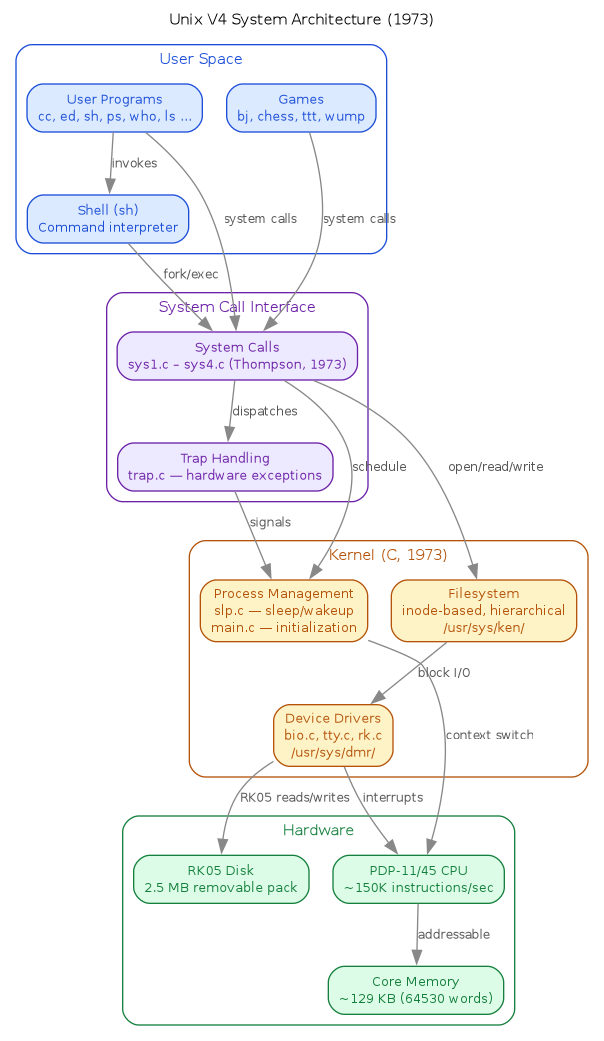
The layered structure of Unix V4 on the PDP-11/45, from user programs at the top down through the system call interface, kernel subsystems, and physical hardware:
3.3. The Recovery Story
The tape was discovered in July 2025 by Aleks Maricq in a storage closet at the University of Utah's Flux Research Group. It had belonged to the late Professor Jay Lepreau and was originally sent to Martin Newell—the computer scientist famous for creating the Utah Teapot, the iconic 3D test model still used today.
On December 19, 2025, Al Kossow at the Computer History Museum successfully read
the decades-old nine-track tape using modified hardware and Len Shustek's readtape
tool. The recovery made headlines across the technology world.
4. Environment Setup
4.1. System Configuration
$ uname -a
FreeBSD nexus 14.3-RELEASE FreeBSD 14.3-RELEASE releng/14.3-n271432-8c9ce319fef7 GENERIC amd64
4.2. Installing SimH
FreeBSD provides two SimH packages. I chose open-simh for its active development:
$ pkg install open-simh
This installs version 4.1.0.20240303, which includes emulators for the entire PDP family (PDP-1 through PDP-15), VAX systems, and many other historic computers.
The pdp11 binary is installed at /usr/local/bin/pdp11.
4.3. Obtaining the Unix V4 Files
The essential files are hosted at squoze.net:
wget http://squoze.net/UNIX/v4/unix_v4.tap   # Original tape image
wget http://squoze.net/UNIX/v4/disk.rk       # Pre-made RK05 disk image
wget http://squoze.net/UNIX/v4/boot.ini      # SimH boot configuration
wget http://squoze.net/UNIX/v4/install.ini   # SimH install configuration
The tape image is also available from the Internet Archive at
https://archive.org/details/utah_unix_v4_raw (file: analog.tap, identical
content with MD5 2e9dc71cbd24001484dc38904e609cba).
5. The Debugging Journey
5.1. Initial Attempts and Confusion
My first approach was to automate the boot process using Expect scripts. This led to hours of frustration as inputs seemed to be swallowed or misinterpreted by the emulator.
The boot process involves a chain of programs:
- SimH loads and executes the tape boot loader (
mboot) mbootpresents a menu of available programsubootloads the Unix kernel from disk- The kernel initializes and presents a login prompt
5.2. The Tape Format Warning Mystery
Every time SimH attached the tape, it displayed concerning warnings:
%SIM-INFO: TM0: Tape Image 'unix_v4.tap' scanned as SIMH format
%SIM-INFO: After processing 2191360 bytes of tape data (4280 records, 0 tapemarks)
%SIM-INFO: Read Tape Record Returned Unexpected Status: error in record
%SIM-INFO: 346332 bytes of unexamined data remain in the tape image file
%SIM-INFO: A potentially unreasonable number of record sizes(1) vs tape marks (0)
%SIM-INFO: The tape format (SIMH) might not be correct for the 'unix_v4.tap' tape image
I initially suspected the tape image was corrupted. Analysis with xxd confirmed
the file began with =0002 0000=—a valid SimH tape format header indicating 512-byte
records. The warnings, it turned out, are informational rather than fatal. The
tape functions correctly despite them.
5.3. The mcopy Input Puzzle
The most frustrating issue involved mcopy, the utility that copies the Unix
filesystem from tape to disk. The squoze.net documentation shows:
=mcopy
'p' for rp; 'k' for rk
k
disk offset
0
tape offset
75
count
4000
This appears straightforward: select k for RK05 disk, then provide three
numeric values. My Expect scripts faithfully sent these inputs, yet the copy
always failed with incorrect parameters.
5.4. Discovery: The Phantom Newline
After switching from Expect to tmux for better visibility, I captured the actual terminal output:
'p' for rp; 'k' for rk
k
disk offset

tape offset
The revelation: disk offset appears WITHOUT a trailing newline. The cursor
sits at the end of that line, not on a new line. When I pressed Enter after
typing k, I was unknowingly submitting an empty response to disk offset.
This caused a cascade failure:
disk offsetreceived empty string (defaulted to 0, but incorrectly)tape offsetreceived my intended disk offset value (0)countreceived my intended tape offset value (75)- My count value (4000) went to the next prompt
The result was copying only 75 blocks from the wrong tape position—a useless disk image.
5.5. The Solution
The correct input sequence requires NOT pressing Enter after the disk type:
=mcopy
'p' for rp; 'k' for rk
k0        ← type 'k' then '0' then Enter
75        ← Enter
4000      ← Enter
In tmux terms:
tmux send-keys -t unixv4 'mcopy' Enter
sleep 1
tmux send-keys -t unixv4 'k'           # NO Enter here!
tmux send-keys -t unixv4 '0' Enter     # disk offset
tmux send-keys -t unixv4 '75' Enter    # tape offset
tmux send-keys -t unixv4 '4000' Enter  # count
5.6. The uboot Boot Sequence
A similar issue affects uboot. After loading, it expects:
- A single character for disk type (
kfor RK05) - The kernel filename (
unix)
Again, no Enter between the disk type and filename:
tmux send-keys -t unixv4 'uboot' Enter
sleep 1
tmux send-keys -t unixv4 'k'           # NO Enter!
tmux send-keys -t unixv4 'unix' Enter  # Kernel name
6. Successful Boot
With the correct input sequences, Unix V4 boots successfully:
sim> set cpu 11/45
Disabling XQ
sim> att rk0 disk.rk
sim> att tm0 unix_v4.tap
sim> d sr 1
sim> boot -o tm
=uboot
k
unix
mem = 64530

login: root
#
The mem = 64530 line indicates 64,530 words of memory (approximately 129KB)—
generous for a 1973 system.
7. Exploring the Running System
7.1. Basic Commands
# date
Wed Jun 12 19:51:34 EDT 1974
# who
root    tty8 Jun 12 19:51
# ls /
bin
dev
etc
lib
mnt
tmp
unix
usr
The date shows June 12, 1974—preserved from when the tape was created.
7.2. User Database
# cat /etc/passwd
root::0:1::/:
bin::3:1::/bin:
Only two users defined. Note the empty password fields—security was simpler then.
7.3. Available Software
# ls /bin
ar    cmp   dump  if    ls    od    sh    su    uniq
as    cp    echo  kill  mail  pr    size  sum   who
bas   date  ed    ld    mkdir ps    sort  sync  write
cat   db    exit  ln    mv    restor strip stty
cc    dc    fc    login nm    rm    su    time
...

# ls /usr/games
bj      chess   cubic   moo     ttt     ttt.k   wump
The system includes cc (C compiler), as (assembler), ed (the original
line editor), and games including chess and wump (Hunt the Wumpus).
7.4. The Kernel Source
The historic kernel source lives in /usr/sys:
/usr/sys/ken/    - Ken Thompson's kernel code
  main.c         - Kernel initialization
  slp.c          - Sleep/wakeup mechanisms
  trap.c         - Trap handling
  sys1.c-sys4.c  - System calls
  ...

/usr/sys/dmr/    - Dennis Ritchie's device drivers
  bio.c          - Block I/O
  tty.c          - Terminal handling
  rk.c           - RK05 disk driver
  ...
The separation into ken and dmr directories reflects the division of labor
between the two Unix creators.
7.4.1. Ken Thompson's main.c (1973)
The opening of the kernel—code that changed computing forever:
/*
 *      Copyright 1973 Bell Telephone Laboratories Inc
 */

#include "../param.h"
#include "../user.h"
#include "../systm.h"
#include "../proc.h"
#include "../text.h"
#include "../inode.h"
#include "../seg.h"

int     lksp[]
{
        0177546,
        0172540,
        0
};
Note the archaic C syntax—this predates ANSI C by over a decade. The array
initializer uses { } without ===, and octal constants represent PDP-11
hardware addresses.
8. Technical Notes
8.1. The Switch Register
The SimH command d sr 1 sets the switch register to 1. This tells the boot
loader to enter interactive mode rather than attempting an automatic boot.
8.2. Filesystem Sync
Before exiting, always sync the filesystem:
# sync
# sync
# sync
The triple sync is a Unix tradition—ensuring all buffered writes complete.
Use Ctrl-E to return to the SimH prompt, then exit.
8.3. RK05 Disk Geometry
The RK05 was a 2.5MB removable disk pack. The disk image is 2,494,464 bytes
(4,872 512-byte blocks). The mcopy count of 4000 blocks copies the filesystem
portion; the remaining space is unused.
8.4. Process Lifecycle
Unix V4 implements a classic multi-state process model. The kernel's slp.c
implements sleep() and wakeup() primitives; scheduling is handled by swtch().
Zombie processes wait until the parent calls wait() to collect the exit status:

9. Lessons Learned
- Terminal conventions have evolved. 1970s software often expected input without the newlines we take for granted today.
- Warnings aren't always errors. The tape format warnings were frightening but ultimately harmless.
- tmux beats Expect for debugging. Being able to see exactly what appears on screen—character by character—was essential for diagnosing the input issues.
- Historical documentation assumes context. The squoze.net instructions are accurate but assume familiarity with 1970s terminal conventions.
10. Conclusion
Running Unix V4 connects us directly to a pivotal moment in computing history. This code, written by Thompson and Ritchie in 1973, established patterns we still use today: hierarchical filesystems, pipes, the shell, and the very concept of a portable operating system.
The challenges in booting it—the cryptic prompts, the missing newlines, the terse error messages—remind us how far user interfaces have come while the fundamental architecture remains recognizable.
11. Repository
The Unix V4 filesystem and boot scripts are available at: https://github.com/aygp-dr/unix-v4
12. References
- squoze.net Unix V4 - Tape contents and boot instructions
- Internet Archive: Unix V4 Tape - Original tape image
- The Register: Unix V4 Recovery
- Tom's Hardware: Unix V4 Recovery
- Diomidis Spinellis: V4 Analysis
- Unix History Repository - Complete Unix source history in git