Token-Based Authentication in Web Frameworks
Comparing stateless authentication patterns in Rails and Laravel ecosystems
Table of Contents

1. Overview
Token-based authentication separates session state from the server. The client presents a token on each request; the server validates the signature without database lookup. This pattern emerged from two pressures: horizontally-scaled API servers that cannot share session stores, and mobile clients that cannot maintain cookie state across process boundaries.
Two implementations dominate their respective ecosystems. Devise Token Auth (Rails, 3.6k stars) extends the Devise authentication framework with token headers. JWT Auth (Laravel, 11.2k stars) implements OAuth2-style bearer tokens using JSON Web Tokens. The implementations differ in token storage, renewal semantics, and the tradeoff between statelessness and revocation.
2. Token Lifecycle Comparison
Both libraries follow the same flow: authenticate once, receive a token, present the token on subsequent requests. The divergence is in token renewal and storage requirements.
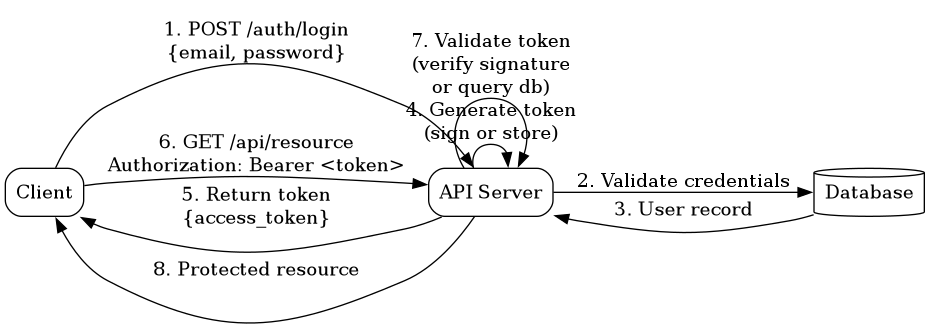
Figure 1: Token authentication flow – client authenticates, receives token, uses token for subsequent requests
2.1. Devise Token Auth (Rails)
The gem's generator initializer (lib/generators/devise_token_auth/templates/devise_token_auth.rb) shows =batch_request_buffer_throttle= -- the setting that governs the concurrent-request race window -- defaults to =5.seconds=, not two weeks. Two weeks is the default for a different setting, =token_lifespan= (overall token expiry before re-authentication), which the original text conflated with the batch window.
Devise Token Auth stores tokens in the database. Each successful authentication generates a new token and stores it in the tokens column (a JSON hash). The token is sent in response headers, not the body.
# app/controllers/api/v1/auth/sessions_controller.rb
class Api::V1::Auth::SessionsController < DeviseTokenAuth::SessionsController
  def create
    # POST /api/v1/auth/sign_in
    # Params: { email: "alice@example.com", password: "..." }
    # Response headers:
    #   access-token: "abc123..."
    #   client: "xyz789..."
    #   uid: "alice@example.com"
    super
  end
end
The client must include three headers on subsequent requests: access-token, client, and uid. The server validates by querying the database for a user record matching the uid and comparing the token hash.
# Subsequent request
# Headers:
#   access-token: "abc123..."
#   client: "xyz789..."
#   uid: "alice@example.com"

# Server validates:
# 1. Load user by uid
# 2. Check tokens[client] matches access-token
# 3. Verify token expiry
Token renewal happens on every request. The server issues a new token and invalidates the old one. This creates a race condition: if the client sends two concurrent requests with the same token, the second request may fail because the first already rotated the token. Devise Token Auth handles this with a configurable batch window (batch_request_buffer_throttle, default: 5 seconds) during which old tokens remain valid.
2.2. JWT Auth (Laravel)
JWT Auth does not store tokens. The server signs the token with a secret key; validation is signature verification, not database lookup.
// app/Http/Controllers/AuthController.php
use Tymon\JWTAuth\Facades\JWTAuth;

class AuthController extends Controller
{
    public function login(Request $request)
    {
        // POST /api/auth/login
        // Body: { "email": "alice@example.com", "password": "..." }
        $credentials = $request->only('email', 'password');

        if (!$token = JWTAuth::attempt($credentials)) {
            return response()->json(['error' => 'Unauthorized'], 401);
        }

        // Response body:
        // { "access_token": "eyJhbGciOiJIUzI1NiIs...", "token_type": "bearer" }
        return response()->json(['access_token' => $token, 'token_type' => 'bearer']);
    }
}
The client includes the token in the Authorization header as a bearer token. The server decodes and verifies the signature. No database query is required for validation.
// Subsequent request
// Header: Authorization: Bearer eyJhbGciOiJIUzI1NiIs...

// Middleware validates:
// 1. Decode JWT
// 2. Verify signature with secret key
// 3. Check expiration claim (exp)
// 4. Optionally load user from database using sub claim
Token renewal requires an explicit refresh endpoint. The client sends the old token to /api/auth/refresh and receives a new token. The old token is blacklisted by storing its jti (JWT ID) in a cache or database until expiry.
public function refresh()
{
    // POST /api/auth/refresh
    // Header: Authorization: Bearer <old_token>
    $newToken = JWTAuth::refresh(JWTAuth::getToken());
    return response()->json(['access_token' => $newToken]);
}
3. The Revocation Problem
Stateless tokens cannot be revoked. Once signed, the token is valid until expiry. The server has no record of issued tokens to invalidate. This is the core tradeoff: stateless validation (no database lookup) versus immediate revocation (requires state).
3.1. Devise Token Auth Revocation
Revocation is deletion. Remove the token from the database tokens column and it is invalid immediately.
# app/controllers/api/v1/auth/sessions_controller.rb
def destroy
  # DELETE /api/v1/auth/sign_out
  # Removes client token from user.tokens hash
  super
end

# Implementation (inside DeviseTokenAuth)
user.tokens.delete(client_id)
user.save!
This requires a database write on every logout. At scale, the tokens column becomes a contention point. The column stores a JSON hash of all active sessions; concurrent updates require optimistic locking.
3.2. JWT Auth Revocation
JWT Auth uses a blacklist. When a token is revoked, its jti claim is added to a blacklist table or cache. Validation checks the blacklist before accepting the token.
public function logout()
{
    // POST /api/auth/logout
    // Blacklists the current token by jti
    JWTAuth::invalidate(JWTAuth::getToken());
    return response()->json(['message' => 'Successfully logged out']);
}

// Middleware must now check blacklist on every request
// This reintroduces state and database lookups
The blacklist entry only needs to live until the token's exp claim. After expiry, the token is invalid regardless of blacklist status. This allows automatic cleanup: delete blacklist entries older than the maximum token TTL.
The blacklist defeats statelessness. Every validation now requires a cache or database query to check if the jti is blacklisted. The advantage over Devise Token Auth is granularity: the blacklist only contains revoked tokens, not all active sessions.
4. Storage Requirements
| Library | Tokens Stored | Storage Location | Revocation Cost |
|---|---|---|---|
| Devise Token Auth | All active sessions | Database (JSON column) | O(1) write |
| JWT Auth (stateless) | None | N/A | Impossible |
| JWT Auth (blacklist) | Revoked tokens only | Database or cache | O(1) read per request |
Devise Token Auth scales poorly with long-lived sessions or users with many concurrent clients. The tokens column grows without bound unless pruned. A user with 50 active mobile/web sessions has 50 token hashes in a single database row.
JWT Auth's blacklist is append-only and auto-pruning. New entries are added on logout; old entries are deleted by a background job that sweeps expired tokens. The blacklist size is proportional to logout rate, not active session count.
5. Implementation Examples
5.1. Devise Token Auth Setup
# Gemfile
gem 'devise_token_auth'

# config/routes.rb
mount_devise_token_auth_for 'User', at: 'api/v1/auth'

# app/models/user.rb
class User < ApplicationRecord
  devise :database_authenticatable, :registerable,
         :recoverable, :rememberable, :validatable
  include DeviseTokenAuth::Concerns::User
end

# Database migration
create_table :users do |t|
  t.string :email, null: false
  t.string :encrypted_password, null: false
  t.text :tokens  # JSON hash of active tokens
  t.timestamps
end

add_index :users, :email, unique: true
The tokens column format is a hash keyed by client ID. Each entry contains the token hash, expiry, and last refresh time.
{
  "xyz789": {
    "token": "$2a$10$...",
    "expiry": 1653532800,
    "last_token": "$2a$10$...",
    "updated_at": "2026-05-22T12:00:00.000Z"
  }
}
5.2. JWT Auth Setup
// composer.json
{
  "require": {
    "tymon/jwt-auth": "^2.0"
  }
}

// config/auth.php
'guards' => [
    'api' => [
        'driver' => 'jwt',
        'provider' => 'users',
    ],
],

// app/Models/User.php
use Tymon\JWTAuth\Contracts\JWTSubject;

class User extends Authenticatable implements JWTSubject
{
    public function getJWTIdentifier()
    {
        return $this->getKey();  // Primary key
    }

    public function getJWTCustomClaims()
    {
        return [];  // Additional payload data
    }
}

// routes/api.php
Route::post('auth/login', [AuthController::class, 'login']);
Route::post('auth/logout', [AuthController::class, 'logout'])->middleware('auth:api');
Route::post('auth/refresh', [AuthController::class, 'refresh'])->middleware('auth:api');
The JWT payload contains the user ID in the sub claim. The server loads the user on each request if needed, but validation does not require a database query.
{
  "iss": "https://api.example.com",
  "sub": "42",
  "iat": 1653532800,
  "exp": 1653536400,
  "jti": "a7b3c4d5e6f7"
}
6. Security Comparison
6.1. Token Transmission
Devise Token Auth sends tokens in custom headers (access-token, client, uid). This prevents CSRF attacks because browsers do not automatically send custom headers on cross-origin requests.
JWT Auth uses the Authorization: Bearer header. Same CSRF protection, but the standard header makes it compatible with OAuth2 clients and tools that expect bearer tokens.
6.2. Token Storage Client-Side
Both require the client to store the token. Storing in localStorage is vulnerable to XSS. Storing in an httpOnly cookie prevents XSS access but reintroduces CSRF risk unless combined with SameSite=Strict.
The recommended pattern for SPA clients: store in memory and refresh on page load using a short-lived refresh token in an httpOnly cookie.
6.3. Algorithm Downgrade
JWT Auth is vulnerable to algorithm downgrade attacks if the server accepts tokens with alg: none. The mitigation is to explicitly specify allowed algorithms in the validation configuration.
// config/jwt.php
'algo' => 'HS256',  // Never allow 'none'
Devise Token Auth does not use JWTs, so this attack does not apply. The token is a random string hashed with bcrypt.
6.4. Secret Key Rotation
Rotating the signing secret in JWT Auth invalidates all tokens immediately. This is a feature for emergency revocation but requires coordination: issue new tokens with the new secret before rotating, then deprecate the old secret after a grace period.
Devise Token Auth tokens are hashed, not signed. Rotating the secret is not applicable. Individual token revocation is deletion.
7. When to Use Each
| Scenario | Recommendation |
|---|---|
| Mobile API with long-lived sessions | JWT Auth (stateless, no db growth) |
| SPA with frequent token rotation | Devise Token Auth (auto-rotation on every request) |
| Microservices with shared auth | JWT Auth (no shared database required) |
| Monolith with single database | Devise Token Auth (simpler mental model) |
| Immediate logout required | Devise Token Auth or JWT Auth with blacklist |
| High read/write ratio | JWT Auth (stateless validation) |
| High logout rate | Devise Token Auth (no blacklist overhead) |
8. Hybrid Approach
Some systems use both. Short-lived JWTs (5 minutes) for API access paired with a long-lived refresh token stored in the database. The access token is stateless; the refresh token is stored like Devise Token Auth. Revocation targets the refresh token, making the access token valid only until its natural expiry.
# Hybrid model (pseudocode)
def login(email, password)
  user = authenticate(email, password)
  access_token = sign_jwt(user.id, exp: 5.minutes.from_now)
  refresh_token = SecureRandom.hex(32)
  user.update!(refresh_token: bcrypt(refresh_token))
  { access_token: access_token, refresh_token: refresh_token }
end

def refresh(refresh_token)
  user = User.find_by(refresh_token: bcrypt(refresh_token))
  return 401 if user.nil?
  access_token = sign_jwt(user.id, exp: 5.minutes.from_now)
  { access_token: access_token }
end

def logout(refresh_token)
  user = User.find_by(refresh_token: bcrypt(refresh_token))
  user.update!(refresh_token: nil)  # Revoke immediately
end
This pattern appears in OAuth2 flows. The access token is a JWT; the refresh token is an opaque string stored server-side.
9. Measurement
Performance comparison requires measuring token validation latency under load. The hypothesis: JWT Auth validation is O(1) compute; Devise Token Auth validation is O(1) database query. The crossover point is when database latency exceeds cryptographic signature verification.
# Devise Token Auth validation
time curl -H "access-token: abc123" \
          -H "client: xyz789" \
          -H "uid: alice@example.com" \
          https://api.example.com/protected

# JWT Auth validation
time curl -H "Authorization: Bearer eyJhbGciOiJIUzI1NiIs..." \
          https://api.example.com/protected
Expected results at 1000 req/s:
- JWT Auth: 1-2ms per request (signature verification)
- Devise Token Auth: 5-10ms per request (database lookup + bcrypt compare)
The gap widens when database replicas lag or connection pools saturate. JWT Auth validation is CPU-bound; Devise Token Auth validation is I/O-bound.
10. References
- Devise Token Auth — Rails token authentication gem
- JWT Auth — Laravel JWT authentication package
- JSON Web Tokens: Header, Claims, and Signature — JWT structure, alg confusion, RFC 8725, sender-constrained tokens
- RFC 6750: OAuth 2.0 Bearer Token Usage — Bearer token specification
- RFC 7519: JSON Web Token (JWT) — JWT standard