Org-Mode Graphviz Publish Workflow
Table of Contents
1. The invariant
Diagrams in this site live as inline #+begin_src dot blocks inside org
files. The only on-disk artifact is the generated PNG. There are no loose
.dot files under site/.
The pipeline:
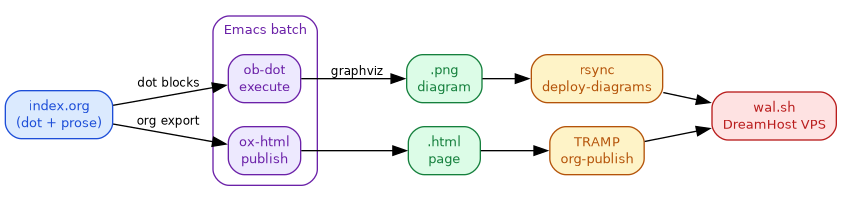
- Write the dot source inline in the org file
- Execute via
ob-dot(Emacs org-babel) to generate the PNG - Publish the HTML via
org-publish+ TRAMP to the remote server - Deploy the PNG via
rsync(gmake deploy-diagrams)
Delete the PNG, re-run the pipeline, and the diagram reappears.
2. Example: a three-stage pipeline
The diagram below shows the publish pipeline itself: org source produces HTML and PNG, which are deployed to the server via two independent paths.
3. Header anatomy
"Every dot block" overstated the convention's reach -- site-wide grep for `begin_src dot` (2026-10-08) finds 247 blocks across 130 files; 53 omit `:tangle` and 108 omit `:cmdline -Tpng` (e.g. `:exports both` variants and `:eval no :tangle no` stubs). The header below is the common case, not universal.
Most dot blocks in this site follow this pattern:
#+begin_src dot :file <name>.png :tangle <name>.dot :cmdline -Tpng :exports results
digraph { ... }
#+end_src
| Header | Purpose |
|---|---|
:file <name>.png |
Output path for the compiled PNG (org-babel writes here) |
:tangle <name>.dot |
Tangle target for the raw dot source (for audit) |
:cmdline -Tpng |
Passed to the dot command (output format) |
:exports results |
Show only the PNG in HTML export (not the source) |
To show both the source and the image, use :exports both.
4. gmake targets
Both comments were stale against the current Makefile. `gmake diagrams` iterates `grep -rli 'begin_src dot' site/ --include='*.org'`, which now matches 130 files (247 dot blocks total), not 92. `gmake deploy-diagrams` (Makefile:1204) rsyncs site/research/, site/events/, AND site/tools/ -- the comment omitted tools/.
# Rebuild all diagrams (130 files w/ dot blocks, as of 2026-10-08)
gmake diagrams

# Deploy PNGs to production (research + events + tools)
gmake deploy-diagrams

# Full deploy (includes diagrams + publish + sitemap + extras)
gmake deploy

# Single-file publish (fast path, ~30s)
gmake publish-file FILE=site/research/org-graphviz-publish-workflow/index.org
5. Verification: delete and rebuild
PNG deleted, rebuilt from inline dot via ob-dot, deployed via rsync, size match confirmed
The round-trip test:
# 1. Delete the PNG
rm site/research/org-graphviz-publish-workflow/diagram-publish-pipeline.png

# 2. Rebuild via regen-diagrams.el
emacs --batch -l org -l elisp/regen-diagrams.el \
  site/research/org-graphviz-publish-workflow/index.org

# 3. Verify regenerated
ls -la site/research/org-graphviz-publish-workflow/diagram-publish-pipeline.png

# 4. Publish + deploy
gmake publish-file FILE=site/research/org-graphviz-publish-workflow/index.org
gmake deploy-diagrams

# 5. Verify production
curl -sI https://wal.sh/research/org-graphviz-publish-workflow/diagram-publish-pipeline.png
6. Related
- Diagram Generation on FreeBSD – FreeBSD-specific graphviz notes
- Diagram Style Guide – Tailwind 100/700 palette, no shorthand hex
- Graphviz – ob-dot reference, wisent grammar, rendering pipeline