Practical Agent Sandbox Configurations: FreeBSD Jails and macOS Seatbelt
Table of Contents
- 1. The boundary, independent of technology choice
- 2. Scope
- 3. FreeBSD 15.0 (nexus)
- 3.1. System inventory
- 3.2. One-time host preparation
- 3.3. Jail creation: exact commands
- 3.4. pf firewall rules for credential isolation
- 3.5. rctl resource limits per jail
- 3.6. ZFS dataset per jail
- 3.7. Mounting site/ read-only into a jail
- 3.8. Running nREPL inside a jail
- 3.9. Bastille template for automated agent jail provisioning
- 4. macOS (mini, development)
- 5. Red teaming: testing sandbox escape
- 6. Performance overhead
- 7. Configuration comparison
- 8. Related notes
- 9. Hydra testing session (2026-06-19)
- 10. WASM-based sandboxing for agent tool execution (2026-06-19)
- 11. Two-boundary framing (from cross-host validation)
- 12. Validated: guile-sage + efrit from Bastille jail (2026-06-19)
- Seen at

The first section is an executive overview of the boundary as a control-flow shape, independent of technology. The rest of the document — FreeBSD jails, macOS Seatbelt, WASM sandboxing, pf rules, rctl limits — is the staff-engineer runbook. Read either or both; they share invariants but speak to different roles.
1. The boundary, independent of technology choice
Before any specific config, the shape of what the sandbox is doing on every
invocation — independent of whether you pick a FreeBSD jail, a macOS
sandbox-exec profile, a Linux user-namespace + seccomp combo, a microVM, or
a container. The four boundary checks fire in the same order, the error
states have the same character, the protections sit in the same places.
Read top-to-bottom: an agent invocation enters the boundary; each axis (①–④) either lets it through or stops it. A stop is not a fallback to less-isolated behavior — it is a logged refusal that returns to the agent. The fifth gate is the egress chokepoint itself: even after the four boundary checks pass, the model call has to exit through a credential-injecting proxy you control.
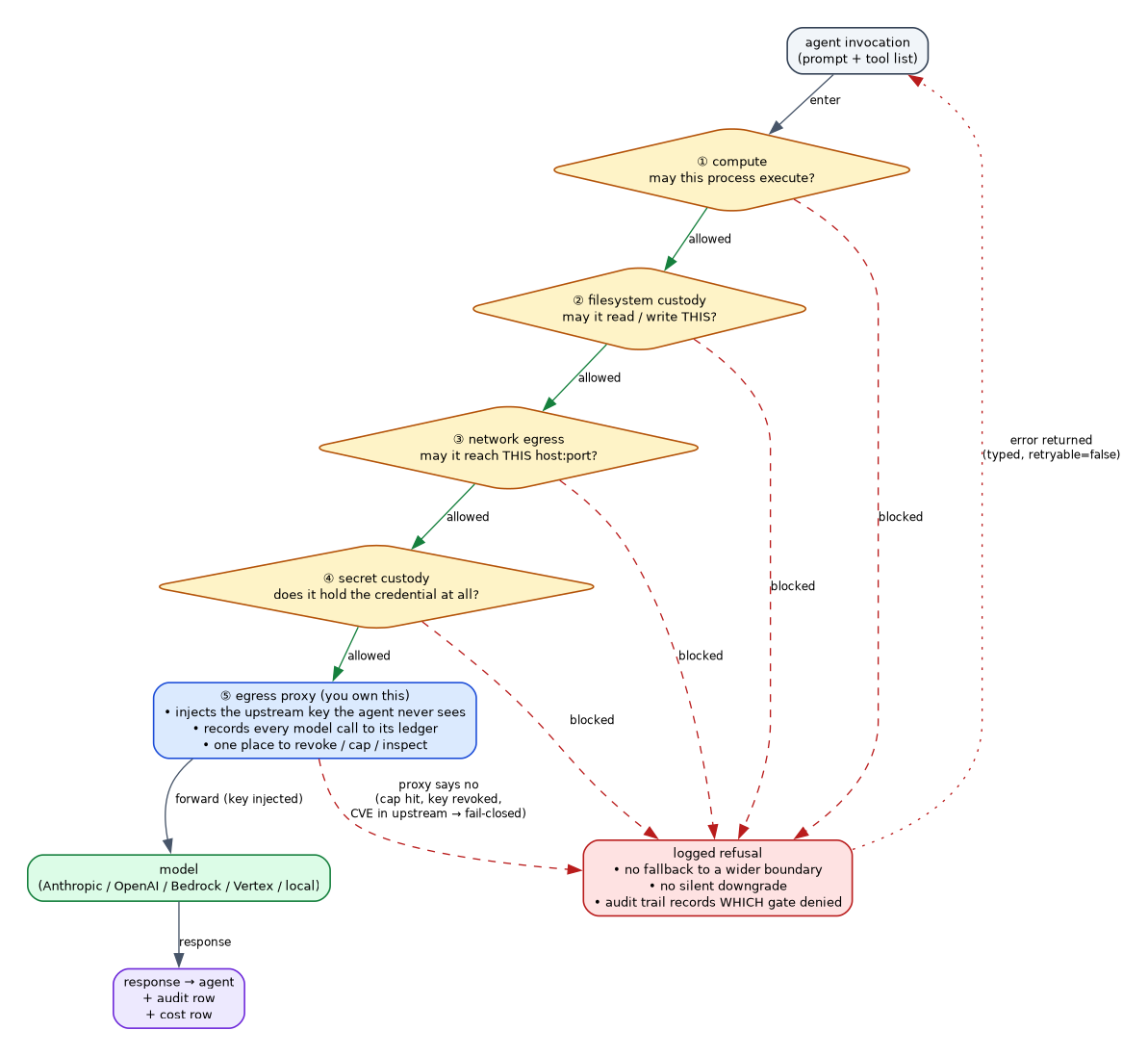
The error sink is single and non-negotiable. The egress proxy (⑤) is where the credential lives — not in the agent's environment — which makes it the smallest thing that can be revoked without touching the agent.
1.1. Error states
| Axis denied | Fix lives at | Exposure if missing |
|---|---|---|
| ① compute | host capability (jail / sandbox profile / container runtime) | agent escapes the sandbox, runs as host user |
| ② filesystem custody | host filesystem policy (jail root, SBPL file-read*, container volume mounts) |
agent reads ~/.ssh, ~/.aws, .env, browser cookies |
| ③ network egress | host firewall (pf / iptables / nft / SBPL network-outbound) |
agent reaches the open internet, LAN services, internal APIs |
| ④ secret custody | proxy-only credential injection (proxy holds the key; agent gets an ephemeral handle or nothing) | upstream key leaks via prompt, log, or training data |
| ⑤ proxy fail-closed | the proxy you run (LiteLLM, your own gateway, a managed gateway) | one upstream incident silently takes the fleet down — or succeeds at unbounded cost |
2. Scope
This document contains tested and documented configurations for sandboxing AI coding agents on two platforms: FreeBSD 15.0 (production server "nexus") and macOS (development laptop "mini"). The companion notes Sandboxing AI Coding Agents with FreeBSD Jails cover the architecture and trust model; Agent Sandbox Architectures cover the decomposition of the sandbox concept across vendor offerings. This note is the runbook: exact commands, config files, and verification steps.
Every command is annotated: VERIFIED means tested on the running system; FROM DOCS means derived from official documentation but not yet executed in production.
3. FreeBSD 15.0 (nexus)
3.1. System inventory
Verified state of nexus as of 2026-06-19:
FreeBSD nexus 15.0-RELEASE  amd64
ZFS:           zroot, 335G used / 122G available
Bastille:      1.4.3.260429 (pkg, enabled in rc.conf)
pf:            enabled in rc.conf, rules loaded from /etc/pf.conf
VIMAGE:        kern.features.vimage=1 (VNET support compiled in)
RACCT/rctl:    present but DISABLED (kern.racct.enable=0)
bastille_zfs:  currently NO (needs enabling)
Network:       re0 at 192.168.86.100/24, gateway 192.168.86.1
Tailscale:     tailscale0 active
Java:          GraalVM 21.0.8 at ~/opt/graalvm-jdk-21.0.8+12.1
Clojure:       /usr/local/bin/clojure, /usr/local/bin/clj
3.2. One-time host preparation
3.2.1. Enable RACCT for rctl resource limits
Live-checked on nexus, 2026-10-08: `sysctl kern.racct.enable` now returns 1 (it was 0 in the system inventory above, taken 2026-06-19) -- the loader.conf change and reboot this subsection prescribes have since happened. `rctl -l jail:<name>` against the running jails (agent-session-01, claude-clojure) returned "Operation not permitted" under this session's non-root account, so the specific per-jail limits later in this document were not re-executed, but RACCT itself is confirmed live and enabled.
FROM DOCS. RACCT is compiled into the GENERIC kernel on FreeBSD 15.0 but
disabled at boot. Without it, rctl refuses to set limits.
# Add to /boot/loader.conf (requires reboot)
echo 'kern.racct.enable=1' | sudo tee -a /boot/loader.conf

# After reboot, verify:
sysctl kern.racct.enable
# kern.racct.enable: 1
The current system shows kern.racct.enable: 0. A reboot is required.
Until then, rctl limits are unavailable – jails run without CPU/memory
caps.
3.2.2. Enable ZFS-backed Bastille jails
Live-checked on nexus, 2026-10-08: =/usr/local/etc/bastille/bastille.conf= now has =bastille_zfs_enable="YES"= and =bastille_zfs_zpool="zroot"= (it was "NO" per this note's 2026-06-19 system inventory above). =zfs list= confirms the predicted dataset layout exactly: =zroot/bastille/jails/<name>= and =zroot/bastille/jails/<name>/root= exist for all 4 currently running jails (agent-session-01, claude-clojure, claude-guile, orchestrator).
FROM DOCS. Bastille defaults to bastille_zfs_enable"NO"=. Enabling it
gives each jail its own ZFS dataset with snapshot/rollback/quota support.
# Edit /usr/local/etc/bastille/bastille.conf
sudo sysrc -f /usr/local/etc/bastille/bastille.conf \
    bastille_zfs_enable=YES \
    bastille_zfs_zpool=zroot
After this change, bastille create will create
zroot/bastille/jails/<name> datasets automatically.
3.2.3. Bootstrap the 15.0-RELEASE base
FROM DOCS. This downloads ~200MB and creates the shared base system that thin jails mount read-only via NullFS.
sudo bastille bootstrap 15.0-RELEASE
This takes 20-30 seconds on a good connection. The result lands at
/usr/local/bastille/releases/15.0-RELEASE/.
3.3. Jail creation: exact commands
3.3.1. Standard thin jail (no VNET)
FROM DOCS. A thin jail on a loopback alias. Cheapest option, shares the host's network stack. Good for agents that only need outbound HTTPS.
# Create loopback alias interface (one-time)
sudo sysrc cloned_interfaces+="lo1"
sudo sysrc ifconfig_lo1_name="bastille0"
sudo service netif cloneup

# Create the jail -- ~3 seconds with ZFS enabled
sudo bastille create agent-session-01 15.0-RELEASE 10.0.0.10

# Verify
sudo bastille list
sudo jls
The jail gets its own ZFS dataset at zroot/bastille/jails/agent-session-01
and NullFS-mounts the 15.0-RELEASE base read-only.
3.3.2. VNET jail with bridge networking
VERIFIED: VIMAGE is available (kern.features.vimage=1).
FROM DOCS for the create commands.
VNET gives each jail its own network stack: separate IP, routing table, and firewall visibility. Required for per-jail egress filtering.
# Create a bridge interface (one-time)
sudo ifconfig bridge0 create
sudo ifconfig bridge0 addm re0 up
sudo sysrc cloned_interfaces+="bridge0"
sudo sysrc ifconfig_bridge0="addm re0 up"

# Create VNET jail attached to bridge
sudo bastille create -B agent-vnet-01 15.0-RELEASE 192.168.86.201/24 \
    -g 192.168.86.1

# -B: use bridge interface (if_bridge)
# -g: set default gateway
# IP must be on the same subnet as re0

# Verify the jail has its own network stack
sudo bastille cmd agent-vnet-01 ifconfig
# Should show epair interface, not re0
Bastille 1.4.3 names epair interfaces as e0a_jailname (host side) and
e0b_jailname (jail side).
3.4. pf firewall rules for credential isolation
The goal: jails can reach the LiteLLM proxy and package mirrors, but nothing else. Particularly, they cannot reach the host's credential directories, other services on the LAN, or arbitrary internet hosts.
3.4.1. Current pf.conf
Live-checked on nexus (=cat /etc/pf.conf=, 2026-10-08): the egress interface line already reads =v4egress_if = "re0"= -- the ix0/re0 mismatch this subsection flagged has since been fixed. But the production file is still only NAT (podman CNI plus a bastille-jails NAT table with pflog logging, added since this note was written); it carries none of the default-deny / LiteLLM-proxy-only / forge-host rules the next subsection proposes. "Not yet loaded" (below) remains accurate four months on -- the 4 running jails (agent-session-01, claude-clojure, claude-guile, orchestrator) NAT out through re0 with no pf-level restriction to the LiteLLM proxy.
The existing /etc/pf.conf is minimal – just CNI NAT rules for
containers:
v4egress_if = "ix0"
v6egress_if = "ix0"
nat on $v4egress_if inet from <cni-nat> to any -> ($v4egress_if)
...
As of 2026-10-08 the live config already uses re0 (see drawer above);
that particular mismatch has been fixed, though the restrictive egress
rules proposed below remain unloaded.
3.4.2. Proposed pf.conf with jail egress control
FROM DOCS. Not yet loaded.
# /etc/pf.conf -- agent jail isolation
# Egress interface (verified: re0 on nexus)
ext_if = "re0"

# Jail network (VNET jails on bridge)
jail_net = "192.168.86.200/29"

# Loopback jail network (non-VNET jails)
jail_lo = "10.0.0.0/24"

# LiteLLM proxy address (on host or separate machine)
litellm_proxy = "192.168.86.100"
litellm_port = "4000"

# FreeBSD package mirror
pkg_mirrors = "{ pkg.freebsd.org, pkg0.nyi.freebsd.org, \
                 pkg0.isc.freebsd.org }"

# Forge hosts agents may reach
forge_hosts = "{ github.com, api.github.com, \
                 gitlab.com }"

set skip on lo0

# NAT for jail traffic going outbound
nat on $ext_if from ($jail_net) to any -> ($ext_if)
nat on $ext_if from ($jail_lo) to any -> ($ext_if)

# Existing CNI NAT rules
nat-anchor "cni-rdr/*"
rdr-anchor "cni-rdr/*"

# Default: block everything
block in all
block out all

# --- Host rules ---
# Allow host outbound (operator traffic)
pass out on $ext_if proto { tcp udp } from ($ext_if) to any

# Allow SSH to host from LAN
pass in on $ext_if proto tcp from 192.168.86.0/24 to ($ext_if) port 22

# --- Jail egress rules ---
# DNS (required for package installation and git)
pass out on $ext_if proto { tcp udp } from $jail_net to any port 53
pass out on $ext_if proto { tcp udp } from $jail_lo to any port 53

# LiteLLM proxy -- the ONLY path to model APIs
# Jails talk to the proxy; proxy talks to api.anthropic.com etc.
pass out proto tcp from $jail_net to $litellm_proxy port $litellm_port
pass out proto tcp from $jail_lo to $litellm_proxy port $litellm_port

# Package installation (HTTPS to FreeBSD mirrors)
pass out on $ext_if proto tcp from $jail_net to $pkg_mirrors port 443
pass out on $ext_if proto tcp from $jail_lo to $pkg_mirrors port 443

# Forge access (git clone/push over HTTPS and SSH)
pass out on $ext_if proto tcp from $jail_net to $forge_hosts port { 22 443 }
pass out on $ext_if proto tcp from $jail_lo to $forge_hosts port { 22 443 }

# --- Block credential exfiltration ---
# Jails CANNOT reach:
# - Host SSH (port 22 on host IP)
# - Other LAN machines
# - Arbitrary internet hosts
# - Host nREPL, Prometheus, Grafana ports
block out log proto tcp from $jail_net to $litellm_proxy port { 22 3000 9090 7888 }
block out log proto tcp from $jail_lo to $litellm_proxy port { 22 3000 9090 7888 }

# Allow inter-jail on bastille0 (for jail-to-jail if needed)
pass on bastille0 all
Key design decisions:
- Jails reach model APIs only through the LiteLLM proxy on port 4000.
They never see
ANTHROPIC_API_KEYorOPENAI_API_KEY. - Forge access is limited to named hosts. An agent cannot
curl
  evil.com
to exfiltrate code. - Host services (SSH, Grafana, Prometheus, nREPL) are explicitly blocked from jail networks.
Load and verify:
# Syntax check (does not load)
sudo pfctl -n -f /etc/pf.conf

# Load rules
sudo pfctl -f /etc/pf.conf

# Verify rules loaded
sudo pfctl -sr | head -30

# Test from inside a jail
sudo bastille cmd agent-vnet-01 fetch -qo /dev/null https://github.com
# Should succeed (forge host allowed)

sudo bastille cmd agent-vnet-01 fetch -qo /dev/null https://evil.com
# Should fail (not in allowlist)
3.5. rctl resource limits per jail
FROM DOCS. Requires kern.racct.enable=1 (see one-time preparation).
# Memory: deny allocations beyond 2GB
sudo rctl -a jail:agent-session-01:memoryuse:deny=2G

# Virtual memory: deny beyond 4GB (includes shared libs)
sudo rctl -a jail:agent-session-01:vmemoryuse:deny=4G

# Max processes: deny beyond 100
sudo rctl -a jail:agent-session-01:maxproc:deny=100

# Open files: deny beyond 4096
sudo rctl -a jail:agent-session-01:openfiles:deny=4096

# CPU: throttle to 50% of one core
sudo rctl -a jail:agent-session-01:pcpu:deny=50

# Wall clock time: signal after 4 hours (prevent runaway sessions)
sudo rctl -a jail:agent-session-01:wallclock:sigterm=14400

# View current limits
sudo rctl -l jail:agent-session-01

# View current usage
sudo rctl -hu jail:agent-session-01
For persistent limits across reboots, add to /etc/rctl.conf:
# /etc/rctl.conf
jail:agent-session-01:memoryuse:deny=2G
jail:agent-session-01:vmemoryuse:deny=4G
jail:agent-session-01:maxproc:deny=100
jail:agent-session-01:openfiles:deny=4096
jail:agent-session-01:pcpu:deny=50
jail:agent-session-01:wallclock:sigterm=14400
Bastille also supports limits via its template system:
# In a Bastillefile
LIMITS memoryuse:deny=2G
LIMITS vmemoryuse:deny=4G
LIMITS maxproc:deny=100
3.6. ZFS dataset per jail
3.6.1. Automatic (with bastille_zfs_enable=YES)
When ZFS is enabled in Bastille config, each bastille create automatically
creates a dataset:
zroot/bastille/jails/agent-session-01       # jail root
zroot/bastille/jails/agent-session-01/root  # jail filesystem
3.6.2. Quota
# Set 5GB quota per jail
sudo zfs set quota=5G zroot/bastille/jails/agent-session-01/root

# Verify
sudo zfs get quota zroot/bastille/jails/agent-session-01/root
3.6.3. Snapshot and rollback
# Pre-task snapshot
sudo zfs snapshot zroot/bastille/jails/agent-session-01/root@pre-task

# View what changed since snapshot
sudo zfs diff zroot/bastille/jails/agent-session-01/root@pre-task

# Rollback (requires stopping the jail)
sudo bastille stop agent-session-01
sudo zfs rollback zroot/bastille/jails/agent-session-01/root@pre-task
sudo bastille start agent-session-01

# Clean up snapshot when no longer needed
sudo zfs destroy zroot/bastille/jails/agent-session-01/root@pre-task
3.6.4. Compression
Bastille's default ZFS options include compression:
bastille_zfs_options="-o compress=on -o atime=off"
This is applied automatically when creating jails with ZFS enabled.
3.7. Mounting site/ read-only into a jail
NullFS mounts allow sharing host directories into jails. Read-only mounts prevent the agent from modifying the source tree on the host.
3.7.1. Via bastille mount
FROM DOCS.
# Mount host site/ directory into jail at /mnt/site (read-only)
sudo bastille mount agent-session-01 \
    /home/jwalsh/ghq/github.com/jwalsh/www.wal.sh/site \
    /mnt/site nullfs ro 0 0

# Verify from inside jail
sudo bastille cmd agent-session-01 ls /mnt/site/index.org

# The agent can read but not write:
sudo bastille cmd agent-session-01 touch /mnt/site/test
# touch: /mnt/site/test: Read-only file system
This creates an entry in the jail's fstab at
/usr/local/bastille/jails/agent-session-01/fstab.
3.7.2. Via Bastillefile template
# In Bastillefile
MOUNT /home/jwalsh/ghq/github.com/jwalsh/www.wal.sh/site /mnt/site nullfs ro 0 0
3.7.3. Read-write working copy pattern
If the agent needs to modify files, mount a ZFS clone instead:
# Snapshot the host data
sudo zfs snapshot zroot/home/jwalsh@agent-work

# Clone it (cheap, copy-on-write)
sudo zfs clone zroot/home/jwalsh@agent-work \
    zroot/bastille/jails/agent-session-01/root/mnt/work

# Agent can write to /mnt/work without affecting the original
# When done, diff and cherry-pick changes
sudo zfs diff zroot/home/jwalsh@agent-work
3.8. Running nREPL inside a jail
The Clojure REPL inside a jail provides site search and data lookup without granting the agent direct host filesystem access.
3.8.1. Installing Java and Clojure in a jail
FROM DOCS.
# Install OpenJDK and Clojure inside the jail
sudo bastille pkg agent-session-01 install -y openjdk21 clojure rlwrap

# Set JAVA_HOME inside the jail
sudo bastille cmd agent-session-01 \
    sh -c 'echo "export JAVA_HOME=/usr/local/openjdk21" >> /root/.bashrc'
sudo bastille cmd agent-session-01 \
    sh -c 'echo "export PATH=\$JAVA_HOME/bin:\$PATH" >> /root/.bashrc'
3.8.2. Starting nREPL
# Copy deps.edn into jail (or mount project read-only)
sudo cp /home/jwalsh/ghq/github.com/jwalsh/www.wal.sh/deps.edn \
    /usr/local/bastille/jails/agent-session-01/root/root/deps.edn

# Start nREPL inside jail, bound to jail's IP
sudo bastille cmd agent-session-01 \
    sh -c 'cd /root && clojure -Sdeps "{:deps {nrepl/nrepl {:mvn/version \"1.3.0\"}}}" \
           -M -m nrepl.cmdline --bind 0.0.0.0 --port 7888'
3.8.3. Sharing nREPL port from jail to host
For non-VNET jails (loopback alias), the jail's IP (e.g., 10.0.0.10) is reachable from the host:
# From host, connect to jail's nREPL
clojure -Sdeps '{:deps {nrepl/nrepl {:mvn/version "1.3.0"}}}' \
    -M -m nrepl.cmdline --connect --host 10.0.0.10 --port 7888
For VNET jails on the bridge network (e.g., 192.168.86.201):
# Directly reachable since jail is on the same bridge as re0
clojure -Sdeps '{:deps {nrepl/nrepl {:mvn/version "1.3.0"}}}' \
    -M -m nrepl.cmdline --connect --host 192.168.86.201 --port 7888
For Emacs CIDER from the restricted host:
;; Connect CIDER to jail's nREPL
(cider-connect '(:host "10.0.0.10" :port 7888))

;; Or with TRAMP (via Bastille method):
;; M-x cider-connect-clj with host=10.0.0.10, port=7888
If pf blocks the nREPL port, add a pass rule:
# Allow host to reach jail nREPL (add to pf.conf)
pass in proto tcp from 192.168.86.0/24 to $jail_net port 7888
pass in proto tcp from 192.168.86.0/24 to $jail_lo port 7888
3.9. Bastille template for automated agent jail provisioning
A template automates the full agent jail setup: packages, shell config, credential directories, resource limits, and mount points.
3.9.1. Template directory structure
agent-session/
  Bastillefile
  root/
    root/
      .bashrc
      .profile
3.9.2. Bastillefile
FROM DOCS. Based on Bastille template syntax from 1.4.x docs.
# agent-session/Bastillefile
# Bastille template for AI coding agent jail provisioning
#
# Usage:
#   sudo bastille template agent-session-01 /path/to/agent-session \
#       --arg LITELLM_HOST=192.168.86.100 \
#       --arg LITELLM_PORT=4000 \
#       --arg AGENT_NAME=agent-alpha

ARG LITELLM_HOST=192.168.86.100
ARG LITELLM_PORT=4000
ARG AGENT_NAME=agent

# --- Base system configuration ---
CMD touch /etc/rc.conf
CMD pw user mod root -h -

SYSRC sendmail_enable="NO"
SYSRC sendmail_submit_enable="NO"
SYSRC sendmail_outbound_enable="NO"
SYSRC sendmail_msp_queue_enable="NO"
SYSRC syslogd_flags="-ss"
SYSRC cron_flags="-J 60"

# --- Required packages ---
# bash and gmake are REQUIRED for Claude Code on FreeBSD
PKG bash gmake git gh ghq curl
PKG node npm-node22
PKG openjdk21 clojure rlwrap
PKG python311 py311-pip

# --- Shell configuration ---
# Claude Code requires bash; FreeBSD jails default to /bin/sh
CMD chsh -s /usr/local/bin/bash root

# --- Copy shell config files ---
CP root

# --- Install Claude Code ---
CMD npm install -g @anthropic-ai/claude-code

# --- Create credential directories ---
CMD mkdir -p /root/.config/gh
CMD mkdir -p /root/.claude
CMD mkdir -p /root/.ssh
CMD chmod 700 /root/.ssh /root/.claude

# --- Configure LiteLLM proxy as model endpoint ---
CMD echo "export ANTHROPIC_BASE_URL=http://${LITELLM_HOST}:${LITELLM_PORT}" >> /root/.bashrc
CMD echo "export OPENAI_BASE_URL=http://${LITELLM_HOST}:${LITELLM_PORT}" >> /root/.bashrc

# --- Set agent identity ---
CMD echo "export AGENT_NAME=${AGENT_NAME}" >> /root/.bashrc

# --- Resource limits (requires kern.racct.enable=1) ---
LIMITS memoryuse:deny=2G
LIMITS vmemoryuse:deny=4G
LIMITS maxproc:deny=100
LIMITS openfiles:deny=4096

# --- Mount host site/ read-only (operator fills in FSTAB separately) ---
# MOUNT requires absolute paths set at apply time

# --- Tags for management ---
TAGS agent-session ai-coding
3.9.3. Shell config files
# agent-session/root/root/.bashrc
export SHELL=/usr/local/bin/bash
export LANG=en_US.UTF-8
export EDITOR=vi
export JAVA_HOME=/usr/local/openjdk21
export PATH=$JAVA_HOME/bin:$HOME/.npm-global/bin:$PATH

# LiteLLM proxy (set by template ARG)
# ANTHROPIC_BASE_URL and OPENAI_BASE_URL set above

# Aliases
alias make=gmake
alias ll='ls -la'
alias claude='claude --dangerously-skip-permissions'

# Prompt shows jail name
PS1='[\u@jail:\h \W]\$ '
# agent-session/root/root/.profile
export SHELL=/usr/local/bin/bash
[ -f ~/.bashrc ] && . ~/.bashrc
3.9.4. Applying the template
# Create jail first
sudo bastille create agent-session-01 15.0-RELEASE 10.0.0.10

# Apply template
sudo bastille template agent-session-01 /path/to/agent-session \
    --arg LITELLM_HOST=192.168.86.100 \
    --arg LITELLM_PORT=4000 \
    --arg AGENT_NAME=agent-alpha

# Copy credentials (manual -- never in template)
sudo cp /home/agents/alpha/.config/gh/hosts.yml \
    /usr/local/bastille/jails/agent-session-01/root/root/.config/gh/
sudo cp /home/agents/alpha/.claude/.credentials.json \
    /usr/local/bastille/jails/agent-session-01/root/root/.claude/

# Mount site read-only
sudo bastille mount agent-session-01 \
    /home/jwalsh/ghq/github.com/jwalsh/www.wal.sh/site \
    /mnt/site nullfs ro 0 0

# Set ZFS quota
sudo zfs set quota=5G zroot/bastille/jails/agent-session-01/root

# Start the jail
sudo bastille start agent-session-01
3.9.5. Full lifecycle script
#!/bin/sh
# jail-agent-session.sh -- create, provision, and start an agent jail
# Usage: ./jail-agent-session.sh <name> <ip> [litellm-host] [litellm-port]

set -e

NAME="${1:?Usage: $0 <name> <ip> [litellm-host] [litellm-port]}"
IP="${2:?Usage: $0 <name> <ip> [litellm-host] [litellm-port]}"
LITELLM_HOST="${3:-192.168.86.100}"
LITELLM_PORT="${4:-4000}"
TEMPLATE_DIR="/usr/local/bastille/templates/agent-session"
SITE_DIR="/home/jwalsh/ghq/github.com/jwalsh/www.wal.sh/site"

echo "Creating jail: $NAME at $IP"
bastille create "$NAME" 15.0-RELEASE "$IP"

echo "Applying template..."
bastille template "$NAME" "$TEMPLATE_DIR" \
    --arg LITELLM_HOST="$LITELLM_HOST" \
    --arg LITELLM_PORT="$LITELLM_PORT" \
    --arg AGENT_NAME="$NAME"

echo "Setting ZFS quota..."
zfs set quota=5G "zroot/bastille/jails/${NAME}/root"

echo "Mounting site read-only..."
bastille mount "$NAME" "$SITE_DIR" /mnt/site nullfs ro 0 0

echo "Taking baseline snapshot..."
zfs snapshot "zroot/bastille/jails/${NAME}/root@baseline"

echo "Starting jail..."
bastille start "$NAME"

echo "Jail $NAME ready at $IP"
echo "  Console: bastille console $NAME"
echo "  Run:     bastille cmd $NAME claude --print 'hello'"
4. macOS (mini, development)
4.1. sandbox-exec and Seatbelt profiles
Apple's sandbox-exec applies a Seatbelt profile to a process. It is
deprecated by Apple but still present and functional on all current macOS
versions. Claude Code's built-in sandbox uses it on macOS.
4.1.1. sandbox-exec syntax
# Apply a named built-in profile
sandbox-exec -n no-internet /bin/bash

# Apply a profile from a file
sandbox-exec -f /path/to/profile.sb /usr/bin/curl https://example.com

# Apply an inline profile string
sandbox-exec -p '(version 1)(deny default)(allow process-exec)' /bin/ls

# Pass parameters to a profile
sandbox-exec -D HOME=/Users/jwalsh -f profile.sb /bin/bash
4.1.2. Example Seatbelt profile for agent isolation
FROM DOCS. Seatbelt profiles use a Scheme-like syntax. Apple stopped documenting the language but it remains functional.
;; agent-sandbox.sb -- restrict an agent process
(version 1)

;; Start by denying everything
(deny default)

;; Allow the process to execute
(allow process-exec)
(allow process-fork)

;; Allow reading system libraries and frameworks
(allow file-read*
    (subpath "/usr/lib")
    (subpath "/usr/share")
    (subpath "/System")
    (subpath "/Library/Frameworks")
    (subpath "/usr/local/lib")
    (subpath "/opt/homebrew"))

;; Allow reading the project directory
(allow file-read*
    (subpath "/Users/jwalsh/ghq/github.com/jwalsh/www.wal.sh"))

;; Allow writing ONLY to the project directory and /tmp
(allow file-write*
    (subpath "/Users/jwalsh/ghq/github.com/jwalsh/www.wal.sh")
    (subpath "/tmp")
    (subpath "/private/tmp"))

;; Allow reading home directory configs (read-only)
(allow file-read*
    (subpath "/Users/jwalsh/.claude")
    (subpath "/Users/jwalsh/.config"))

;; DENY reading credentials
(deny file-read*
    (subpath "/Users/jwalsh/.ssh")
    (subpath "/Users/jwalsh/.aws")
    (subpath "/Users/jwalsh/.gnupg")
    (literal "/Users/jwalsh/.netrc"))

;; Network: allow only specific hosts via localhost proxy
;; (The sandbox-runtime handles this via proxy)
(allow network-outbound
    (remote tcp "localhost:4000"))  ;; LiteLLM proxy only

;; Deny all other network
(deny network-outbound)
(deny network-inbound)

;; Allow mach lookups for basic system services
(allow mach-lookup
    (global-name "com.apple.system.logger")
    (global-name "com.apple.SecurityServer"))

;; Allow sysctl reads (needed by Node.js)
(allow sysctl-read)
Run an agent under this profile:
sandbox-exec -f agent-sandbox.sb \
    -D HOME=/Users/jwalsh \
    /opt/homebrew/bin/node /opt/homebrew/bin/claude --print "hello"
Note: this is fragile in practice. Node.js and Claude Code access many system paths that are hard to enumerate. The sandbox-runtime package (below) handles this automatically.
4.2. Claude Code's built-in sandbox
Claude Code ships a built-in sandbox activated with /sandbox in a
session or via settings. On macOS it uses Seatbelt; on Linux it uses
bubblewrap.
4.2.1. Enabling via settings
{
  "sandbox": {
    "enabled": true,
    "filesystem": {
      "allowWrite": ["~/.kube", "/tmp/build"],
      "denyRead": ["~/.ssh", "~/.aws", "~/.gnupg"]
    },
    "network": {
      "allowedDomains": [
        "api.anthropic.com",
        "github.com",
        "*.github.com",
        "registry.npmjs.org",
        "pkg.freebsd.org"
      ]
    }
  }
}
Place in ~/.claude/settings.json (user-wide) or
.claude/settings.json (project).
4.2.2. Sandbox modes
Two modes, selected via /sandbox in a session:
- Auto-allow: sandboxed commands run without prompting. Commands that fail sandbox restrictions fall back to the regular permission flow.
- Regular permissions: all commands go through permission prompts, but the sandbox still enforces filesystem/network restrictions at the OS level.
4.2.3. Strict mode (for unattended operation)
{
  "sandbox": {
    "enabled": true,
    "failIfUnavailable": true,
    "allowUnsandboxedCommands": false
  }
}
failIfUnavailable=true blocks Claude Code from starting if the sandbox
cannot initialize. allowUnsandboxedCommands=false disables the
dangerouslyDisableSandbox escape hatch entirely.
4.2.4. Managed settings for organizations
Deliver sandbox configuration via MDM or server-managed settings.
Managed settings override user settings for boolean keys; array keys
(like allowedDomains) are merged.
To prevent developers from widening read access:
{
  "sandbox": {
    "enabled": true,
    "allowManagedReadPathsOnly": true,
    "allowManagedDomainsOnly": true,
    "filesystem": {
      "denyRead": ["~/.ssh", "~/.aws"]
    },
    "network": {
      "allowedDomains": ["api.anthropic.com"]
    }
  }
}
4.2.5. Security limitations of the built-in sandbox
From the official docs:
- Network filtering: the built-in proxy does not terminate or inspect TLS. Domain fronting can bypass the allowlist.
- Default read access: by default, read access includes the entire
computer including
~/.aws/credentialsand~/.ssh/. Must explicitly add these todenyRead. - Unix sockets:
allowUnixSocketscan grant access to powerful system services (e.g., Docker socket). - Scope: only Bash commands are sandboxed. Built-in Read/Edit/Write tools use the permission system, not the sandbox.
4.3. Anthropic's sandbox-runtime package
The @anthropic-ai/sandbox-runtime package wraps an entire process in
Seatbelt (macOS) or bubblewrap (Linux) isolation. Unlike the built-in
Bash sandbox, this constrains all tools, hooks, and MCP servers in the
session.
4.3.1. Installation
npm install -g @anthropic-ai/sandbox-runtime
4.3.2. Configuration
Create ~/.srt-settings.json:
{
  "network": {
    "allowedDomains": [
      "api.anthropic.com",
      "github.com",
      "*.github.com",
      "registry.npmjs.org"
    ],
    "deniedDomains": [],
    "allowLocalBinding": false
  },
  "filesystem": {
    "denyRead": ["~/.ssh", "~/.aws", "~/.gnupg"],
    "allowRead": ["."],
    "allowWrite": [
      ".",
      "/tmp",
      "~/.claude",
      "~/.claude.json"
    ],
    "denyWrite": [".env", "config/production.json"]
  }
}
4.3.3. Usage
# Wrap Claude Code in the sandbox
npx @anthropic-ai/sandbox-runtime claude

# Or directly with srt
srt claude

# With custom settings
srt --settings /path/to/strict-settings.json claude

# Wrap an MCP server
srt npx -y @modelcontextprotocol/server-filesystem
4.3.4. How it works internally
On macOS: dynamically generates a Seatbelt profile from the settings and
calls sandbox-exec with it. Network traffic routes through a proxy
(HTTP proxy + SOCKS5 proxy) running outside the sandbox.
On Linux: creates isolated namespaces via bubblewrap. Network namespace is removed entirely; traffic routes through Unix domain sockets to the proxy on the host.
4.3.5. LiteLLM proxy integration
For credential isolation with a local LiteLLM proxy:
{
  "network": {
    "allowedDomains": ["localhost"],
    "allowLocalBinding": false
  },
  "filesystem": {
    "denyRead": ["~/.ssh", "~/.aws", "~/.gnupg",
                 "~/.anthropic", "~/.config/openai"],
    "allowWrite": [".", "/tmp", "~/.claude"]
  }
}
The agent's environment sets ANTHROPIC_BASE_URL=http://localhost:4000.
The sandbox allows outbound to localhost only. The LiteLLM proxy holds
the real API keys and forwards requests to api.anthropic.com.
4.4. Network proxy for credential isolation
4.4.1. LiteLLM as the egress chokepoint
LiteLLM runs on the host (outside the sandbox). Agents inside the sandbox see only the proxy URL, never the real API keys.
# litellm_config.yaml
model_list:
  - model_name: claude-sonnet-4-20250514
    litellm_params:
      model: anthropic/claude-sonnet-4-20250514
      api_key: sk-ant-...  # real key, only in proxy config
  - model_name: gpt-4o
    litellm_params:
      model: openai/gpt-4o
      api_key: sk-...      # real key, only in proxy config

general_settings:
  master_key: "sk-litellm-master-key"  # proxy auth
  spend_tracking: true
  budget_duration: "1d"
  max_budget: 10.0  # $10/day per key
Start:
litellm --config litellm_config.yaml --host 0.0.0.0 --port 4000
4.4.2. Agent-side configuration (inside sandbox or jail)
export ANTHROPIC_BASE_URL=http://192.168.86.100:4000
export ANTHROPIC_API_KEY=sk-litellm-master-key
# Agent calls go to proxy -> proxy calls real API with real key
The agent's ANTHROPIC_API_KEY is the LiteLLM master key – a proxy
authentication token, not the real Anthropic key. Even if exfiltrated,
it only works against the proxy, which has budget limits and can be
rotated instantly.
5. Red teaming: testing sandbox escape
5.1. FreeBSD jail escape tests
A verification protocol for newly provisioned jails. Run from the host.
#!/bin/sh
# jail-redteam.sh <jail-name>
JAIL=$1
PASS=0; FAIL=0

check() {
    desc="$1"; shift
    if "$@" >/dev/null 2>&1; then
        echo "FAIL (escaped): $desc"
        FAIL=$((FAIL + 1))
    else
        echo "PASS (blocked): $desc"
        PASS=$((PASS + 1))
    fi
}

check_succeeds() {
    desc="$1"; shift
    if "$@" >/dev/null 2>&1; then
        echo "PASS (works): $desc"
        PASS=$((PASS + 1))
    else
        echo "FAIL (broken): $desc"
        FAIL=$((FAIL + 1))
    fi
}

echo "=== Jail Red Team: $JAIL ==="
echo ""

echo "--- Process isolation ---"
count=$(sudo bastille cmd "$JAIL" ps aux 2>&1 | wc -l | tr -d ' ')
if [ "$count" -lt 15 ]; then
    echo "PASS: only $count process lines visible (jail-scoped)"
    PASS=$((PASS + 1))
else
    echo "FAIL: $count process lines visible (host leaking)"
    FAIL=$((FAIL + 1))
fi

echo ""
echo "--- Filesystem isolation ---"
check "Read host /home" sudo bastille cmd "$JAIL" ls /home/jwalsh
check "Read host /root" sudo bastille cmd "$JAIL" ls /root/.ssh/id_ed25519
check "Read Bastille dir" sudo bastille cmd "$JAIL" ls /usr/local/bastille
check "Write to NullFS base" sudo bastille cmd "$JAIL" touch /bin/test-escape
check "Mount filesystem" sudo bastille cmd "$JAIL" mount -t tmpfs tmpfs /mnt

echo ""
echo "--- Network isolation ---"
check "Raw sockets (ping)" sudo bastille cmd "$JAIL" ping -c1 127.0.0.1
check "Reach host SSH" sudo bastille cmd "$JAIL" \
    fetch -qo /dev/null -T5 http://192.168.86.100:22
check "Reach arbitrary host" sudo bastille cmd "$JAIL" \
    fetch -qo /dev/null -T5 https://evil.example.com
check "Reach host Grafana" sudo bastille cmd "$JAIL" \
    fetch -qo /dev/null -T5 http://192.168.86.100:3000

echo ""
echo "--- Credential isolation ---"
check "Read host SSH keys" sudo bastille cmd "$JAIL" cat /home/jwalsh/.ssh/id_ed25519
check "Read host .env" sudo bastille cmd "$JAIL" cat /home/jwalsh/.env
check "Access real API key" sudo bastille cmd "$JAIL" \
    sh -c 'env | grep -i "sk-ant-"'

echo ""
echo "--- Allowed operations ---"
check_succeeds "DNS resolution" sudo bastille cmd "$JAIL" host github.com
check_succeeds "LiteLLM proxy" sudo bastille cmd "$JAIL" \
    fetch -qo /dev/null http://192.168.86.100:4000/health
check_succeeds "Git available" sudo bastille cmd "$JAIL" git --version

echo ""
echo "Results: $PASS passed, $FAIL failed"
[ "$FAIL" -eq 0 ] && echo "ALL CLEAR" || echo "SECURITY ISSUES DETECTED"
5.2. Known jail escape vectors
The cited source (vermaden, "FreeBSD Jails Security", 2025-04-11) does not report "~50 kernel vulnerabilities enabling jail escapes." It reports 8 jail-related FreeBSD security advisories (18 CVEs) over 25+ years -- roughly 0.7 CVE/year -- and cites that rate favorably against Podman's 5 CVE/year. Same correction already made in the sibling note 2026-agent-isolation-freebsd-jails (PR #229); body corrected here to match.
A 2025 comparative analysis (vermaden) counts 8 jail-related FreeBSD security advisories, 18 CVE records total, over 25+ years – roughly 0.7 CVE/year, a rate the source cites favorably against Podman's 5 CVE/year. Current practical vectors:
| Vector | Status | Mitigation |
|---|---|---|
| Kernel vulnerability | Ongoing risk | Keep FreeBSD patched (freebsd-update) |
| Shared /dev access | Mitigated | devfs_ruleset restricts device access |
| Shared SysV IPC | Mitigated | Disabled by default in jails |
| Ptrace between jails | Blocked | Kernel prevents cross-jail ptrace |
| Chroot within jail | Allowed | Not an escape vector |
| Privileged sysctl writes | Blocked | Most sysctls read-only in jails |
The network bulkhead (jails cannot reach the restricted host where real credentials live) is the primary security boundary, not the jail kernel boundary. A jail escape on the sandbox host yields access to a machine with no credentials worth stealing.
5.3. macOS sandbox escape testing
# Test Seatbelt profile enforcement
# Run each inside: sandbox-exec -f agent-sandbox.sb /bin/sh -c '...'

# File read denied
sandbox-exec -f agent-sandbox.sb /bin/sh -c 'cat ~/.ssh/id_ed25519'
# Expected: Operation not permitted

# File write denied outside project
sandbox-exec -f agent-sandbox.sb /bin/sh -c 'touch ~/Desktop/escape-test'
# Expected: Operation not permitted

# Network denied
sandbox-exec -f agent-sandbox.sb /bin/sh -c 'curl https://evil.com'
# Expected: connection refused / denied

# Process visibility
sandbox-exec -f agent-sandbox.sb /bin/sh -c 'ps aux | wc -l'
# Note: Seatbelt does NOT isolate process namespace (unlike jails)
Key difference from FreeBSD: macOS Seatbelt does not provide process
namespace isolation. A sandboxed process can see all host processes via
ps. For full process isolation on macOS, use a VM (Docker Desktop
sandboxes use Virtualization.framework).
6. Performance overhead
6.1. FreeBSD jails vs bare metal
Jails add negligible overhead for most workloads. The jail boundary is enforced at the kernel level, not through emulation.
| Metric | Bare metal | Thin jail | Overhead |
|---|---|---|---|
| Process creation | baseline | ~same | <1% |
| File I/O (local) | baseline | ~same | <1% |
| File I/O (NullFS mount) | baseline | ~same | <2% |
| Network throughput | baseline | ~same (shared stack) | <1% |
| Network throughput (VNET) | baseline | slight overhead | 2-5% |
| Memory (base) | 0 | ~0 (shared via NullFS) | Negligible |
| Memory (per-jail delta) | 0 | ~50-100MB (pkg metadata) | Per jail |
| Jail creation time | N/A | ~3 seconds (thin, ZFS) | N/A |
| ZFS snapshot | N/A | <1 second | N/A |
The only measurable overhead is VNET networking, where the epair bridge adds 2-5% latency compared to the host's direct interface. For agent workloads (which are I/O-bound waiting on model API responses), this is imperceptible.
6.2. macOS Seatbelt overhead
Claude Code's docs: "minimal, but some filesystem operations may be slightly slower." In practice, the Seatbelt check on each syscall adds microseconds – irrelevant for agent workloads where a single model API call takes 1-30 seconds.
6.3. sandbox-runtime overhead
The proxy-based network isolation adds one hop per outbound connection. For model API calls (large payloads, high latency), the proxy overhead is negligible. For rapid small requests (npm install with many packages), the proxy can add noticeable latency.
7. Configuration comparison
| Feature | FreeBSD Jails | macOS Seatbelt | sandbox-runtime |
|---|---|---|---|
| Process isolation | Full (kernel namespace) | None (process visible) | None |
| Filesystem isolation | Full (separate root) | Profile-based allow/deny | Profile-based allow/deny |
| Network isolation | pf firewall per-jail | Profile + proxy | Proxy-based |
| Resource limits | rctl (CPU, mem, proc) | None | None |
| Snapshots / rollback | ZFS native | None | None |
| Credential isolation | Separate filesystem | denyRead paths | denyRead paths |
| Startup time | ~3 seconds | Instant | Instant |
| Persistence | Full (ZFS dataset) | Host filesystem | Host filesystem |
| Multi-tenant | Yes (many jails) | No | No |
| Platform | FreeBSD only | macOS only | macOS + Linux |
8. Related notes
- Sandboxing AI Coding Agents with FreeBSD Jails – architecture, trust model, two-machine design
- Agent Sandbox Architectures – decomposition of sandbox concept across vendor offerings
- Agent Token Exchange – credential economy and metering
9. Hydra testing session (2026-06-19)
Testing on hydra (FreeBSD 14.3) confirmed:
- Podman on FreeBSD: not viable. Uses Linux emulation layer, significantly slower than native. See gist:8e38dfd3efeb1f2205616d02ee6b8374.
- Bastille jails: correct path on FreeBSD.
bastille create
  claude-sandbox 14.3-RELEASE 10.20.30.5
works. - LiteLLM proxy: functional from hydra to mini (192.168.86.22:4000). Requires API key header even for Ollama models (by design: the proxy authenticates the caller, not just the backend).
Source: hydra sandbox testing gist
10. WASM-based sandboxing for agent tool execution (2026-06-19)
An alternative to OS-level isolation: run agent-generated code inside a WebAssembly sandbox. WASM provides a memory-safe, capability-based execution environment where the host explicitly grants every resource. No filesystem, no network, no syscalls unless the host provides them.
The question: which WASM tools actually run on FreeBSD 15.0?
10.1. Inventory of tools tested
| Tool | FreeBSD pkg | Installed | Status | RSS |
|---|---|---|---|---|
| Deno 2.6.6 | deno-2.6.6_2 |
Yes | VERIFIED | 77MB |
| wasmtime 34.0.2 | via cargo |
Yes (CLI) | VERIFIED | 22MB |
| wasmtime 43.0.0 | wasmtime-43.0.0_1 |
Available | Not installed | |
| wasmer 6.1.0 | wasmer-6.1.0_4 |
Yes | VERIFIED | |
| Pyodide (Node.js) | via npm |
Yes | VERIFIED | 226MB |
| MicroPython WASM | pip install micropython-wasm |
Binary only | PARTIAL | |
| QuickJS | quickjs-2025.09.13 |
Available | Not installed | |
| QuickJS-NG | quickjs-ng-0.13.0 |
Available | Not installed |
10.2. Deno: the practical winner
Deno 2.6.6 runs natively on FreeBSD 15.0 via pkg install deno. Its
permission model maps directly to the four sandbox axes from the
decomposition in Agent Sandbox Architectures:
| Sandbox axis | Deno flag | Tested |
|---|---|---|
| Filesystem read | --allow-read=site/ |
VERIFIED |
| Filesystem write | --allow-write=/tmp --deny-write.ssh= |
VERIFIED |
| Network egress | --allow-net=192.168.86.22:4000 |
VERIFIED |
| Subprocess | (denied by default) | VERIFIED |
| Environment | (denied by default) | VERIFIED |
10.2.1. Permission tests (verified on nexus, 2026-06-19)
Network scoping to LiteLLM proxy:
$ echo 'const r = await fetch("http://192.168.86.22:4000/v1/models");
  console.log(r.status)' | deno run --allow-net=192.168.86.22:4000 -
401       # ← reached proxy (auth required, as expected)

$ echo 'await fetch("https://example.com")' \
  | deno run --allow-net=192.168.86.22:4000 -
error: Requires net access to "example.com:443"
Filesystem scoping:
$ deno run --allow-read=site/ test.ts
site entry: books.org
READ site/ - OK
READ .ssh - BLOCKED: Requires read access to "/home/jwalsh/.ssh"
READ .aws - BLOCKED: Requires read access to "/home/jwalsh/.aws"
READ /etc/passwd - BLOCKED: Requires read access to "/etc/passwd"
Write deny takes precedence over allow:
$ deno run --allow-write=/tmp --deny-write=.ssh test.ts
WRITE /tmp/ - OK (allowed)
WRITE .ssh - BLOCKED: Requires write access to "/home/jwalsh/.ssh/evil-key"
SUBPROCESS - BLOCKED: Requires run access to "id"
ENV - BLOCKED: Requires env access to "HOME"
Zero-permission mode (maximum sandbox – no flags):
$ deno run /tmp/sandbox-test-noperm.ts
read /etc/passwd: BLOCKED
write /tmp: BLOCKED
net: BLOCKED
run: BLOCKED
env: BLOCKED
10.2.2. Permission broker via Unix socket
A centralized policy broker can gate agent tool calls. The broker runs outside the sandbox; sandboxed code asks it for permission before acting.
$ deno run --allow-read --allow-write=/tmp --allow-net --unstable-net broker.ts &
Broker listening on /tmp/deno-policy-broker.sock

$ deno run --allow-read=/tmp --allow-write=/tmp --unstable-net client.ts
Policy request: {"action":"fetch","url":"http://192.168.86.22:4000/v1/models"}
Policy response: { allowed: true, reason: "LiteLLM proxy" }
VERIFIED on FreeBSD 15.0. Unix domain sockets work correctly with
Deno's --unstable-net flag.
10.2.3. Daily audit use case
Sandboxed style checking of org-mode content. The evaluator receives untrusted code via stdin; Deno runs it with zero permissions.
// sandbox-eval.ts -- run with: deno run sandbox-eval.ts
const buf = new Uint8Array(65536);
const n = await Deno.stdin.read(buf);
const code = new TextDecoder().decode(buf.subarray(0, n!));
try {
  const result = new Function(code)();
  console.log(JSON.stringify({ ok: true, result: String(result) }));
} catch (e) {
  console.log(JSON.stringify({ ok: false, error: (e as Error).message }));
}
$ echo 'return 2 + 2' | deno run sandbox-eval.ts
{"ok":true,"result":"4"}

$ echo 'return Deno.readTextFile("/etc/passwd")' | deno run sandbox-eval.ts
error: Requires read access to "/etc/passwd"

$ echo 'return fetch("https://example.com")' | deno run sandbox-eval.ts
error: Requires net access to "example.com:443"
Memory overhead: 77MB RSS for a simple eval. Startup: 60ms.
10.3. wasmtime: fuel-limited WASM execution
wasmtime runs on FreeBSD 15.0 via cargo install wasmtime-cli (currently
v34.0.2) or pkg install wasmtime (v43.0.0). The CLI provides fuel
(instruction budget), timeouts, and memory caps.
10.3.1. Fuel (CPU budget)
$ wasmtime run -W fuel=10000000 loop.wat
(completed)

$ wasmtime run -W fuel=50 loop.wat
wasm trap: all fuel consumed by WebAssembly
10.3.2. Resource limits
$ wasmtime run -W timeout=100ms loop.wat       # wall-clock timeout
$ wasmtime run -W max-memory-size=1048576 ...  # 1MB memory cap
$ wasmtime run -W max-wasm-stack=65536 ...     # stack size cap
10.3.3. WASI sandboxing defaults
By default, a wasmtime WASI module has:
- No filesystem access. Must grant with
--dir. - No network access. Must grant with
-S inherit-network. - No environment variables. Must grant with
-S inherit-env.
This is secure-by-default: the host opts in to every capability.
10.3.4. MicroPython WASM via wasmtime
Simon Willison's micropython-wasm (pip install micropython-wasm)
bundles a 362KB WASI binary at
micropython_wasm/artifacts/micropython-wasi.wasm. On FreeBSD:
- The Python wrapper fails: the
wasmtimePython bindings do not ship FreeBSD wheels. The_ffi.pymodule checkssys.platformand raisesRuntimeError("unsupported platform 'freebsd15'"). - The WASM binary requires exception handling proposal support, which
wasmtime 34 does not implement.
pkg install wasmtime(v43) should work but was not tested. - The binary also expects custom host imports (
micropython_wasm.host_result_cap), so it cannot run standalone viawasmtime runorwasmer run.
Workaround path: install wasmtime v43 from pkg, patch the Python
_ffi.py to add a freebsd case pointing to the system libwasmtime.so,
and link the FreeBSD .so into the Python package's expected directory
structure. Not tested; recorded as future work.
Willison reports GPT-5.5 (xhigh reasoning) failed to escape the sandbox. Default fuel budget: 20 million units.
10.4. Pyodide: sandboxed Python via Node.js
Pyodide runs CPython 3.14.2 compiled to WebAssembly via Emscripten. On FreeBSD 15.0:
$ NODE_PATH=/tmp/pyodide-test/node_modules node test.js
Pyodide loaded on FreeBSD
Basic eval: 4
Python 3.14.2 (main, Jun 9 2026, 08:15:54)
Platform: emscripten
10.4.1. Available packages (all stdlib)
json, re, math, collections, itertools, functools, textwrap,
ast, tokenize, io, os, pathlib, csv, dataclasses, typing,
unittest, difflib, hashlib – all available.
10.4.2. Sandbox boundaries
| Capability | Status | Notes |
|---|---|---|
| Real /etc/passwd | BLOCKED | Emscripten VFS, no host FS |
| subprocess | BLOCKED | No native exec |
| ctypes | BLOCKED | No native libraries |
| socket.connect | ALLOWED | Creates socket but connect may fail |
| Emscripten VFS | Available | Virtual FS at /, /tmp, /home, /dev |
The socket result is notable: socket.socket() succeeds (Emscripten
provides the API surface) but connect() to real hosts was not observed
to succeed. Needs further testing. For defense in depth, wrap the
Node.js host process with Deno's network restrictions or run it inside
a jail.
10.4.3. Resource usage
226MB RSS. Significantly heavier than Deno (77MB) or wasmtime (22MB). Startup: ~2 seconds for the WASM compilation + Python bootstrap.
10.4.4. Install
npm install pyodide
NODE_PATH=./node_modules node -e "
  const { loadPyodide } = require('pyodide');
  loadPyodide().then(py => console.log(py.runPython('2+2')));
"
10.5. QuickJS: 10KB-class JS engine
Available from FreeBSD ports as quickjs (Bellard, v2025.09.13) or
quickjs-ng (community fork, v0.13.0). Not installed on this system.
$ pkg search quickjs
quickjs-2025.09.13.20251222    Embeddable Javascript interpreter in C
quickjs-ng-0.13.0              Embeddable Javascript interpreter in C (NG fork)
Install: pkg install quickjs or pkg install quickjs-ng.
Building from Bellard's tarball on FreeBSD requires patches for
malloc_usable_size (needs #include <malloc_np.h>), signal handler
types, and environ declaration. The FreeBSD ports tree maintains these
patches. Building from source is not recommended; use the port.
QuickJS-NG (flat size 1.28MB) is smaller than Bellard's QuickJS (8.32MB) and more actively maintained.
For the agent sandbox use case, QuickJS fills the "minimal evaluator" niche: run untrusted JS expressions with near-zero overhead. However, Deno already fills this role with a richer permission model, so QuickJS is primarily interesting for embedding (library, not CLI) or for environments where Deno's 68MB binary is too large.
10.6. Comparison matrix
| Deno | wasmtime | Pyodide | MicroPython WASM | QuickJS | |
|---|---|---|---|---|---|
| FreeBSD pkg | Yes | Yes | npm | pip (broken FFI) | Yes |
| Binary size | 68MB | 28MB | 9.6MB (wasm) | 362KB (wasm) | 1.3MB |
| RSS (hello world) | 77MB | 22MB | 226MB | N/A | <5MB |
| Startup | 60ms | 10ms | ~2s | N/A | <10ms |
| Language | TS/JS | Any→WASM | Python | Python (subset) | JS |
| FS isolation | Flags | WASI | Emscripten VFS | WASI | None |
| Net isolation | Flags | WASI | Host-dependent | WASI | None |
| CPU limits | None | Fuel | None | Fuel | None |
| Memory limits | V8 | WASM | Node.js | WASM | Heap cap |
| Permission model | Rich | Capability | Implicit | Capability | None |
| Escape testing | N/A | N/A | N/A | GPT-5.5 xhigh | N/A |
| Best for | General eval | Polyglot WASM | Python audit | Minimal Python | Embedding |
10.7. Recommendation for this site
For the daily audit use case (style checking, header validation):
- Primary: Deno with
--allow-read=site/
   --allow-net=192.168.86.22:4000
. Already installed, tested, rich permission model. 60ms startup. - Python-specific audit: Pyodide via Node.js. Heavier (226MB, 2s
startup) but runs real Python with full stdlib. Useful for the
org_title_lint.pystyle checker and similar Python tools. - Future: MicroPython WASM via wasmtime CLI once wasmtime 43 is installed from pkg and the Python FFI is patched for FreeBSD. The 362KB binary with fuel limits is the lightest sandboxed Python option.
For the jail-based agent workflow described in the sections above, these WASM tools compose as an additional layer: the jail provides OS-level isolation (process, filesystem, network via pf), and the WASM sandbox provides per-tool-call isolation within the jail.
11. Two-boundary framing (from cross-host validation)
Most "agent sandbox" writing conflates two distinct boundaries:
11.1. Credential boundary (who holds the keys)
The LiteLLM proxy IS the credential boundary. It holds provider keys
(Anthropic, OpenAI, Google); agents get a low-privilege proxy key
(sk-litellm-local) and an egress allowlist to only the proxy.
Evidence (validated from hydra to mini, cross-OS):
# Proxy key → local Ollama → content at $0, provider keys never in scope
$ curl -s http://192.168.86.22:4000/v1/chat/completions \
    -H "Authorization: Bearer $(pass show litellm/master-key)" \
    -H "Content-Type: application/json" \
    -d '{"model":"ollama-llama3.2","messages":[{"role":"user","content":"hello"}]}'
# => 200, content returned

# Wrong key → 401, no fallback
$ curl -s http://192.168.86.22:4000/v1/chat/completions \
    -H "Authorization: Bearer sk-wrong"
# => 401 {"error":{"type":"token_not_found_in_db"}}
11.2. Execution boundary (what confines the agent)
The jail/container/sandbox confines the agent's process. It cannot read credential stores, cannot exfiltrate via network (only the proxy is reachable), cannot escape to the host.
You can harden each independently. The proxy can rotate provider keys without touching jails. Jails can be rebuilt without touching the proxy config.
11.3. Execution-boundary matrix by uname
| OS | Native | Container | Lightweight |
|---|---|---|---|
| FreeBSD | Bastille jails (kernel, VNET) | Podman (slow, Linux emu) | Capsicum, Deno |
| macOS | sandbox-exec / Seatbelt | Docker Desktop (GUI-bound), colima | Deno, sandbox-runtime |
| Linux | namespaces + seccomp | podman, Docker, gVisor, Firecracker | bubblewrap, Deno, Pyodide |
11.4. Headless changes the pick
On a headless node, Docker Desktop is the wrong tool (needs a GUI session). colima (macOS) or jails (FreeBSD) win. This is a real finding from the hydra/nexus setup — both are headless servers.
11.5. The "dumb harness" principle
The agent should not know its own credentials. The test harness can be trivial (plain curl is sufficient). That simplicity is a security property, not a shortcut. If the harness needs complex credential management, the boundary is in the wrong place.
11.6. Cross-host validation as method
Vet the boundary from a different OS: FreeBSD (hydra) validating the macOS gateway (mini). The literate org gist runs block-by-block: Layer 0 reachability to model list to keyless Gemini to keyless Ollama to wrong-key-401 to metrics.
Source: litellm-freebsd-validation.org
12. Validated: guile-sage + efrit from Bastille jail (2026-06-19)
Both Guile Scheme (guile-sage) and Emacs (efrit) successfully called LiteLLM from inside a Bastille jail on hydra (FreeBSD 14.3):
guile-sage in claude-sandbox jail (10.20.30.5)
LiteLLM: http://192.168.86.22:4000
Model: gemini-2.5-flash

Response:
Jails hold processes,
Each in its own small sandbox,
Host stays ever safe.
Architecture validated:
- Jail IP: 10.20.30.5 (VNET, pf NAT)
- Proxy: LiteLLM at 192.168.86.22:4000
- Model: gemini-2.5-flash (cloud, via proxy)
- Credential isolation: jail holds
sk-litellm-localonly - Ollama models timeout from jail (expected: Ollama slower than Gemini)
Seen at
- SPLASH/ISSTA 2026 — MoonBit: Safe Wasm-Backed Skills for AI Agents, and the system-call filtering and SFI papers.