Web 2.0 Sign-up Forms, c. 2010, Rebuilt and Fuzzed
Fifteen-year-old UIs, one property-based tester, and what pixels cannot tell you about a label
Table of Contents
What this is
These are not contemporary interfaces, and nothing here says anything about the sites
as they are today. They are a fixed, recognisable set of forms with a known history,
used to try out two tools together: Bombadil, which explores a page and checks
properties over what it finds, and Playwright, whose role-and-name locators are what
the exploration records. Old forms make good fixtures. Nobody is changing them, most
readers will recognise them, and they span the years in which form markup changed most.
They are Web 2.0 forms, from what developers would call the jQuery era, and the two
albums sit either side of browsers taking on type="email", required and
placeholder, which they adopted unevenly between about 2011 and 2014.
That change is the result worth having, and it is subtler than the screenshots suggest.
Between 2010 and 2014 the biggest sites moved the visible caption into the placeholder,
where it vanishes as you type. Read from pixels, those forms look unlabelled. Read from
the archived HTML, most of them kept an accessible name behind the placeholder: an
aria-label, a label drawn inside the field, a label clipped out of sight. The 2010
forms, which look well captioned, often gave assistive technology nothing at all. The same four years cut the share of forms with a
CAPTCHA from half to one in seven and brought in the mobile number. A property-based tester over rebuilt fixtures measures that
without a survey.
The 2010 album was captioned at the time "UI for registration systems with field requirements, alignment, error placement, ToS positioning, and captcha", which is close to a rubric. The audit below uses it, and the note ends where an audit should: the same forms, mildly hardened by a script, explored again.
Sources
| Album | Taken | Screens | Rebuilt | Link |
|---|---|---|---|---|
| Registration | about February 2010 | 15 | 12 | flickr.com/photos/jwalsh_/albums/72157623332651441 |
| Account - Create | 11 March 2014, 00:07 to 00:21 | 22 | 21 | flickr.com/photos/jwalsh_/albums/72157642238435653 |
The 2010 set is the large sites of the day plus Tudou, MediaFire, MySpace, Classmates, Rakuten and Ameba. The 2014 set is the large sites again, now including Baidu, QQ, Alipay and Wikipedia, followed by a run through fundraising and charity sites (GoFundMe, GiveForward, Fundly, YouCaring, Razoo, JustGive, the American Red Cross, UNICEF Malaysia, Goodwill) taken in about fourteen minutes.
Not rebuilt: Rakuten and Ameba (too small to read even at full size), an early-2000s Classmates "pick your state" page (not a form), and one duplicate. Six sites appear in both albums: Facebook, Yahoo, Twitter, LinkedIn, Amazon, and Windows Live, which became the Microsoft account.
Method
A screenshot is not a DOM, so every screen was rebuilt as a static HTML page that reproduces the form and nothing else: the same fields in the same order, the same captions, placeholders, hints, button text and terms copy, no logos. The one thing a screenshot can show and a rebuild has to get right is how each field is identified, so the rules for that were fixed before anyone built:
- a field with only grey text inside it gets a
placeholderand no<label>; - visible text beside or above a field gets a
<label for>; - a column of text flush with a column of inputs, the 2010 layout table, gets a table
cell and no
<label>, because that is what such pages shipped; - no
aria-*,roleordata-testidunless an archived capture of the page shows them (see What the archive changed), because their absence is part of what is measured.
The sequence, which is the part that transfers:
| Step | What | Who |
|---|---|---|
| 1 | Save each album; fetch the 1024 px originals through Flickr's oEmbed | by hand, then a script |
| 2 | Read every screen once; write a catalogue (site, kind, buildable or not, privacy notes) | one reader |
| 3 | Write one contract for all builders and one shared script for behaviour | one reader |
| 4 | Build, six or seven screens per batch, in parallel, disjoint paths | five builder agents |
| 5 | Review every build against the full-size image; settle or keep each guess | three reviewer agents, then the reader |
| 6 | Explore each page with Bombadil from file://, no server |
a script, 30 s per screen |
| 7 | Audit: markup plus traces into one table per album | a script |
Behaviour is the same on every page and comes from data attributes, not per-page code:
each form reports signup_attempt, signup_error (with the field and the rule that
failed), signup_success and signup_duplicate on window.dataLayer. Required fields
are enforced wherever the page did not mark a field optional; whether the user could
see that a field was required is recorded separately, from the visible caption text,
so the enforcement rule cannot inflate the evidence.
Two things went wrong and are worth knowing. The builders first worked from the
thumbnails the saved album page kept (240 to 640 px); the 1024 px originals were one
oEmbed call away, so every label-versus-table call and CAPTCHA word was checked again
at full size and the first exploration was thrown away. And two builders inferred
required where the page showed no marker while a third did not, so four forms
accepted an empty submit until the contract was changed to separate behaviour from
evidence.
Each page is explored by Bombadil with an extractor that records, per state, every visible control with the role and accessible name Playwright would locate it by, where its visible caption sits relative to it, where the terms text sits relative to the submit button, and the events the page reported. A second pass adds one guided generator: an email-shaped value in email fields and a copy of the original in confirm fields. Everything else is random.
Six sites, four years apart
Screenshots by the author, from the two albums above; each links to its photo. The 2010 Amazon screenshot is linked rather than shown, because a typed address is visible in it.
2010: captions in a table column, flush right ("First Name:", "Your Email:"), a sex
select, three birthday selects, no terms text by the button. 2014: the visible captions are
gone into the placeholders (the archived HTML shows an aria-label behind each one), an
email confirmation field appears, the sex select becomes
two radios, and the terms sentence sits above Sign Up.


2010: four labelled fields, a "6 or more characters" hint under the password, and the terms as an asterisked footnote below a divider. 2014: the same four fields with their captions drawn inside the fields; they look like placeholders, but the archived HTML shows real labels positioned over the inputs. The hint is folded into the password caption, the terms one line above "Join now".


2010: labelled fields, a username field with its future URL, a newsletter box ticked by default, a reCAPTCHA ("blasted vicente"), and the terms below the button in a footer band. 2014: three placeholder fields in a sidebar box, no CAPTCHA, no visible terms.


Yahoo
2010: sixteen fields across three sections, two secret questions, an italic caption as the only sign that Alternate Email is optional, and a CAPTCHA. 2014 (Malaysia): placeholders throughout (with a clipped label behind each, in the US site's archived HTML), a mobile number with a country code, a recovery number marked "Optional", no CAPTCHA.


Windows Live to Microsoft account
2010: "All information is required." as the only marker, right-aligned labels, an eight-character CAPTCHA, and the agreement text above an "I accept" button. 2014: labels move above the fields, the minimum password length rises from six to eight, and the visible part of the page ends at the phone section.


Amazon
The one that held still. Both years: "My name is:", an email typed twice, a password typed twice, captions as table cells, "(optional)" on the one field that is. 2010 adds a birthday; 2014 swaps it for a mobile number and moves the Conditions of Use sentence up under the button.
2010, on Flickr (not shown here)

Screenshot and rebuild, side by side
Each pair puts the 2010 screenshot (left) beside a capture of its rebuild (right), served locally and rendered by a current Chromium at 1024 pixels wide. The rebuild keeps the structure, the captions and the field order, and leaves out the artwork. Where they differ, the screenshot is the evidence, corrected by archived HTML where a capture existed (see What the archive changed).

Facebook, 2010: screenshot, rebuild, and Bombadil's capture of the rebuild after an empty submit. Every field reports "This field is required", including the sex and birthday selects, which have no caption of their own. The text in the login box at the top is Bombadil's random typing.
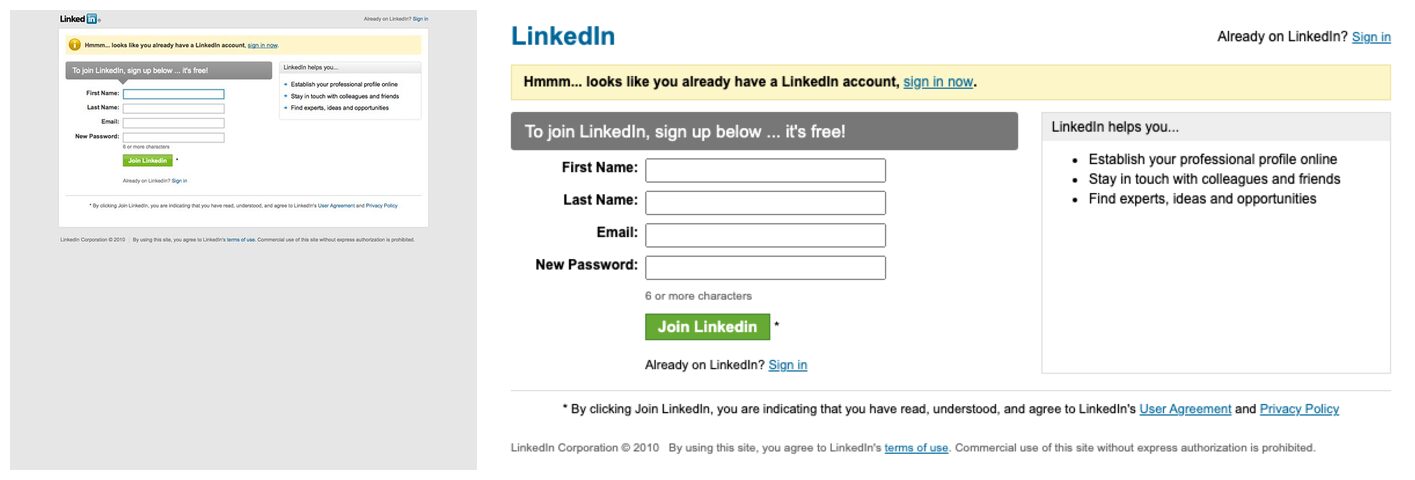
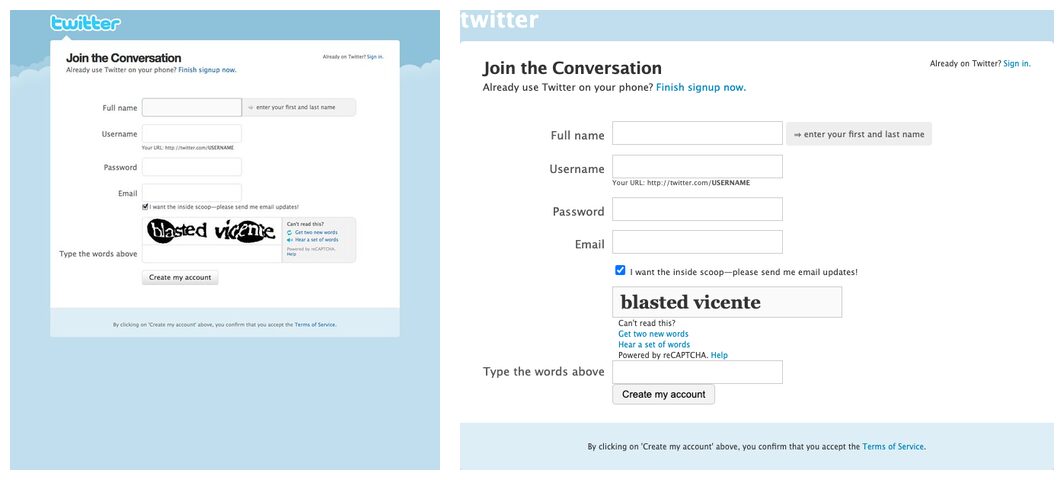
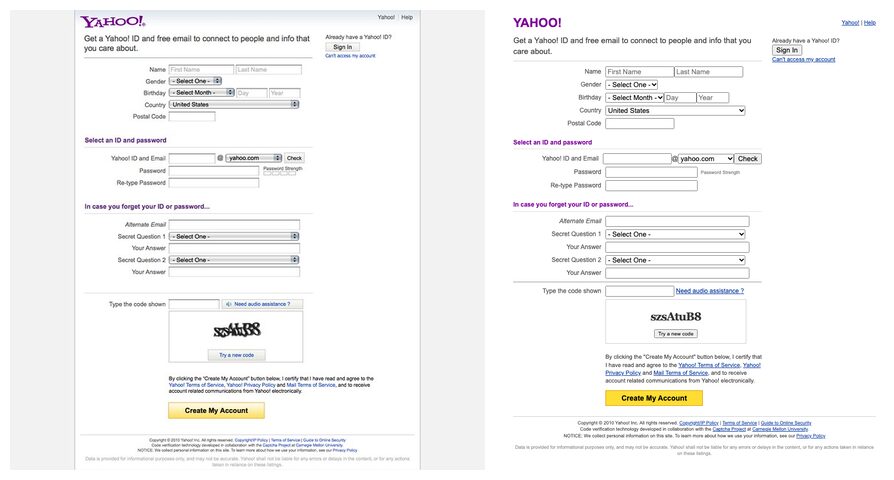
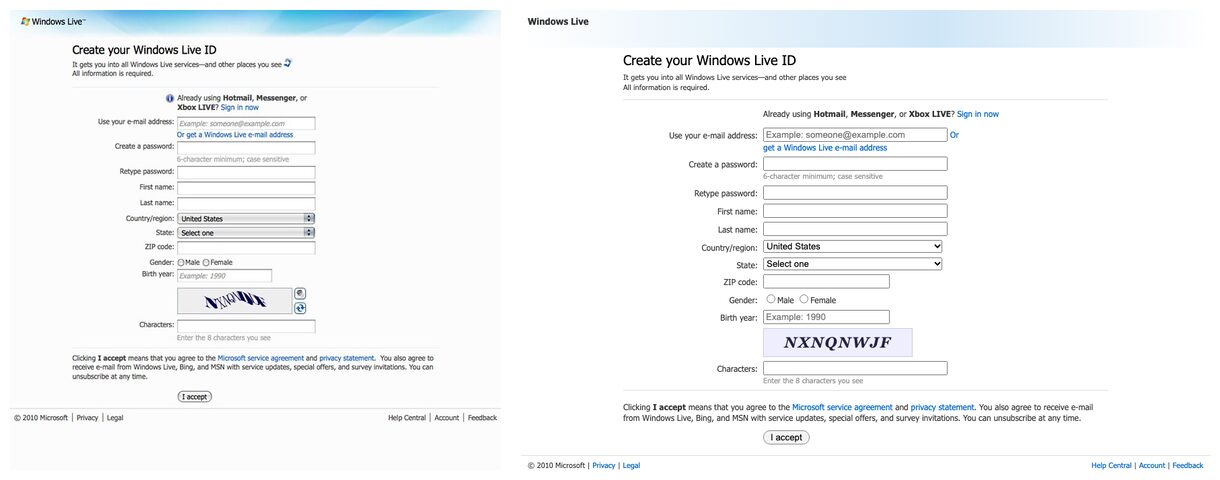
LinkedIn, Twitter, Yahoo and Windows Live, 2010. The rebuild's CAPTCHA is a static image of the one in the screenshot. It cannot be solved, and it is not meant to be.
What the archive changed
The first version of this note was built from pixels alone, and it was wrong about the
thing it set out to measure. Screenshots show what a sighted user saw; they cannot show
whether a caption was a <label>, whether a field carried aria-label, or whether a label
existed but was clipped out of sight. So the rebuilds were checked against the Internet
Archive's Wayback Machine: for each site, the capture of the signup page nearest the
screenshot, fetched as original HTML.
Eleven of seventeen page and date pairs had a usable capture within eight days of the screenshot; three more were 84 to 227 days off; Amazon (both years) and Baidu had nothing usable. Where a capture exists it now overrides the screenshot for how fields are identified, and each rebuilt page cites the capture beside the change.
| Site | Year | From the screenshot | In the archived HTML |
|---|---|---|---|
| 2014 | placeholder only | placeholder plus aria-label on five fields |
|
| 2014 | placeholder only | a real <label for> drawn inside each field |
|
| Yahoo | 2014 | placeholder only | a clipped <label for> behind each placeholder (US capture; the screenshot is the Malaysian site) |
| Microsoft | 2014 | labels, two unnamed fields | labels, plus aria-labelledby or aria-label on the rest |
| 2014 | placeholder only | placeholder only (confirmed) | |
| 2010 | a <label> in each caption cell |
bare table-cell text, no labels | |
| 2010 | a <label> in each caption cell |
captions in a <span> in the cell, no labels anywhere |
|
| YouTube | 2010 | bare table-cell text | a real <label for> on three of the fields |
| MySpace | 2010 | table cells | floated <div> columns, no table and no labels |
| 2010 | labels | <th><label for>, with the password label pointing at an id that does not exist |
|
| 2010 | labels | labels (confirmed) |
Two things follow. The 2014 story is not "the label disappeared" but "the visible
caption moved into the placeholder while the accessible name, on the big sites, often
survived": a distinction a screenshot cannot make and a DOM check makes at once. And the
original rebuild rules had forbidden copying any aria-* attribute, which biased the
first 2014 table toward unlabelled; the rules now let archived evidence override the
pixels and require a citation when it does.
The archive also showed things no screenshot could: maxlength on almost every field,
type"email"= at LinkedIn, Microsoft and Wikipedia, aria-required at Facebook and Yahoo
in 2014, no HTML5 required anywhere, and two labels pointing at ids that do not exist
(Twitter's password in 2010, Yahoo's gender in 2010). The rebuilds keep those bugs.
What the rebuilt forms show
How each text field and select was identified, measured in the page by the same extractor for
both albums, after the rebuilds were checked against archived HTML where a capture exists
(What the archive changed). Labelled means a real accessible name (a non-empty
<label>, aria-label or aria-labelledby, including labels hidden from sight); placeholder
only means the only name is grey text that disappears on typing; table-cell text only means a
sighted user sees a caption but assistive technology gets nothing; nothing means neither.
| 2010 | 2014 | |
|---|---|---|
| forms | 12 | 21 |
| fields | 104 | 130 |
| labelled | 41% | 56% |
| placeholder only | 0% | 14% |
| table-cell text only | 50% | 25% |
| nothing | 9% | 5% |
| forms with a CAPTCHA | 6 | 3 |
| forms asking a birthday | 8 | 5 |
| forms with social sign-in | 1 | 5 |
Placeholder-only fields went from 0 to 18. The bigger change is
what the screenshots cannot show: by 2014 the large sites had moved the visible caption into the
placeholder but often kept an accessible name behind it, as aria-label (Facebook), a label
drawn inside the field (LinkedIn) or a label clipped out of sight (Yahoo). Read from pixels
alone, those forms look unlabelled; read from the DOM, most of them are not. Table-cell captions,
the 2010 default, give sighted users a caption and assistive technology nothing.
Per form
2010:
| site | fields | labelled | placeholder only | cell text only | nothing | CAPTCHA | terms |
|---|---|---|---|---|---|---|---|
| Classmates | 9 | 0 | 0 | 9 | 0 | yes | above |
| Windows Live ID | 10 | 10 | 0 | 0 | 0 | yes | below |
| 5 | 3 | 0 | 2 | 0 | yes | - | |
| MySpace | 6 | 0 | 0 | 0 | 6 | - | below |
| Google (Gmail) | 12 | 1 | 0 | 10 | 1 | yes | below |
| Yahoo | 18 | 16 | 0 | 0 | 2 | yes | above |
| YouTube | 6 | 3 | 0 | 3 | 0 | - | above |
| Amazon | 7 | 0 | 0 | 7 | 0 | - | - |
| 4 | 4 | 0 | 0 | 0 | - | - | |
| Tudou | 13 | 0 | 0 | 13 | 0 | yes | above |
| MediaFire | 6 | 6 | 0 | 0 | 0 | - | - |
| 8 | 0 | 0 | 8 | 0 | - | - |
2014:
| site | fields | labelled | placeholder only | cell text only | nothing | CAPTCHA | terms |
|---|---|---|---|---|---|---|---|
| 8 | 5 | 0 | 0 | 3 | - | above | |
| Yahoo (Malaysia) | 12 | 8 | 1 | 0 | 3 | - | above |
| Baidu | 3 | 0 | 3 | 0 | 0 | yes | above + box |
| Wikipedia | 5 | 5 | 0 | 0 | 0 | yes | - |
| 4 | 4 | 0 | 0 | 0 | - | above | |
| 3 | 0 | 3 | 0 | 0 | - | - | |
| QQ (Tencent) | 9 | 0 | 0 | 9 | 0 | - | above + box |
| GoFundMe | 5 | 0 | 2 | 3 | 0 | - | above |
| Alexa | 1 | 1 | 0 | 0 | 0 | - | - |
| Amazon | 6 | 0 | 0 | 6 | 0 | - | below |
| Microsoft account | 12 | 12 | 0 | 0 | 0 | - | - |
| GiveForward | 4 | 4 | 0 | 0 | 0 | - | - |
| Fundly | 3 | 0 | 3 | 0 | 0 | - | - |
| YouCaring | 3 | 3 | 0 | 0 | 0 | - | above + box |
| Razoo | 5 | 0 | 5 | 0 | 0 | - | below + box |
| JustGive | 9 | 9 | 0 | 0 | 0 | - | - |
| American Red Cross | 6 | 6 | 0 | 0 | 0 | - | - |
| Alipay | 3 | 3 | 0 | 0 | 0 | yes | above + box |
| PayPal | 13 | 13 | 0 | 0 | 0 | - | below |
| UNICEF (Malaysia) | 15 | 0 | 0 | 14 | 1 | - | above |
| Goodwill | 1 | 0 | 1 | 0 | 0 | - | - |
What a fuzzer can finish
Each form got 30 seconds of Bombadil: random clicks and typing, plus a nudge that clicks an empty field or the submit button once a field has text. The guided pass adds one generator that types an email-shaped value into email fields (from a pool of three, one repeated, so the duplicate path is reachable) and copies the original into confirm fields.
| forms | submits | accounts created on | |
|---|---|---|---|
| 2010, unguided | 12 | 673 | 1: YouTube (4) |
| 2010, guided | 12 | 637 | 1: YouTube (3) |
| 2014, unguided | 21 | 1754 | 3: Alipay (7), UNICEF (Malaysia) (1), Goodwill (13) |
| 2014, guided | 21 | 1435 | 4: Alexa (4), Alipay (4), UNICEF (Malaysia) (3), Goodwill (17) |
Forms finished at least once: Goodwill 2014 (1 field), Alexa 2014 (1 field), Alipay 2014 (3 fields), YouTube 2010 (6 fields), UNICEF (Malaysia) 2014 (15 fields). Of the 38 runs on forms with more than five fields, 4 created an account; the rest failed on required in every submit, because thirty seconds of random input rarely fills every field, picks a birthday and ticks a box in the same attempt, and a guided email does not change that. The exceptions are forms whose long tail is selects with a preselected value or optional fields. Field count, more precisely the number of fields that must be right at once, is the friction, and it is measurable without a user study.
The duplicate path shows up as soon as a value repeats: with one address used twice, the guided pass reached "an account with this email already exists" on the forms it could finish.

Bombadil's capture of the rebuilt 2014 Facebook form after a submit: every placeholder-only field marked required, the birthday selects with nothing naming them.

The one-field Goodwill register box is the form the fuzzer finished most often.
What the runs checked
The fuzzing above measures reach: how many forms random input could finish. A second question came later. When a run reports no violations, what did it check?
For the first 99 runs (36 on the 2010 rebuilds, 63 on 2014, 55,731 page states), the answer was nothing about the forms. Those runs carried only Bombadil's four default properties: no uncaught exception, no unhandled promise rejection, no console error, no HTTP error. None of them reads a field, a rule or an error, and their inputs never changed across all 55,731 states. The zero was vacuous.
To check that, five faults were planted in copies of six rebuilds (three from each year):
| Fault | What breaks |
|---|---|
| wrong field | an error appears beside the field after the one that failed |
| submit while invalid | the gate reads only the last field, so an invalid form goes through |
| match ignores the confirm | "re-enter your email" is never compared |
| reload skips validation | after a reload, the form submits without checking |
| event without state | the success event fires, but the page never shows success |
| Suite | Mocks reaching success | Planted faults caught | Violations on the unmodified rebuilds |
|---|---|---|---|
| defaults only (the 99 runs) | 5 of 33 | 0 of 30 | 0 (vacuous) |
| four form laws | 5 of 33 | 19 of 30 | 0 |
| four form laws and a generator that completes the form | 33 of 33 | 26 of 30 | 0 |
The four laws compare three views of each form after a submit: what the page shows, what the form's own rules say, and what the dataLayer reports. They are: errors match the rules; success only when valid; each error sits beside its field; and a success event is shown on the page. The four faults still missed cannot apply: Goodwill has a single field and no confirm field, and YouTube has no confirm field.
The generator is what made the zero mean something. It picks a real option in every select, ticks the agreement box, gives each field a value its rules accept, and types any confirm field last (sometimes deliberately wrong). Each run now records, per law, how many states triggered it, and a law that was never triggered fails the run instead of passing it.
One finding survives all of this. A rebuilt 2010 form accepts the "disagree" radio as agreement to the terms, because its rules say only that one option must be chosen. The laws share those rules, so they cannot object. The fix belongs in the form's rules: a terms control needs its own "the agree option is checked" rule, and the laws will then enforce it.
From traces to a page model
A Bombadil run keeps every state it visits. Add one extractor that lists the visible
controls in each state (role, accessible name, name attribute, enclosing form) and the
trace becomes raw material for a model of the site. The miner groups states by route,
identifies a control by its scope, role and name, counts how often each one appears, and
records two kinds of edge: the navigation seen after a click, and the requests a form
fired. Its output is a page model with a Playwright locator for every control, much as
OpenAPI code generation produces a client, except that this one comes from observed DOM
rather than from a schema.
The diagram below is the model mined from one working copy of the Classmates rebuild, with sign-up, login, a home page, an event form and a profile page, all running locally with synthetic accounts. It took two traces, about 2,900 states in all. Blue boxes are pages. Yellow boxes are one route that the miner split in two because the heading differed. Purple boxes are endpoints the forms posted to. Edge labels are the links that were clicked most often, and thicker edges were traversed more.
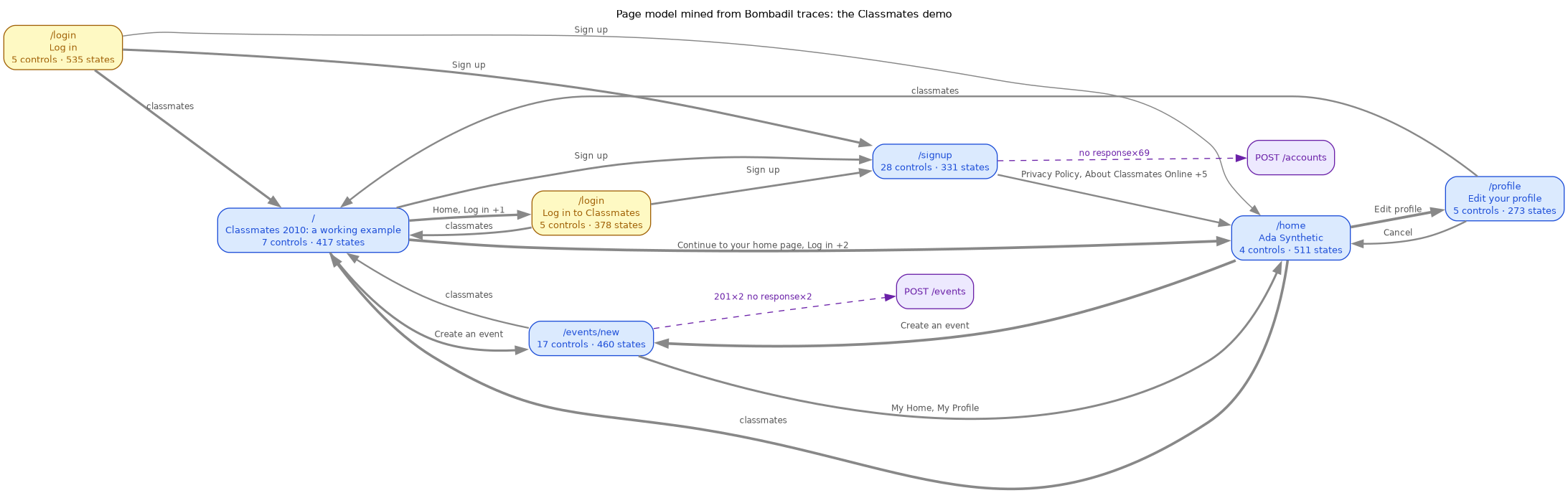
Four things in the picture are worth reading closely, because none of them is a bug in the site. Each is a limit of mining a model from what a fuzzer happened to see.
- Identity keyed on user data. The home page is labelled "Ada Synthetic": its heading is the account holder's name. Once people can choose that text, the same route mines into one page per name. Two runs with edited profiles produced 52 "home" pages until the heading was dropped from the page's identity.
- Same route, different page.
/loginappears twice: once as the plain login form and once after a failed attempt, when its heading changes. Telling the two apart by heading happens to work here. In general the miner can't know which differences make a different page. - Edges record what came next.
/signupleads to/homeunder "Privacy Policy" and five other links. Those links didn't go home. The sign-up form was submitted, and the last link clicked before the navigation got the credit. Navigation in a page model is correlation with the last action, so a test generated from it has to submit the form. - A form post isn't a request the page can see. The sign-up form is a classic
full-page submit, so its 69 posts show no response: the document navigated away before
any script could record one. The event form posts with
fetchand its responses are recorded (two 201s). How a form submits decides what a model can say about it.
The controls survive better than the edges. Each locator in the model was checked
against deliberate changes to the DOM: renamed captions, reordered table rows, ids
removed, a wrapping <div>, changed button text. Locators keyed on the name attribute
survived every change. Locators keyed on role and accessible name broke when their text
changed, which is loud and therefore safe. Positional locators (the nth match) never broke,
but after a row reorder 11 of 13 silently picked a different element. A purely cosmetic
change had a measurable cost too: a Halloween theme whose CSS adds a pumpkin to the logo
link's accessible name broke 4 of 70 locators.
Mildly hardened
The same 33 forms after one scripted pass over the live DOM, changing nothing a user
would read except a small label where there was none and an asterisk where a field is
required: every placeholder-only or table-cell field gets a <label for> with the text
it already showed; a field with neither gets an aria-label; required fields get
aria-required and a visible marker with a key; email fields get type"email"; known
fields get =autocomplete tokens. The originals are untouched and every change is marked
in the markup.
| fields | labelled before | labelled after | placeholder only after | nothing after | |
|---|---|---|---|---|---|
| 2010 | 104 | 41% | 100% | 0% | 0% |
| 2014 | 130 | 56% | 100% | 0% | 0% |

The hardened 2014 Facebook form under the same exploration: each field now has a small
visible label and an asterisk, and a "* required" key sits above Sign Up. It also shows
the cost of a mild fix. Changing the email fields to type"email"= dropped them out of
the page's own CSS, which styled input[type=text], so they render small and unstyled. The
fix is right and the regression is real; the same coupling existed on the original sites.
Limits
- Rebuilds, not the originals. Every page is a reconstruction from one screenshot.
Where the image could not decide something, the rebuild says so in a comment, and
those calls are counted below rather than hidden. The most common one cannot be
settled from pixels at all: whether a caption was also a
<label>. Archived HTML settled it for eleven forms (see What the archive changed); Amazon, Baidu, QQ, GoFundMe, UNICEF and the fundraising sites have no usable capture and still rest on the screenshot. - One behaviour for every form. Validation comes from one shared script, driven by what each page showed (a "Re-enter" field, "6 or more characters", an agreement box). The originals' own validation, server checks and error messages are not reproduced, so error placement, the fourth item on the 2010 rubric, is not measured: the screenshots were taken before anything was submitted.
- Above the fold only. Several screenshots stop before the submit button or the terms (Microsoft 2014, PayPal, UNICEF). The rebuilds end where the image ends, with an invented button where one had to exist.
- One day each. Each album is one sitting, one browser, one locale per site. Yahoo is the Malaysian site in 2014 and the US site in 2010.
- Thirty seconds of fuzzing. Each exploration is short and unseeded (Bombadil 0.7.10 has no seed option), so the run columns are indicative, not stable figures.